Our Community is getting an upgrade! To get everything ready for the relaunch, we’ll be placing the site in read-only mode starting September 21st. We really appreciate your understanding while we get things set up behind the scenes. Catch up on all the exciting details about the move here. Need help or have questions? Drop us a line at [email protected]
Created on 11-14-201805:02 AM - edited 08-19-201901:31 PM
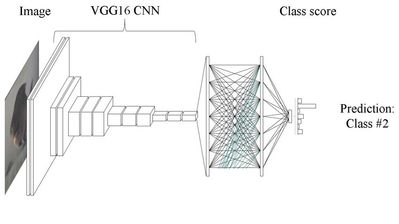
In part 1 of, we looked at how we could use deep learning to classify Melanoma, using transfer learning with a pre-trained VGG16 convolutional neural network. Here we take a look at how to implement this using TensorFlow and Keras.
First we import the packages we need:
import numpy as np
from keras.preprocessing.image import ImageDataGenerator
from keras.models import Sequential
from keras.layers import Dropout, Flatten, Dense
from keras import applications
These packages include, the network layers we will be using, the applications (which includes the pretrained VGG16 model), and some image pre-processing utilities.
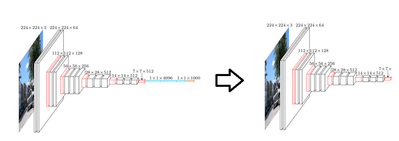
Next, we “strip” our model of it’s top layers. This is as simple as one line of code in Keras.
We train this classifier by feeding the feature set generated from our stripped VGG16 network through it. We’ll also save the weights of the trained classifier, once we’ve trained it.