Created on
03-02-2017
05:25 PM
- edited on
03-13-2020
03:03 AM
by
SumitraMenon
13165-webingest1.png
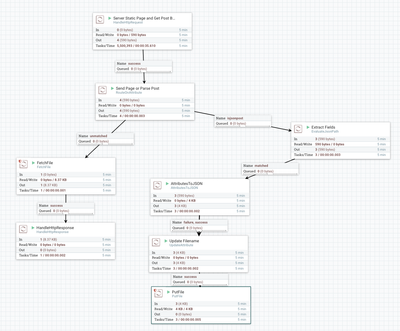
1. Host a Web Page (index.html) via HTTP GET with 200 OK Status
2. Receive POST from that page via AJAX with browser data
3. Extract Content and Attributes
4. Build a JSON file of HTTP data
5. Store it
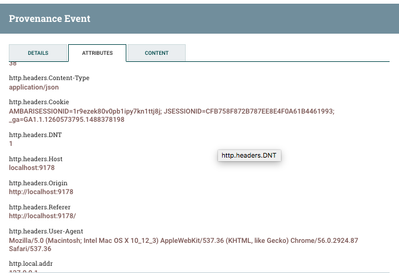
13168-webingestattributes.png
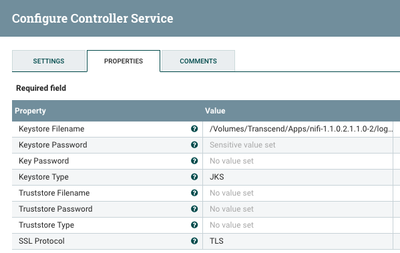
To accept location in a phone or modern browser you must be running SSL.
So I added that for this HTTP Request.
Use openssl to create your 2048 RSA X509, PKCS12, JKS Keystore, Import Trust Store and import in browser
13167-webingeststandardsslcontext.png
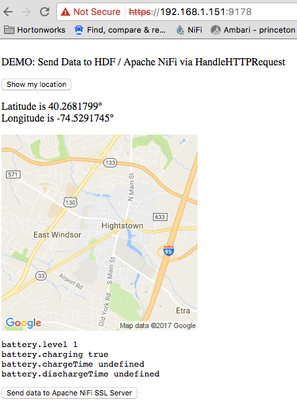
Your web page can be any web page, just POST back via AJAX or Form Submit.
13169-webingestwebpage.png
<html>
<head>
<title>NiFi Browser Data Acquisition</title>
<body>
<script>
// Usage
window.onload = function() {
navigator.getBattery().then(function(battery) {
console.log(battery.level);
battery.addEventListener('levelchange', function() {
console.log(this.level);
});
});
};
////////////// print these
var latitude = "";
var longitude = "";
var ips = "";
var batteryInfo = "";
var screenInfo = screen.width +","+ screen.height + "," +
screen.availWidth +","+ screen.availHeight + "," +
screen.colorDepth + "," + screen.pixelDepth;
var pluginsInfo = "";
var coresInfo = "";
/////////////
////// Set Plugins
for (var i = 0; i < 12; i++) {
if ( typeof window.navigator.plugins[i] !== 'undefined' ) {
pluginsInfo += window.navigator.plugins[i].name + ', ';
}
}
////// Set Cores
if ( window.navigator.hardwareConcurrency > 0 ) {
coresInfo = window.navigator.hardwareConcurrency + " cores";
}
/////////////
/// send the information to the server
function loadDoc() {
var xhttp = new XMLHttpRequest();
xhttp.onreadystatechange = function() {
if (this.readyState == 4 && this.status == 200) {
document.getElementById("demo").innerHTML = 'Sent.';
}
};
// /send
xhttp.open("POST", "/send", true);
xhttp.setRequestHeader("Content-type", "application/json");
xhttp.send('{"plugins":"' + pluginsInfo +
'", "screen":"' + screenInfo +
'", "cores":"' + coresInfo +
'", "battery":"' + batteryInfo +
'", "ip":"' + ips +
'", "lat":"' + latitude + '", "lng":"' + longitude + '"}')
}
////////////
function geoFindMe() {
var output = document.getElementById("out");
if (!navigator.geolocation){
output.innerHTML = "<p>Geolocation is not supported by your browser</p>";
return;
}
function success(position) {
latitude = position.coords.latitude;
longitude = position.coords.longitude;
output.innerHTML = '<p>Latitude is ' + latitude + '° <br>Longitude is ' + longitude + '°</p>';
var img = new Image();
img.src="https://maps.googleapis.com/maps/api/staticmap?center=" + latitude + "," + longitude + "&zoom=13&size=300x300&sensor=false";
output.appendChild(img);
}
function error() {
output.innerHTML = "Unable to retrieve your location";
}
output.innerHTML = "<p>Locating…</p>";
navigator.geolocation.getCurrentPosition(success, error);
}
//get the IP addresses associated with an account
function getIPs(callback){
var ip_dups = {};
//compatibility for firefox and chrome
var RTCPeerConnection = window.RTCPeerConnection
|| window.mozRTCPeerConnection
|| window.webkitRTCPeerConnection;
var useWebKit = !!window.webkitRTCPeerConnection;
//bypass naive webrtc blocking using an iframe
if(!RTCPeerConnection){
//NOTE: you need to have an iframe in the page right above the script tag
//
//<iframe id="iframe" sandbox="allow-same-origin" style="display: none"></iframe>
//<script>...getIPs called in here...
//
var win = iframe.contentWindow;
RTCPeerConnection = win.RTCPeerConnection
|| win.mozRTCPeerConnection
|| win.webkitRTCPeerConnection;
useWebKit = !!win.webkitRTCPeerConnection;
}
//minimal requirements for data connection
var mediaConstraints = {
optional: [{RtpDataChannels: true}]
};
var servers = {iceServers: [{urls: "stun:stun.services.mozilla.com"}]};
//construct a new RTCPeerConnection
var pc = new RTCPeerConnection(servers, mediaConstraints);
function handleCandidate(candidate){
//match just the IP address
var ip_regex = /([0-9]{1,3}(\.[0-9]{1,3}){3}|[a-f0-9]{1,4}(:[a-f0-9]{1,4}){7})/
var ip_addr = ip_regex.exec(candidate)[1];
//remove duplicates
if(ip_dups[ip_addr] === undefined)
callback(ip_addr);
ip_dups[ip_addr] = true;
}
//listen for candidate events
pc.onicecandidate = function(ice){
//skip non-candidate events
if(ice.candidate)
handleCandidate(ice.candidate.candidate);
};
//create a bogus data channel
pc.createDataChannel("");
//create an offer sdp
pc.createOffer(function(result){
//trigger the stun server request
pc.setLocalDescription(result, function(){}, function(){});
}, function(){});
//wait for a while to let everything done
setTimeout(function(){
//read candidate info from local description
var lines = pc.localDescription.sdp.split('\n');
lines.forEach(function(line){
if(line.indexOf('a=candidate:') === 0)
handleCandidate(line);
});
}, 1000);
}
window.addEventListener("load", function (ev) {
"use strict";
var log = document.getElementById("log");
// https://dvcs.w3.org/hg/dap/raw-file/tip/sensor-api/Overview.html
window.addEventListener("devicetemperature", function (ev) {
log.textContent += "devicetemperature " + ev.value + "\n";
}, false);
window.addEventListener("devicepressure", function (ev) {
log.textContent += "devicepressure " + ev.value + "\n";
}, false);
window.addEventListener("devicelight", function (ev) {
log.textContent += "devicelight " + ev.value + "\n";
// toy tric
log.style.color = "rgb(" + (255 - 2*ev.value) + ",0,0)";
log.style.backgroundColor = "rgb(0,0," + (2*ev.value) + ")";
}, false);
window.addEventListener("deviceproximity", function (ev) {
log.textContent += "deviceproximity " + ev.value + "\n";
// toy tric
if (ev.value < 3) navigator.vibrate([300, 100, 100]);
}, false);
window.addEventListener("devicenoise", function (ev) {
log.textContent += "devicenoise " + ev.value + "\n";
}, false);
window.addEventListener("devicehumidity", function (ev) {
log.textContent += "devicehumidity " + ev.value + "\n";
}, false);
//https://wiki.mozilla.org/Magnetic_Field_Events
window.addEventListener("devicemagneticfield", function (ev) {
log.textContent += "devicemagneticfield " + [ev.x, ev.y, ev.x]+ "\n";
}, false);
// https://dvcs.w3.org/hg/dap/raw-file/default/pressure/Overview.html
window.addEventListener("atmpressure", function (ev) {
log.textContent += "atmpressure " + ev.value + "\n";
}, false);
// https://dvcs.w3.org/hg/dap/raw-file/tip/humidity/Overview.html
window.addEventListener("humidity", function (ev) {
log.textContent += "humidity " + ev.value + "\n";
}, false);
// https://dvcs.w3.org/hg/dap/raw-file/tip/temperature/Overview.html
window.addEventListener("temperature", function (ev) {
log.textContent += "temperature " + [ev.f, ev.c, ev.k, ev.value] + "\n";
}, false);
// https://dvcs.w3.org/hg/dap/raw-file/tip/battery/Overview.html
try {
if (typeof navigator.getBattery === "function") {
navigator.getBattery().then(function (battery) {
log.textContent += "battery.level " + battery.level + "\n";
log.textContent += "battery.charging " + battery.charging + "\n";
batteryInfo = "battery.level=" + battery.level + "," +
"battery.charging=" + battery.charging;
log.textContent += "battery.chargeTime " + battery.chargeTime + "\n";
log.textContent += "battery.dischargeTime " + battery.dischargeTime + "\n";
battery.addEventListener("levelcharge", function (ev) {
log.textContent += "change battery.level " + battery.level + "\n";
}, false);
}).catch(function (err) {
log.textContent += err.toString() + "\n";
});
} else {
log.textContent += "";
}
} catch (ex) {
log.textContent += ex.toString() + "\n";
}
}, false);
</script>
<p>
<br>
DEMO: Send Data to HDF / Apache NiFi via HandleHTTPRequest
<br>
<p><button onclick="geoFindMe()">Show my location</button></p>
<div id="out"></div>
<div id="demo"></div>
<pre id="log"></pre>
<button type="button" onclick="loadDoc()">Send data to Apache NiFi SSL Server</button>
<iframe id="iframe" sandbox="allow-same-origin" style="display: none"></iframe>
<script>
getIPs(function(ip){ips = ip;});
</script>
</body>
</html>
index.html : A web page to grab user information.
mobile-ingest-v3.xml : Apache NiFi 1.1.x template.
Note: Different browsers, devices, phones, tables and versions will send different values. Users should get a location request pop-up.
JSON Result File
{
"http.request.uri" : "/send",
"http.context.identifier" : "a4f9ae25-5f49-463e-97eb-c8a6bf3be8a7",
"http.remote.host" : "192.xxx.1.xxx",
"http.headers.Host" : "192.xxx.1.xxx:9178",
"http.local.name" : "192.xxx.1.xxx",
"http.headers.DNT" : "1",
"plugins" : "Widevine Content Decryption Module, Shockwave Flash, Chrome PDF Viewer, Native Client, Chrome PDF Viewer, ",
"latitude" : "40.2681799",
"http.headers.Accept" : "*/*",
"battery" : "battery.level=1,battery.charging=true",
"uuid" : "a2f299ae-6ef6-480d-a359-1362d25abe76",
"http.request.url" : "https://192.168.1.151:9178/send",
"http.server.name" : "192.168.1.151",
"http.character.encoding" : "UTF-8",
"path" : "./",
"cores" : "8 cores",
"http.remote.addr" : "192.168.1.151",
"http.headers.User-Agent" : "Mozilla/5.0 (Macintosh; Intel Mac OS X 10_12_3) AppleWebKit/537.36 (KHTML, like Gecko) Chrome/56.0.2924.87 Safari/537.36",
"http.method" : "POST",
"http.headers.Connection" : "keep-alive",
"longitude" : "-74.5291745",
"http.server.port" : "9178",
"ip" : "192.168.1.151",
"mime.type" : "application/json",
"http.locale" : "en_US",
"http.headers.Accept-Encoding" : "gzip, deflate, br",
"http.headers.Origin" : "https://192.168.1.151:9178",
"http.servlet.path" : "",
"http.local.addr" : "192.168.1.151",
"filename" : "1082639525534467",
"http.headers.Referer" : "https://192.168.1.151:9178/",
"http.headers.Accept-Language" : "en-US,en;q=0.8",
"http.headers.Content-Length" : "253",
"http.headers.Content-Type" : "application/json",
"RouteOnAttribute.Route" : "isjsonpost"
}
References: