Our Community is getting an upgrade! To get everything ready for the relaunch, we’ll be placing the site in read-only mode starting September 21st.
We really appreciate your understanding while we get things set up behind the scenes. Catch up on all the exciting details about the move here.
Need help or have questions? Drop us a line at [email protected]
Created on 02-24-2017 10:37 AM - edited 08-17-2019 02:08 PM
In order to setup HTTPs access for LogSearch Portal UI first of all we will need to create the keystore. We will also create truststore as well using the "$JAVA_HOME/bin/keytool" utility. In this example we will be using the self signed certificates.
# mkdir -p /etc/security/serverKeys/ # keytool -genkey -v -alias logsearch -keyalg RSA -keysize 1024 -keystore /etc/security/serverKeys/logsearch.keyStore.jks -validity 3650 -keypass logsearch -storepass logsearch -dname 'CN=erie1.example.com, OU=hwx, O=test, L=Pune, S=Maharashtra, C=IN' # keytool -genkeypair -alias logsearch -keyalg RSA -keysize 2048 -keypass logsearch -storepass logsearch -validity 3650 -keystore /etc/security/serverKeys/logsearch.trustStore.jks -dname 'CN=erie1.example.com, OU=hwx, O=test, L=Pune, S=Maharashtra, C=IN' -rfc
.
- In the above example i used CN=erie1.example.com as my LogSearch service is running on the same host.
- Now we will need to make sure that those files has proper read permissions and ownership set correctly.
# chown -R logsearch:hadoop /etc/security/serverKeys/ # ls -la /etc/security/serverKeys/ -rw-r--r--. 1 logsearch hadoop 1399 Feb 24 07:19 logsearch.keyStore.jks -rw-r--r--. 1 logsearch hadoop 2245 Feb 24 07:38 logsearch.trustStore.jks
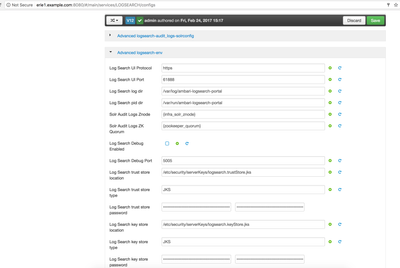
. - Now we can login to ambari UI and navigate to "Log Search" --> "Configs" --> "Advanced" --> "Advanced logsearch-env" and then provide the following details there:
Log Search UI Protocol: https Log Search UI Port: 61888 Log Search trust store location: /etc/security/serverKeys/logsearch.trustStore.jks Log Search trust store type: JKS Log Search trust store password: logsearch Log Search key store location: /etc/security/serverKeys/logsearch.keyStore.jks Log Search key store type: logsearch Log Search key store password: logsearch
.
- Once we enter the above details then we can "Save" the settings and then restart the "Log Search" service.
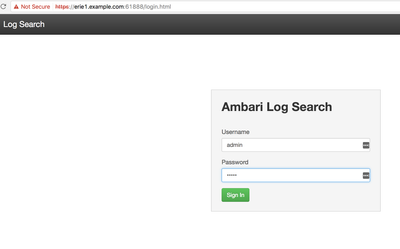
- Now we should be able to access the "Log Search" using the HTTPs protocol
.
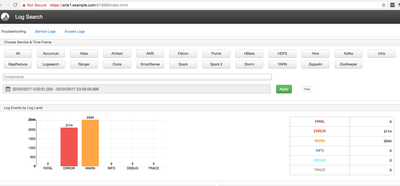
And then the Log Search UI dashboard:
.
Troubleshooting Common Issues:
If we encounter any issue while while running starting up the Log Search after enabling the https then we can look at the file "/var/log/ambari-logsearch-portal/logsearch/logsearch.err", For example if we enter incorrect credentials of store then we might see the following kind of error in our logs:
[main] WARN org.eclipse.jetty.util.component.AbstractLifeCycle (AbstractLifeCycle.java:212) - FAILED ServerConnector@1cb37ee4{SSL-http/1.1}{0.0.0.0:61888}: java.io.IOException: Keystore was tampered with, or password was incorrect
java.io.IOException: Keystore was tampered with, or password was incorrect
at sun.security.provider.JavaKeyStore.engineLoad(JavaKeyStore.java:780)
at sun.security.provider.JavaKeyStore$JKS.engineLoad(JavaKeyStore.java:56)
at sun.security.provider.KeyStoreDelegator.engineLoad(KeyStoreDelegator.java:225)
at sun.security.provider.JavaKeyStore$DualFormatJKS.engineLoad(JavaKeyStore.java:70)
at java.security.KeyStore.load(KeyStore.java:1445)
at org.eclipse.jetty.util.security.CertificateUtils.getKeyStore(CertificateUtils.java:55)
at org.eclipse.jetty.util.ssl.SslContextFactory.loadTrustStore(SslContextFactory.java:884)
at org.eclipse.jetty.util.ssl.SslContextFactory.doStart(SslContextFactory.java:274)
at org.eclipse.jetty.util.component.AbstractLifeCycle.start(AbstractLifeCycle.java:68)
at org.eclipse.jetty.util.component.ContainerLifeCycle.start(ContainerLifeCycle.java:132)
at org.eclipse.jetty.util.component.ContainerLifeCycle.doStart(ContainerLifeCycle.java:114)
at org.eclipse.jetty.server.SslConnectionFactory.doStart(SslConnectionFactory.java:64)
at org.eclipse.jetty.util.component.AbstractLifeCycle.start(AbstractLifeCycle.java:68)
at org.eclipse.jetty.util.component.ContainerLifeCycle.start(ContainerLifeCycle.java:132)
at org.eclipse.jetty.util.component.ContainerLifeCycle.doStart(ContainerLifeCycle.java:114)
at org.eclipse.jetty.server.AbstractConnector.doStart(AbstractConnector.java:256)
at org.eclipse.jetty.server.AbstractNetworkConnector.doStart(AbstractNetworkConnector.java:81)
at org.eclipse.jetty.server.ServerConnector.doStart(ServerConnector.java:236)
at org.eclipse.jetty.util.component.AbstractLifeCycle.start(AbstractLifeCycle.java:68)
at org.eclipse.jetty.server.Server.doStart(Server.java:366)
at org.eclipse.jetty.util.component.AbstractLifeCycle.start(AbstractLifeCycle.java:68)
at org.apache.ambari.logsearch.LogSearch.run(LogSearch.java:89)
at org.apache.ambari.logsearch.LogSearch.main(LogSearch.java:73)
Caused by: java.security.UnrecoverableKeyException: Password verification failed
at sun.security.provider.JavaKeyStore.engineLoad(JavaKeyStore.java:778)
... 22 more.