Created on 06-08-201711:01 PM - edited 08-17-201912:34 PM
This article describes how to enable Knox proxying for Zeppelin Notebook for
Wire encrypted environment (i.e SSL is enabled for Knox and Zeppelin)
Non Wire encrypted environments
Configuring Knox proxying for Zeppelin Notebook in Wire encrypted Environments
If you have already configured SSL for zeppelin, please proceed to section 2. If not, please read through section 1.
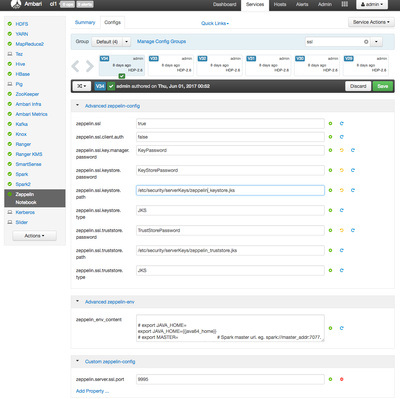
Section 1 : Configuring SSL for Zeppelin
Note : The steps mentioned in section 1 are just for example purpose, and the production setup may be different. Also the steps assume no client-side authentication. For client-side authentication, please follow the Zeppelin Component Guide in HDP release documents
Copy the zeppelin certificate file onto Knox gateway host
Add zeppelin certificate file into java cacert store of the Knox gateway host using following command on Knox gateway host (This is a way to configure knox gateway to trust incoming request from zeppelin server)
( Note: Please don’t forget to append a trailing ‘/’ with the URL. This bug is work in progress)
The other bug that is still work in progress is that if a user logs out from Zeppelin while using knox’s proxy URL , he does not remain on the Zeppelin’s Login page anymore. (
https://issues.apache.org/jira/browse/ZEPPELIN-2601) The user needs to type the URL again in browser to go back to the Login page