Our Community is getting an upgrade! To get everything ready for the relaunch, we’ll be placing the site in read-only mode starting September 21st.
We really appreciate your understanding while we get things set up behind the scenes. Catch up on all the exciting details about the move here.
Need help or have questions? Drop us a line at [email protected]

Community Articles

Find and share helpful community-sourced technical articles.
Announcements
Share your experience with Cloudera on G2 and get a $25 Amazon Gift card.
Hi, I'm CLEO! Something exciting is coming to the Community. Stay Tuned!

Labels (2)
avatar
Master Guru

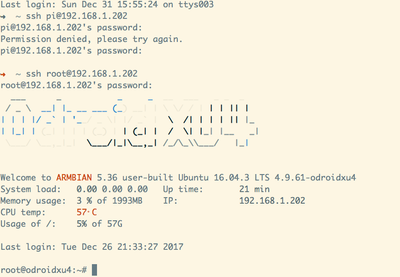
45699-odroidxu4loginpage.png

Initial Login to ODroid XU4

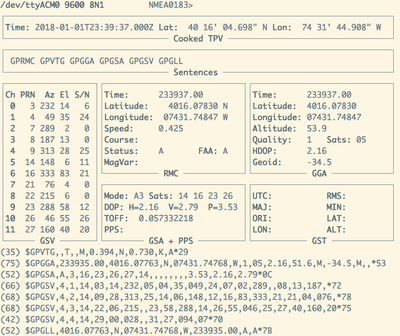
45700-odroidgpsfeed.png

GPS Command Line Check

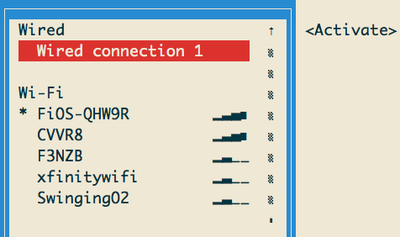
45701-odroidwifi.png

WiFi Signal Strength

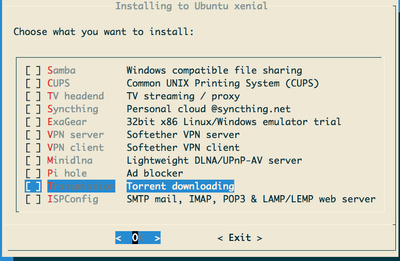
45702-odroidconfig1.png

Install Ubuntu Extras

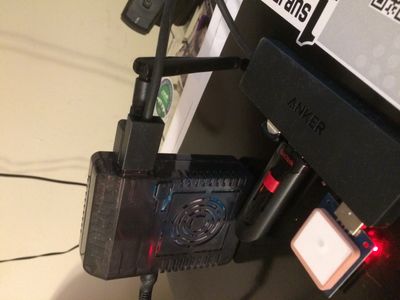
45703-odroidbox.jpg

Above is our device with GPS

The ODroid XU4 is a powerful little inexpensive IoT device. It is similar to a Raspberry PI and compatible with many of the libraries. I chose to install ARMBIAN Ubuntu which is a good OS. It is very easy to add GPS libraries, Apache MiniFi, JDK 8 and Python for processing.

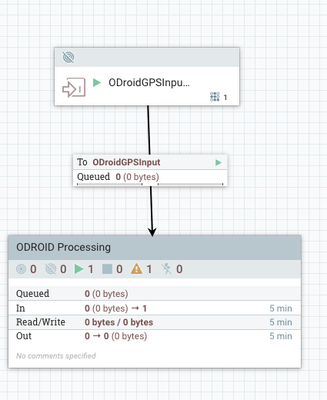
45736-odroidingestflow.png

Apache NiFi processing flow

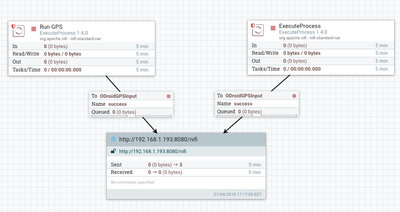
45737-odroidminifi.png

Apache MiniFi Flow on Device

Apache NiFi Processing

See: https://community.hortonworks.com/content/kbentry/155604/iot-ingesting-camera-data-from-nanopi-duo-d...

Source Code

https://github.com/tspannhw/odroidxu4-gps-python-minifi

Software

sudo apt-get update

sudo apt-get upgrade

sudo apt-get dist-upgrade

armbian-config

sudo add-apt-repository ppa:webupd8team/java

sudo apt-get update

sudo apt-get install oracle-java8-installer -y

sudo apt-get install oracle-java8-set-default -y

blkid

swapon /dev/sda1

sudo apt-get install gpsd gpsd-clients

sudo dpkg-reconfigure gpsd

sudo gpsmon /dev/ttyACM0

sudo apt-get install python-gps

cgps -s

Resources


Hardware

Armbian Ubuntu 16.04.3 LTS 4.9.61-odroidxu4

Two quad core CPUs and a GPU 2GB LPDDR3

USB 3

Power Supply

Powered USB Hub

Active Cooling Fan

Stratus GPYes USB GPS Device

Example Run of GPS Device

root@odroidxu4:/opt/demo# ./gps2.sh
[{"utc": "2018-01-02T00:19:25.000Z", "epx": "25.829", "epv": "62.56", "diskfree": "54166.8 MB", "altitude": "41.844", "memory": 7.6, "eps": "1.43", "longitude": "-74.529222193", "ts": "2018-01-02 00:19:23", "ept": "0.005", "host": "odroidxu4", "track": "141.59", "mode": "3", "time": "2018-01-02T00:19:25.000Z", "latitude": "40.268098177", "climb": "-0.042", "ipaddress": "192.168.1.202", "cputemp": 53.0, "speed": "0.189"}]


Software and Device Setup

We need to setup a Swap area to deal with not enough RAM for builds.

root@odroidxu4:~# sudo blkid
/dev/mmcblk1p1: UUID="7a81b72b-eee2-428f-9706-2aa0bd7e766f" TYPE="ext4" PARTUUID="7cbb190c-01"
/dev/zram7: UUID="794ef788-2696-4f56-97da-8c9e179be92d" TYPE="swap"
/dev/zram0: UUID="99613ecb-d41b-4dbe-a85c-2134800fcd8e" TYPE="swap"
/dev/zram1: UUID="57aaeb7c-b970-456d-a415-3e9151dc5fbf" TYPE="swap"
/dev/zram2: UUID="61a42b3a-e605-49e4-844b-467212228878" TYPE="swap"
/dev/zram3: UUID="7f7539df-3500-489b-990b-929d09896a42" TYPE="swap"
/dev/zram4: UUID="49d3a36a-5150-4c31-8acc-c77c512f8a31" TYPE="swap"
/dev/zram5: UUID="9ae98fa0-507d-415a-95d3-e24e9a4a8b2f" TYPE="swap"
/dev/zram6: UUID="4644d45f-dd3e-4bab-9507-1e28fe4b9d40" TYPE="swap"
/dev/mmcblk1: PTUUID="7cbb190c" PTTYPE="dos"
/dev/sda1: UUID="3C09-B728" TYPE="vfat"
root@odroidxu4:~# sudo mkswap /dev/sda1
mkswap: /dev/sda1: warning: wiping old vfat signature.
Setting up swapspace version 1, size = 114.6 GiB (123010527232 bytes)
no label, UUID=24360a18-0939-47b1-b383-27982d8a2007
root@odroidxu4:~# sudo swapon /dev/sda1
root@odroidxu4:~# sudo swapon
NAME       TYPE        SIZE USED PRIO
/dev/zram0 partition 124.6M   0B    5
/dev/zram1 partition 124.6M   0B    5
/dev/zram2 partition 124.6M   0B    5
/dev/zram3 partition 124.6M   0B    5
/dev/zram4 partition 124.6M   0B    5
/dev/zram5 partition 124.6M   0B    5
/dev/zram6 partition 124.6M   0B    5
/dev/zram7 partition 124.6M   0B    5
/dev/sda1  partition 114.6G   0B   -1


sudo apt-get install gpsd gpsd-clients
sudo gpsmon /dev/ttyACM0
sudo cgps -s
sudo apt-get install python-gps
sudo apt-get install gpsd gpsd-clients
sudo dpkg-reconfigure gpsd
sudo gpsmon /dev/ttyACM0
sudo pip install psutil
sudo pip install --upgrade pip
sudo pip install psutil

  ___      _           _     _  __  ___   _ _  _
 / _ \  __| |_ __ ___ (_) __| | \ \/ / | | | || |
| | | |/ _` | '__/ _ \| |/ _` |  \  /| | | | || |_
| |_| | (_| | | | (_) | | (_| |  /  \| |_| |__   _|
 \___/ \__,_|_|  \___/|_|\__,_| /_/\_\___/   |_|
Welcome to ARMBIAN 5.36 user-built Ubuntu 16.04.3 LTS 4.9.61-odroidxu4
System load:   0.00 0.01 0.00   Up time:       10 min
Memory usage:  3 % of 1993MB  IP:            192.168.1.202
CPU temp:      58°C
Usage of /:    6% of 57G
[ General system configuration (beta): armbian-config ]
Last login: Mon Jan  1 23:19:21 2018 from 192.168.1.193
pip install --upgrade pip setuptools wheel
pip install -upgrade psutil<br>
2,044 Views