Our Community is getting an upgrade! To get everything ready for the relaunch, we’ll be placing the site in read-only mode starting September 21st.
We really appreciate your understanding while we get things set up behind the scenes. Catch up on all the exciting details about the move here.
Need help or have questions? Drop us a line at [email protected]
Created on 01-25-2017 10:07 PM - edited 08-17-2019 05:16 AM
OSQuery
OSQuery is a cool tool that lets you query your servers via SQL. It supports Windows, OSX and most Linux variants.
Installing osquery
wget https://osquery-packages.s3.amazonaws.com/centos7/osquery-2.2.1-1.el7.x86_64.rpmrpm -ivh osquery-2.2.1-1.el7.x86_64.rpmsudo cp /usr/share/osquery/osquery.example.conf /etc/osquery/osquery.confsudo service osqueryd startRedirecting to /bin/systemctl start osqueryd.servicesudo service osqueryd statusRedirecting to /bin/systemctl status osqueryd.service● osqueryd.service - The osquery Daemon Loaded: loaded (/usr/lib/systemd/system/osqueryd.service; disabled; vendor preset: disabled) Active: active (running) since Wed 2017-01-25 20:32:06 UTC; 4s ago Process: 21531 ExecStartPre=/bin/sh -c if [ ! -f $FLAG_FILE ]; then touch $FLAG_FILE; fi (code=exited, status=0/SUCCESS) Main PID: 21534 (osqueryd) CGroup: /system.slice/osqueryd.service ├─21534 /usr/bin/osqueryd --flagfile /etc/osquery/osquery.flags --config_path /etc/osquery/osquery.conf └─21537 osqueryd: workerJan 25 20:32:06 tspanndev10.field.hortonworks.com osqueryd[21534]: I0125 20:32:06.240648 21543 scheduler.cpp:63] Executing scheduled query: system_info: SELECT hostname, cpu_brand, physica...ystem_info;Jan 25 20:32:06 tspanndev10.field.hortonworks.com osqueryd[21534]: I0125 20:32:06.248845 21543 query.cpp:68] Storing initial results for new scheduled query: system_infoJan 25 20:32:06 tspanndev10.field.hortonworks.com osqueryd[21534]: I0125 20:32:06.540765 21543 scheduler.cpp:63] Executing scheduled query: system_info: SELECT hostname, cpu_brand, physica...ystem_info;Jan 25 20:32:06 tspanndev10.field.hortonworks.com osqueryd[21534]: I0125 20:32:06.836784 21543 scheduler.cpp:63] Executing scheduled query: system_info: SELECT hostname, cpu_brand, physica...ystem_info;Jan 25 20:32:07 tspanndev10.field.hortonworks.com osqueryd[21534]: I0125 20:32:07.134472 21543 scheduler.cpp:63] Executing scheduled query: system_info: SELECT hostname, cpu_brand, physica...ystem_info;Jan 25 20:32:07 tspanndev10.field.hortonworks.com osqueryd[21534]: I0125 20:32:07.414026 21543 scheduler.cpp:63] Executing scheduled query: system_info: SELECT hostname, cpu_brand, physica...ystem_info;Jan 25 20:32:09 tspanndev10.field.hortonworks.com osqueryd[21534]: I0125 20:32:09.205369 21543 scheduler.cpp:63] Executing scheduled query: system_info: SELECT hostname, cpu_brand, physica...ystem_info;Jan 25 20:32:09 tspanndev10.field.hortonworks.com osqueryd[21534]: I0125 20:32:09.495270 21543 scheduler.cpp:63] Executing scheduled query: system_info: SELECT hostname, cpu_brand, physica...ystem_info;Jan 25 20:32:09 tspanndev10.field.hortonworks.com osqueryd[21534]: I0125 20:32:09.792325 21543 scheduler.cpp:63] Executing scheduled query: system_info: SELECT hostname, cpu_brand, physica...ystem_info;Jan 25 20:32:10 tspanndev10.field.hortonworks.com osqueryd[21534]: I0125 20:32:10.083355 21543 scheduler.cpp:63] Executing scheduled query: system_info: SELECT hostname, cpu_brand, physica...ystem_info;Hint: Some lines were ellipsized, use -l to show in full.
[root@tspanndev10 demo]# osqueryiUsing a virtual database. Need help, type '.help'osquery> .exit[root@tspanndev10 demo]# osqueryi --json "select * from
routes where destination = '::1'"[
{"destination":"::1","flags":"0","gateway":"","interface":"lo","metric":"0","mtu":"0","netmask":"0","source":"","type":"local"}][root@tspanndev10 demo]# osqueryi --json ".tables" => acpi_tables => apt_sources => arp_cache => augeas =>
authorized_keys => block_devices =>
carbon_black_info =>
chrome_extensions => cpu_time => cpuid => crontab => deb_packages => device_file => device_hash =>
device_partitions =>
disk_encryption => dns_resolvers => etc_hosts => etc_protocols => etc_services => file => file_events => firefox_addons => groups =>
hardware_events => hash =>
interface_addresses =>
interface_details => iptables => kernel_info =>
kernel_integrity => kernel_modules => known_hosts => last =>
listening_ports =>
logged_in_users => magic => memory_info => memory_map => mounts => msr => opera_extensions => os_version => osquery_events =>
osquery_extensions => osquery_flags => osquery_info => osquery_packs =>
osquery_registry =>
osquery_schedule => pci_devices => platform_info =>
portage_keywords => portage_packages => portage_use => process_envs => process_events =>
process_memory_map =>
process_open_files =>
process_open_sockets => processes => routes =>
rpm_package_files => rpm_packages => shared_memory => shell_history => smbios_tables => socket_events => sudoers => suid_bin => syslog =>
system_controls => system_info => time => uptime => usb_devices => user_events => user_groups => user_ssh_keys => users => yara => yara_eventsosqueryi --json "select * from system_info"[ {"computer_name":"timserver.com","cpu_brand":"Intel
Xeon E312xx (Sandy
Bridge)","cpu_logical_cores":"8","cpu_physical_cores":"8","cpu_subtype":"42","cpu_type":"6","hardware_model":"OpenStack
Nova","hardware_serial":"00000000-0000-0000-0000-0cc47ab4bfdc","hardware_vendor":"OpenStack
Foundation","hardware_version":"13.1.1","hostname":"timserver.com","physical_memory":"15601471488","uuid":"0BDAB55A-3709-41BA-85A8-84CB628BACF2"}]/var/log/osqueryosqueryd.INFOosqueryd.results.logResult Through NIFI
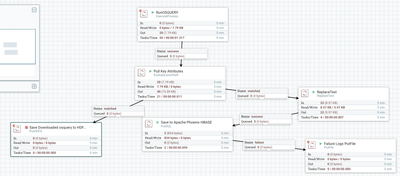
[
{"computer_name":"tspannserver","cpu_brand":"Intel
Xeon E312xx (Sandy
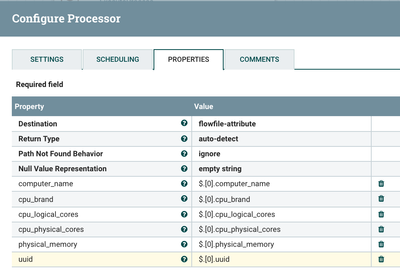
Bridge)","cpu_logical_cores":"8","cpu_physical_cores":"8","cpu_subtype":"42","cpu_type":"6","hardware_model":"","hardware_serial":"","hardware_vendor":"","hardware_version":"","hostname":"tspannserver","physical_memory":"15601471488","uuid":"e877cbb9-175e-48c8-a6d9-ff824791d204"}]JSON Path Extraction
$.[0].computer_name
Apache Phoenix Table
CREATE TABLE osquery (uuid varchar not null primary key, computer_namevarchar, cpu_logical_cores varchar, filename varchar, cpu_physical_cores varchar,cpu_brand varchar, physical_memory varchar);
Phoenix Query
upsert into osquery (uuid, computer_name,
cpu_logical_cores, filename, cpu_physical_cores, cpu_brand, physical_memory) values ('${'uuid'}','${'computer_name'}','${cpu_logical_core}','${'filename'}','${'cpu_physical_cores'}','${'cpu_brand'}','${'physical_memory'}')Caveat: If you have a type mismatch on an Upsert
21:54:45 UTC
ERROR
30d6398f-310f-1cac-b1d6-39d48b542b1e
server:port
PutSQL[id=30d6398f-310f-1cac-b1d6-39d48b542b1e] Failed to update database for [StandardFlowFileRecord[uuid=0228c884-cff8-4468-a082-d24cf9df6c11,claim=StandardContentClaim [resourceClaim=StandardResourceClaim[id=1485381190973-6753, container=default, section=609], offset=162842, length=277],offset=0,name=2355976778239757,size=277]] due to org.apache.phoenix.exception.BatchUpdateExecution: ERROR 1106 (XCL06): Exception while executing batch.; it is possible that retrying the operation will succeed, so routing to retry: org.apache.phoenix.exception.BatchUpdateExecution: ERROR 1106 (XCL06): Exception while executing batch.
Reference
Created on 01-25-2017 10:47 PM
To add to the configuration for more
sudo service osqueryd restart
I turned on some extra packs
"packs": { "osquery-monitoring": "/usr/share/osquery/packs/osquery-monitoring.conf", "incident-response": "/usr/share/osquery/packs/incident-response.conf", "it-compliance": "/usr/share/osquery/packs/it-compliance.conf", // "osx-attacks": "/usr/share/osquery/packs/osx-attacks.conf", // "vuln-management": "/usr/share/osquery/packs/vuln-management.conf", "hardware-monitoring": "/usr/share/osquery/packs/hardware-monitoring.conf" }
In /etc/osquery/osquery.conf
Created on 01-11-2018 02:27 PM
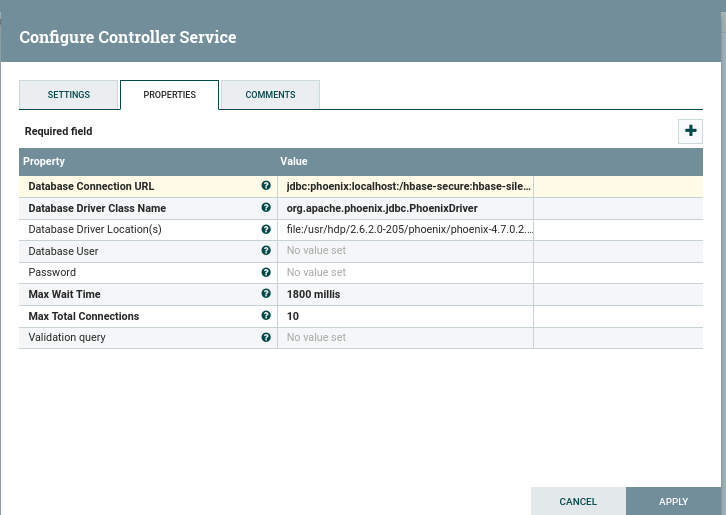
Hi Timothy, I got error while upsert to Phoenix I configured jdbc to secure Hbase tested manually working fine , Could you refer me to a example of jdbc connection Phoenix
jdbc:phoenix:hostname:/hbase-secure:[email protected]:/etc/security/keytabs/hbase.headless.keytab
/usr/hdp/current/phoenix-client/bin/sqlline.py xx.xx.com:2181:hbase-silence@RELAM:/home/nifi/hbase.headless.keytab this working fine from command line. Thankserror-putsql1.pngjdbc-phoenix.png
Created on 03-06-2018 05:02 PM
Check HCC for articles on connecting NiFi to Secure Phoenix. You must make sure you have permissions to the keytabs from NiFi