Our Community is getting an upgrade! To get everything ready for the relaunch, we’ll be placing the site in read-only mode starting September 21st.
We really appreciate your understanding while we get things set up behind the scenes. Catch up on all the exciting details about the move here.
Need help or have questions? Drop us a line at [email protected]
Created on 05-19-2016 01:29 AM - edited 08-17-2019 12:21 PM
Goals:
Notes:
export ambari_server=node1 curl -sSL https://raw.githubusercontent.com/seanorama/ambari-bootstrap/master/ambari-bootstrap.sh | sudo -E sh
export install_ambari_server=true curl -sSL https://raw.githubusercontent.com/seanorama/ambari-bootstrap/master/ambari-bootstrap.sh | sudo -E sh
yum install -y git git clone https://github.com/hortonworks-gallery/ambari-zeppelin-service.git /var/lib/ambari-server/resources/stacks/HDP/2.4/services/ZEPPELIN sed -i.bak '/dependencies for all/a \ "ZEPPELIN_MASTER-START": ["NAMENODE-START", "DATANODE-START"],' /var/lib/ambari-server/resources/stacks/HDP/2.4/role_command_order.json
mkdir /staging chmod a+rx /staging
tar -xvzf /staging/hdb-2.0.0.0-*.tar.gz -C /staging/ tar -xvzf /staging/hdb-ambari-plugin-2.0.0-*.tar.gz -C /staging/ yum install -y httpd service httpd start cd /staging/hdb* ./setup_repo.sh cd /staging/hdb-ambari-plugin* ./setup_repo.sh yum install -y hdb-ambari-plugin
service ambari-server restart service ambari-agent restart
curl -u admin:admin -H X-Requested-By:ambari http://localhost:8080/api/v1/hosts service ambari-agent status
#install bootstrap yum install -y python-argparse cd git clone https://github.com/seanorama/ambari-bootstrap.git #decide which services to deploy and set the number of nodes in the cluster export ambari_services="HDFS MAPREDUCE2 YARN ZOOKEEPER HIVE ZEPPELIN SPARK HAWQ PXF" export host_count=4 cd ./ambari-bootstrap/deploy/
cat << EOF > configuration-custom.json
{
"configurations" : {
"hdfs-site": {
"dfs.allow.truncate": "true",
"dfs.block.access.token.enable": "false",
"dfs.block.local-path-access.user": "gpadmin",
"dfs.client.read.shortcircuit": "true",
"dfs.client.socket-timeout": "300000000",
"dfs.client.use.legacy.blockreader.local": "false",
"dfs.datanode.handler.count": "60",
"dfs.datanode.socket.write.timeout": "7200000",
"dfs.namenode.handler.count": "600",
"dfs.support.append": "true"
},
"hawq-site":{
"hawq_master_address_port":"5432"
},
"hawq-env":{
"hawq_password":"gpadmin"
},
"core-site": {
"ipc.client.connection.maxidletime": "3600000",
"ipc.client.connect.timeout": "300000",
"ipc.server.listen.queue.size": "3300"
}
}
}
EOF#optional - if you want to review the BP before deploying it #export deploy=false #./deploy-recommended-cluster.bash #more temp*/blueprint.json #generate BP including customizations and start cluster deployment export deploy=true ./deploy-recommended-cluster.bash
curl -u admin:admin -H X-Requested-By:ambari -X DELETE http://localhost:8080/api/v1/blueprints/recommended
su - gpadmin source /usr/local/hawq/greenplum_path.sh export PGPORT=5432 psql -d postgres create database contoso; \q
ALTER ROLE gpadmin WITH PASSWORD 'gpadmin';
echo "host all all 172.17.0.2/32 trust" >> /data/hawq/master/pg_hba.conf
hawq stop cluster --reload
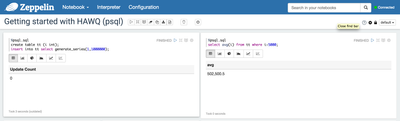
%psql.sql create table tt (i int); insert into tt select generate_series(1,1000000);
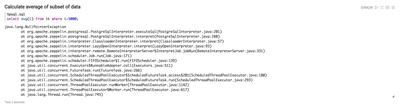
%psql.sql select avg(i) from tt where i>5000;
#Import sample tables cd /tmp wget https://raw.githubusercontent.com/abajwa-hw/security-workshops/master/data/sample_07.csv beeline -u "jdbc:hive2://localhost:10000/default" use default; CREATE TABLE `sample_07` ( `code` string , `description` string , `total_emp` int , `salary` int ) ROW FORMAT DELIMITED FIELDS TERMINATED BY '\t' STORED AS TextFile; load data local inpath '/tmp/sample_07.csv' into table sample_07;
su - gpadmin source /usr/local/hawq/greenplum_path.sh export PGPORT=5432 psql -d postgres SET hcatalog_enable = true; SET pxf_service_address TO "node2:51200"; select count(*) from hcatalog.default.sample_07;
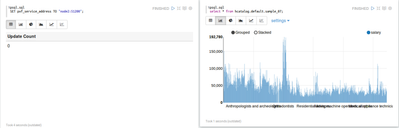
%psql.sql SET hcatalog_enable = true; SET pxf_service_address TO "node2:51200";
%psql.sql select description, salary from hcatalog.default.sample_07;
A retail dataset with sample queries can be found at https://github.com/pivotalsoftware/pivotal-samples
cd /tmp git clone https://github.com/pivotalsoftware/pivotal-samples.git cd /tmp/pivotal-samples/sample-data/ sudo -u hdfs ./load_data_to_HDFS.sh sudo -u hdfs hdfs dfs -chmod -R 777 /retail_demo hive -f /tmp/pivotal-samples/hive/create_hive_tables.sql
%psql.sql
SELECT product_id
, product_category_id
, product_count
, category_rank
FROM (SELECT product_id, product_category_id
, SUM(item_quantity::int) AS product_count
, row_number() OVER (PARTITION BY product_category_id ORDER BY SUM(item_quantity::int) DESC) AS category_rank
FROM hcatalog.retail_demo.order_lineitems_hive
GROUP BY product_id, product_category_id
) AS lineitems
WHERE category_rank <= 10
ORDER BY product_category_id, category_rank
;%psql.sql
SELECT CASE WHEN order_datetime::timestamp < timestamp '2010-10-08' THEN date_trunc('day', order_datetime::timestamp + interval ' 1 week')
ELSE date_trunc('day', order_datetime::timestamp)
END::date AS order_day
, SUM(CASE WHEN order_datetime >= timestamp '2010-01-08' THEN 1 ELSE 0 END) AS num__orders_current
, SUM(CASE WHEN order_datetime < timestamp '2010-01-08' THEN 1 ELSE 0 END) AS num__orders_last_week
FROM hcatalog.retail_demo.order_lineitems_hive
WHERE order_datetime BETWEEN timestamp '2010-10-01' AND timestamp '2010-10-15 23:59:59'
GROUP BY 1
ORDER BY 1
;%psql.sql
SELECT product_id
, product_category_id
, product_count
, category_rank
FROM (SELECT product_id, product_category_id
, SUM(item_quantity::int) AS product_count
, row_number() OVER (PARTITION BY product_category_id ORDER BY SUM(item_quantity::int) DESC) AS category_rank
FROM hcatalog.retail_demo.order_lineitems_hive
GROUP BY product_id, product_category_id
) AS lineitems
WHERE category_rank <= 10
ORDER BY product_category_id, category_rank
;Created on 05-20-2016 03:52 AM