Our Community is getting an upgrade! To get everything ready for the relaunch, we’ll be placing the site in read-only mode starting September 21st.
We really appreciate your understanding while we get things set up behind the scenes. Catch up on all the exciting details about the move here.
Need help or have questions? Drop us a line at [email protected]

Community Articles

Find and share helpful community-sourced technical articles.
Announcements
Share your experience with Cloudera on G2 and get a $25 Amazon Gift card.
Hi, I'm CLEO! Something exciting is coming to the Community. Stay Tuned!

Labels (2)
avatar
Master Guru

Part 1: Installation and Setup

NVIDIA Maxwell ™, 256 CUDA cores
Quad ARM® A57/2 MB L2
4K x 2K 30 Hz Encode (HEVC) 4K x 2K 60 Hz Decode (10-Bit Support)
4 GB 64 bit LPDDR4 25.6 GB/s
2x DSI, 1x eDP 1.4 / DP 1.2 / HDMI
16 GB eMMC, SDIO, SATA
Up to 6 Cameras (2 Lane) CSI2 D-PHY 1.1 (1.5 Gbps/Lane)
UART, SPI, I2C, I2S, GPIOs
1 Gigabit Ethernet, 802.11ac WLAN, Bluetooth

Part 2: Classifying Images with ImageNet

Part 3: Detecting Faces in Images

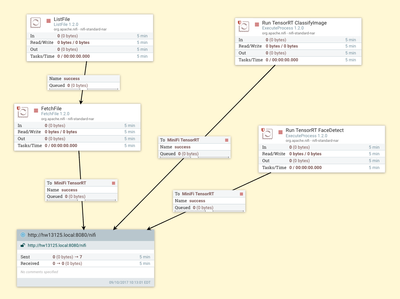
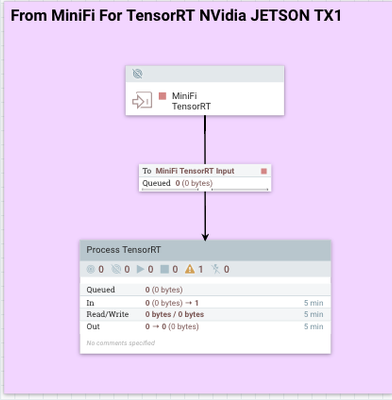
Part 4: Using MiniFi to Send the Data and NiFi to Consume and Convert

34731-minifirt.png

34732-tensorrtprocess.png

Build the Config File

minifi-toolkit-0.2.0/bin/config.sh transform TensorRTMiniFi.xml config.yml


Note:

Do not install minifi as a service, I had issues with this version of ubuntu and that


References:

1,532 Views