2)
Use
ReplaceText and EvaluateJsonPath processors to trim
json result and extract stock value and variation in stock price today. Use
UpdateAttribute processor to save
values to attributes.
3) Now
you can use a
RouteOnAttribute to
decide when to trigger mail or/and give voice feedback.
4) Finally
Use
PutEmail
processor for email Alert and/or Use ExecuteStreamCommand
for voice feedback using Mac OS X’s “say” command, values can be extracted
from attributes.
I am
Attaching my flow template, which will help you understand better.
5) you may dry run the flow to see if it works as expected!
6)
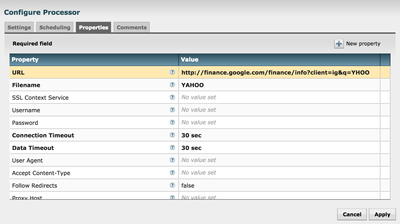
Now we have to link Mac Dictation to communicate with NiFi. For that we have to create
custom commands in Dictation that fire NiFi API calls to make changes in the
GetHttp processor based on the stock requested via voice command. [Now
you would be thinking about better Speech recognition software 😉 ]
A
Sample API call to update processor
based on command would look like [update it with your processor-ids and client-ids]:
curl -i -X PUT -H 'Content-Type: application/json' -d '{"revision":{"version":176,"clientId":"93a9b515-1643-4ccf-8db1-71ef38238ae5"},"processor":{"id":"7f033b6f-e13e-4295-85de-33444aae6c4b","parentGroupId":"02888a59-ee2b-483e-8860-b0fdf948de97","config":{"properties":{"URL":"http://finance.google.com/finance/info?client=ig&q=AAPL","Filename":"APPLE"}}}}' http://localhost:8080/nifi-api/controller/process-groups/02888a59-ee2b-483e-8860-b0fdf948de97/proces...
Hi @Andrew Grande Thanks!, I actually did that:) in the demo video I had it, but disabled and removed in the flow attached [Kathy will say if its going down based on value "You may want to buy some today" or Alex will say if Its going up," you may want to sell some" ;)] Thanks again!