Our Community is getting an upgrade! To get everything ready for the relaunch, we’ll be placing the site in read-only mode starting September 21st.
We really appreciate your understanding while we get things set up behind the scenes. Catch up on all the exciting details about the move here.
Need help or have questions? Drop us a line at [email protected]

Community Articles

Find and share helpful community-sourced technical articles.
Announcements
Share your experience with Cloudera on G2 and get a $25 Amazon Gift card.
Hi, I'm CLEO! Something exciting is coming to the Community. Stay Tuned!

Labels (2)
avatar
Super Guru

ENV: HDP 2.5

Please follow following steps to configure

1. under Ambari-> Knox -> Advanced topologies

2. add the following snippet in advanced topologies

<provider> 
<role>ha</role> 
<name>HaProvider</name> 
<enabled>true</enabled> 
<param> 
<name>HIVE</name> 
<value>maxFailoverAttempts=3;failoverSleep=1000;enabled=true;zookeeperEnsemble=rkk3.hdp.local:2181,rkk2.hdp.local:2181,
rkk1.hdp.local:2181;zookeeperNamespace=hiveserver2</value>
</param> 
</provider> 


comment out the url from hive service tag

<service> 
<role>HIVE</role> 
<!-- <url>http://{{hive_server_host}}:{{hive_http_port}}/{{hive_http_path}}</url> --> 
</service> 

3. Restart KNOX

4. Open Beeline and connect to HS2

beeline
Beeline version 1.2.1000.2.5.0.0-1133 by Apache Hive
beeline> !connect jdbc:hive2://rkk1.hdp.local:8443/;ssl=true;sslTrustStore=/var/lib/knox/data-2.5.0.0-1133/security/keystores/gateway.jks;trustStorePassword=knox?hive.server2.transport.mode=http;hive.server2.thrift.http.path=gateway/default/hive
Connecting to jdbc:hive2://rkk1.hdp.local:8443/;ssl=true;sslTrustStore=/var/lib/knox/data-2.5.0.0-1133/security/keystores/gateway.jks;trustStorePassword=knox?hive.server2.transport.mode=http;hive.server2.thrift.http.path=gateway/default/hive
Enter username for jdbc:hive2://rkk1.hdp.local:8443/;ssl=true;sslTrustStore=/var/lib/knox/data-2.5.0.0-1133/security/keystores/gateway.jks;trustStorePassword=knox?hive.server2.transport.mode=http;hive.server2.thrift.http.path=gateway/default/hive: guest
Enter password for jdbc:hive2://rkk1.hdp.local:8443/;ssl=true;sslTrustStore=/var/lib/knox/data-2.5.0.0-1133/security/keystores/gateway.jks;trustStorePassword=knox?hive.server2.transport.mode=http;hive.server2.thrift.http.path=gateway/default/hive: **************
16/11/26 19:58:04 [main]: WARN jdbc.Utils: ***** JDBC param deprecation *****
16/11/26 19:58:04 [main]: WARN jdbc.Utils: The use of hive.server2.transport.mode is deprecated.
16/11/26 19:58:04 [main]: WARN jdbc.Utils: Please use transportMode like so: jdbc:hive2://<host>:<port>/dbName;transportMode=<transport_mode_value>
16/11/26 19:58:04 [main]: WARN jdbc.Utils: ***** JDBC param deprecation *****
16/11/26 19:58:04 [main]: WARN jdbc.Utils: The use of hive.server2.thrift.http.path is deprecated.
16/11/26 19:58:04 [main]: WARN jdbc.Utils: Please use httpPath like so: jdbc:hive2://<host>:<port>/dbName;httpPath=<http_path_value>
Connected to: Apache Hive (version 1.2.1000.2.5.0.0-1133)
Driver: Hive JDBC (version 1.2.1000.2.5.0.0-1133)
Transaction isolation: TRANSACTION_REPEATABLE_READ
0: jdbc:hive2://rkk1.hdp.local:8443/> show tables;
+-----------+--+
| tab_name  |
+-----------+--+
| xx        |
+-----------+--+
1 row selected (0.201 seconds)
4,217 Views
Comments
avatar
New Member

@Rajkumar Singh

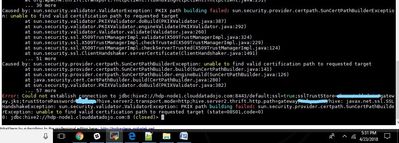
I did the same thing but I'm getting either HTTP Error 401 or 404 or certificate error. The cluster I'm testing this on is also Kerberized.

72405-inkedbeeline-hive-knox-li.jpg

Version history
Last update:
‎12-18-2016 12:29 PM
Updated by:
Contributors