Our Community is getting an upgrade! To get everything ready for the relaunch, we’ll be placing the site in read-only mode starting September 21st.
We really appreciate your understanding while we get things set up behind the scenes. Catch up on all the exciting details about the move here.
Need help or have questions? Drop us a line at [email protected]

Community Articles

Find and share helpful community-sourced technical articles.
Announcements
Share your experience with Cloudera on G2 and get a $25 Amazon Gift card.
Hi, I'm CLEO! Something exciting is coming to the Community. Stay Tuned!

Labels (2)
avatar

Follow steps below to run this sample spark-shell code to index a Spark Data Frame into a Solr Cloud:

1- Install java 8 in your sandbox 2.3.2

yum install all java-1.8.0-openjdk*

2- Define java 8 as your default java, using alternatives

alternatives --config java
##choose /usr/lib/jvm/jre-1.8.0-openjdk.x86_64/bin/java

3- Logoff / Logon again

exit
ssh [email protected]

4- Change java version in spark, in spark-env.sh

vi /usr/hdp/current/spark-client/conf/spark-env.sh
##change JAVA_HOME like below:
export JAVA_HOME=/usr/lib/jvm/java-1.8.0-openjdk-1.8.0.65-0.b17.el6_7.x86_64

5- Download and build spark-solr

git clone https://github.com/LucidWorks/spark-solr.git
cd spark-solr
mvn clean install -DskipTests 

6- Create a sample text file and write into hdfs

echo "1,guilherme" > your_text_file
echo "2,isabela" >> your_text_file
hadoop fs -put your_text_file /tmp/

7- Start sandbox solr cloud

cd
./start_solr.sh

8- Create a solr collection

/opt/lucidworks-hdpsearch/solr/bin/solr create -c testsparksolr -d data_driven_schema_configs

7- Open spark-shell with spark-solr package dependency

spark-shell --packages com.lucidworks.spark:spark-solr:1.2.0-SNAPSHOT

8- Run spark/scala code below

import com.lucidworks.spark.SolrSupport;
import org.apache.solr.common.SolrInputDocument;

val input_file = "hdfs:///tmp/your_text_file"
case class Person(id: Int, name: String)
val people_df1 = sc.textFile(input_file).map(_.split(",")).map(p => Person(p(0).trim.toInt, p(1))).toDF()
val docs = people_df1.map{doc=>
  val docx=SolrSupport.autoMapToSolrInputDoc(doc.getAs[Int]("id").toString, doc, null)
  docx.setField("scala_s", "supercool")
  docx.setField("name_s", doc.getAs[String]("name"))
  docx
}
SolrSupport.indexDocs("sandbox.hortonworks.com:2181", "testsparksolr", 10, docs);

val solrServer = com.lucidworks.spark.SolrSupport.getSolrServer("sandbox.hortonworks.com:2181")
solrServer.setDefaultCollection("testsparksolr")
solrServer.commit(false, false)

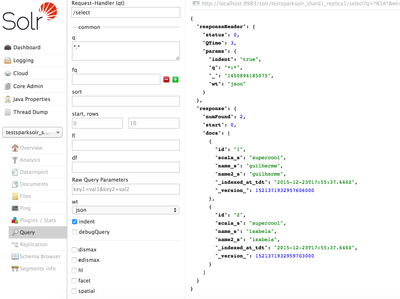
9- Check results:

1051-screen-shot-2015-12-23-at-160948.png

PS: If you are using SparkStreaming, you can use method below with a DStream object, instead of indexDocs():

SolrSupport.indexDStreamOfDocs("sandbox.hortonworks.com:2181", "testsparksolr", 10, docs);
8,103 Views
Comments
avatar

Very nice! A good way to do ETL and create SOLR indexes.

Version history
Last update:
‎08-17-2019 01:40 PM
Updated by:
Contributors