

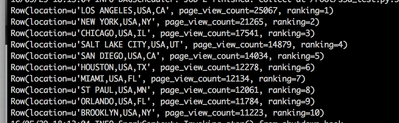

The source data in the S3 bucket is Omniture clickstream data (weblogs). The goal is to write PySpark code against the S3 data to RANK geographic locations by page view traffic - which areas generate the most traffic by page view counts.
The S3A filesystem client (s3a://) is a replacement for the S3 Native (s3n://):
It uses Amazon’s libraries to interact with S3
Supports larger files
Higher performance
Supports IAM role-based authentication
Production stable since Hadoop 2.7 (per Apache website)
The code below is a working example tested using HDP 2.4.0.0-169 (Hadoop version 2.7.1.2.4.0.0-169)
Note that I am using the HiveContext and not the SQLContext. I am NOT querying or accessing any Hive tables, but I am using the RANK() function to perform a ranking. If you want to use the RANK() function on a Data Frame writing standard SQL that you are already familiar with, then you you have to use the HiveContext. If you use the SQLContext, then the code and syntax will look much different. Please refer to the PySpark documentation.
In short, it’s easier to use the HiveContext; however, this can be done using the SQLContext.
STEP 1: Create a Spark properties file
Store your AWS credentials in a configuration file.
Specify the location for the AWS jars needed to interact with S3A. Two are required, hadoop-aws and aws-java-sdk.
from pyspark import SparkConf, SparkContext, SQLContext
from pyspark.sql import *
## set Spark properties
conf = (SparkConf()
.setAppName("s3a_test")
.set("spark.executor.instances", "8")
.set("spark.executor.cores", 2)
.set("spark.shuffle.compress", "true")
.set("spark.io.compression.codec", "snappy")
.set("spark.executor.memory", "2g"))
sc = SparkContext(conf = conf)
## create SQL SQLContext
sqlContext = HiveContext(sc)
## path to S3 bucket containing my files
path = "s3a://bkm-clickstream/Omniture/*"
## get those fields we need to create the schema. file is tab delimited
lines = sc.textFile(path)
parts = lines.map(lambda l: l.split("\t"))
weblogs_hit = parts.map(lambda p: Row(url=p[12], city=p[49], country = p[50], state = p[52]))
## create DataFrame
schema_weblogs_hit = sqlContext.createDataFrame(weblogs_hit)
## register DataFrame as a temporary table
schema_weblogs_hit.registerTempTable("weblogs_hit")
## RANK pageview count by geographic location - which areas generate the most traffic in terms of page views
rows = sqlContext.sql("SELECT m.location, m.page_view_count, RANK() OVER (ORDER BY m.page_view_count DESC) AS ranking FROM (SELECT CONCAT(UPPER(city),',',UPPER(country),',',UPPER(state)) AS location, count(1) AS page_view_count FROM weblogs_hit GROUP BY city, country, state ORDER BY page_view_count) m LIMIT 10")
## run SQL command and display output
output = rows.collect()
for row in output:
row = str(row)
print "%s" % (row)
Thanks Binu for the guide . This is helpful. Could you please point me to similar guide for HBase? Also, what services are supported with S3A filesystem and HDP?