Our Community is getting an upgrade! To get everything ready for the relaunch, we’ll be placing the site in read-only mode starting September 21st.
We really appreciate your understanding while we get things set up behind the scenes. Catch up on all the exciting details about the move here.
Need help or have questions? Drop us a line at [email protected]

Community Articles

Find and share helpful community-sourced technical articles.
Announcements
Share your experience with Cloudera on G2 and get a $25 Amazon Gift card.
Hi, I'm CLEO! Something exciting is coming to the Community. Stay Tuned!

Labels (2)
avatar

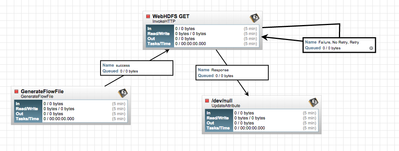
Once one moves beyond trivial flow design a visual image like the one below becomes common. Surely, it becomes more and more messy over time and harder to glance over.

283-screenshot.png

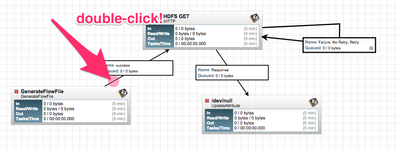
Here's a great tip - double-click on the connection line that you want to bend:

287-screenshot.png

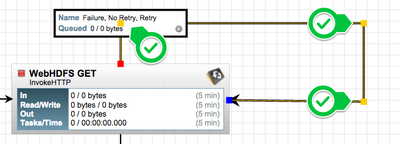
A new yellow anchor will appear which one can then drag around to organize things nicely.

Bonus tip - one can add multiple bend points to a connection.

To remove a specific anchor, simply double-click on it again, repeat for each yellow point.

284-screenshot.png

And an extra bonus courtesy of @[email protected]: a connection label can be moved along the connection and snaps to a bend point, see below:

288-screenshot.png

9,331 Views
Comments
avatar
Rising Star

Additionally, you can move the connection label to any bend point. Click and drag the label to desired bend point.

avatar

+1 to Andrew for 'Best Title' competition

avatar

I'm surprised it wasn't @[email protected] who wrote this article 😉

Version history
Last update:
‎04-21-2026 05:35 AM
Updated by: