Our Community is getting an upgrade! To get everything ready for the relaunch, we’ll be placing the site in read-only mode starting September 21st.
We really appreciate your understanding while we get things set up behind the scenes. Catch up on all the exciting details about the move here.
Need help or have questions? Drop us a line at [email protected]

Community Articles

Find and share helpful community-sourced technical articles.
Announcements
Share your experience with Cloudera on G2 and get a $25 Amazon Gift card.
Hi, I'm CLEO! Something exciting is coming to the Community. Stay Tuned!

Labels (2)
avatar
Expert Contributor
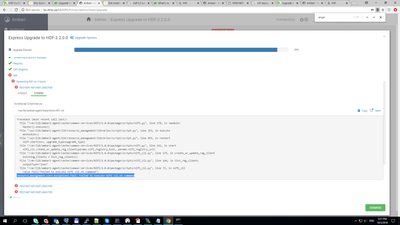
Restarting NiFi nodes fails with an error message such as the one below:
<br>File "/var/lib/ambari-agent/cache/common-services/NIFI/1.0.0/package/scripts/nifi.py", line 278, in
    Master().execute()
  File "/usr/lib/ambari-agent/lib/resource_management/libraries/script/script.py", line 353, in execute
    method(env)
  File "/usr/lib/ambari-agent/lib/resource_management/libraries/script/script.py", line 993, in restart
    self.start(env, upgrade_type=upgrade_type)
  File "/var/lib/ambari-agent/cache/common-services/NIFI/1.0.0/package/scripts/nifi.py", line 152, in start
    nifi_cli.create_or_update_reg_client(params.nifi_registry_host, params.nifi_registry_url)
  File "/u/var/lib/ambari-agent/cache/common-services/NIFI/1.0.0/package/scripts/nifi_cli.py", line 175, in create_or_update_reg_client
    existing_clients = list_reg_clients()
  File "/u/var/lib/ambari-agent/cache/common-services/NIFI/1.0.0/package/scripts/nifi_cli.py", line 144, in list_reg_clients
    outputType="json"
  File "/u/var/lib/ambari-agent/cache/common-services/NIFI/1.0.0/package/scripts/nifi_cli.py", line 73, in nifi_cli
    raise Fail("Failed to execute nifi cli.sh command")

Cause:

This occurs when the nifi.initial.admin.identity does not have permission to access the /controller API.

Workaround:

Create a local user in Ranger with the name of the initial admin idenity

Add a Ranger Policy for NiFi with Read/Write permissions for /controller

4,231 Views
Comments

This solution can help too as it can be caused by a port clash on 9088 when superset is running on the same host

avatar
Expert Contributor

Hi! Have same problem, but Ranger not installed

[root@serv12 ~]# grep -i Ranger /var/lib/ambari-agent/data/output-869.txt 2018-10-03 17:49:28,216 - Ranger admin not installed

91600-to-hdf-32.png

@Charles Bernard's suggestion solved it for me.

Version history
Last update:
‎04-21-2026 05:15 AM
Updated by: