Our Community is getting an upgrade! To get everything ready for the relaunch, we’ll be placing the site in read-only mode starting September 21st.
We really appreciate your understanding while we get things set up behind the scenes. Catch up on all the exciting details about the move here.
Need help or have questions? Drop us a line at [email protected]
Created on 12-08-2016 06:25 PM - edited 08-17-2019 07:27 AM
Until https://github.com/jupyter-incubator/sparkmagic/issues/285 is fixed, set
livy.server.csrf_protection.enabled ==> false
in Ambari under Spark Config - Advanced livy-conf
Details see https://github.com/jupyter-incubator/sparkmagic
Install Jupyter, if you don't already have it:
$ sudo -H pip install jupyter notebook ipython
Install Sparkmagic:
$ sudo -H pip install sparkmagic
Install Kernels:
$ pip show sparkmagic # check path, e.g /usr/local/lib/python2.7/site-packages $ cd /usr/local/lib/python2.7/site-packages $ jupyter-kernelspec install --user sparkmagic/kernels/sparkkernel $ jupyter-kernelspec install --user sparkmagic/kernels/pysparkkernel
Install Sparkmagic widgets
$ sudo -H jupyter nbextension enable --py --sys-prefix widgetsnbextension
The configuration file is a json file stored under ~/.sparkmagic/config.json
To avoid timeouts connecting to HDP 2.5 it is important to add
"livy_server_heartbeat_timeout_seconds": 0
To ensure the Spark job will run on the cluster (livy default is local), spark.master needs needs to be set to yarn-cluster. Therefore a conf object needs to be provided (here you can also add extra jars for the session):
"session_configs": {
"driverMemory": "2G",
"executorCores": 4,
"executorMemory": "8G",
"proxyUser": "bernhard",
"conf": {
"spark.master": "yarn-cluster",
"spark.jars.packages": "com.databricks:spark-csv_2.10:1.5.0"
}
}
The proxyUser is the user the Livy session will run under.
Here is an example config.json. Adapt and copy to ~/.sparkmagic
$ cd <project-dir> $ jupyter notebook
In Notebook Home select New -> Spark or New -> PySpark or New -> Python
Add into your Notebook after the Kernel started
In[ ]: %load_ext sparkmagic.magics
In[ ]: %manage_spark
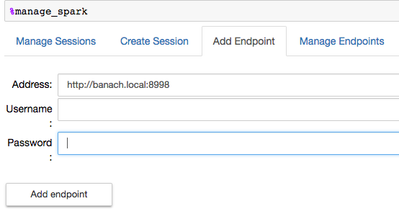
This will open a connection widget
Username and password can be ignored in non secured clusters
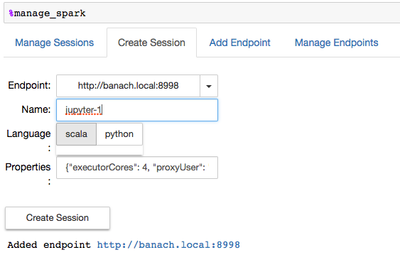
When this is successful, create a session:
Note that it uses the created endpoint and under properties the configuration on the config.json.
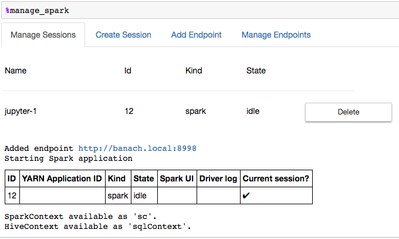
When you see
Spark session is successfully started and
val df = sqlContext.read.
format("com.databricks.spark.csv").
option("header", "true").
option("inferSchema", "true").
load("/tmp/iris.csv")
Thanks to Alex (@azeltov) for the discussions and debugging session
Created on 12-27-2017 02:14 AM
This is great. And can be even better if you fix the broken links to image. Thanks
Created on 10-25-2018 07:51 PM
Useful for getting SparkMagic to run w/ Jupyter. And the images do not seem to load for me either, still good how-to tech article for Jupyter.