Our Community is getting an upgrade! To get everything ready for the relaunch, we’ll be placing the site in read-only mode starting September 21st.
We really appreciate your understanding while we get things set up behind the scenes. Catch up on all the exciting details about the move here.
Need help or have questions? Drop us a line at [email protected]

Community Articles

Find and share helpful community-sourced technical articles.
Announcements
Share your experience with Cloudera on G2 and get a $25 Amazon Gift card.
Hi, I'm CLEO! Something exciting is coming to the Community. Stay Tuned!
Labels (1)
avatar
Cloudera Employee

What is CRN?

CRN is an acronym for Customer Resource Number and this is a Cloudera-specific identifier for an environment. The CRN uniquely identifies the environment as well as the CDP control plane that is used to create it.

Where can I find the CRN?

It is located prominently on the Details page of each CDP environment. Steps to find the CRN for an environment:

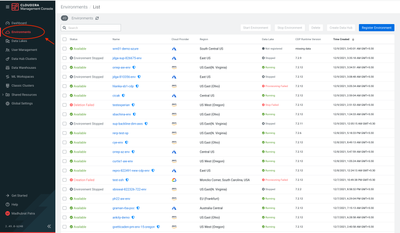
  1. Click Environments from the CDP Management Console in the left panel next to DashboardScreenshot 2021-12-09 at 12.04.20 PM.png 
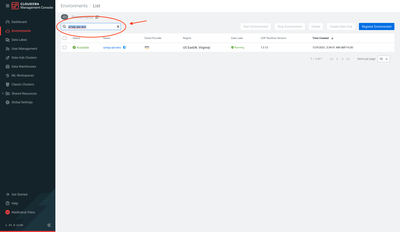
  2. Type in the name of the environment in the search bar. In the screenshot here, the search key is "orrep-aw-env"
    Screenshot 2021-12-09 at 12.06.49 PM.png
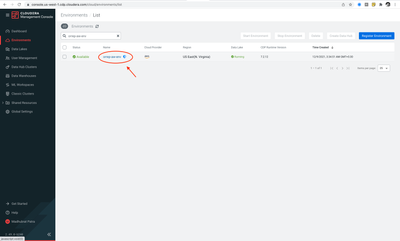
  3. Click on the "Name" of the environment. This should show the details of the environmentScreenshot 2021-12-09 at 12.09.09 PM.png
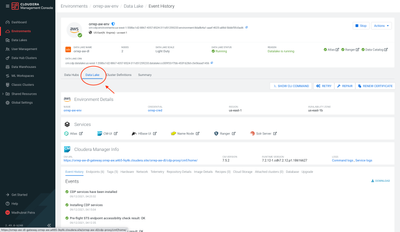
  4. Click Data Lake
    Screenshot 2021-12-09 at 12.12.14 PM.png
  5. Now, click Copy to Clipboard icon next to "crn: ..." in the headerScreenshot 2021-12-09 at 11.52.58 AM.png

 This should copy the CRN to the clipboard. Now you can paste it as and where needed.

7,296 Views
Version history
Last update:
‎04-21-2026 01:02 AM
Updated by: