Our Community is getting an upgrade! To get everything ready for the relaunch, we’ll be placing the site in read-only mode starting September 21st.
We really appreciate your understanding while we get things set up behind the scenes. Catch up on all the exciting details about the move here.
Need help or have questions? Drop us a line at [email protected]
Created on 02-04-2017 08:20 AM - edited 08-17-2019 05:04 AM
PROBLEM
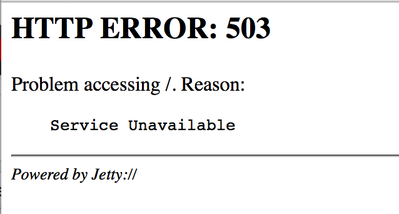
After restarting the Zeppelin service from UI I have the following situation:
Checking out zeppelin-zeppelin-<ZEPPELIN_HOST>.log file I can see
INFO [2017-02-04 07:47:09,081] ({main}
ZeppelinServer.java[main]:114) - Starting zeppelin server INFO [2017-02-04
07:47:09,084] ({main} Server.java[doStart]:327) - jetty-9.2.15.v20160210 WARN [2017-02-04
07:47:09,129] ({main} WebAppContext.java[doStart]:514) - Failed startup of
context
o.e.j.w.WebAppContext@3b938003{/,null,null}{/usr/hdp/current/zeppelin-server/lib/zeppelin-web-0.6.0.2.5.0.0-1245.war}java.lang.IllegalStateException: Failed to delete temp dir
/usr/hdp/2.5.0.0-1245/zeppelin/webapps at
org.eclipse.jetty.webapp.WebInfConfiguration.configureTempDirectory(WebInfConfiguration.java:372) at
org.eclipse.jetty.webapp.WebInfConfiguration.resolveTempDirectory(WebInfConfiguration.java:260) at
org.eclipse.jetty.webapp.WebInfConfiguration.preConfigure(WebInfConfiguration.java:69) at
org.eclipse.jetty.webapp.WebAppContext.preConfigure(WebAppContext.java:468) at
org.eclipse.jetty.webapp.WebAppContext.doStart(WebAppContext.java:504) at
org.eclipse.jetty.util.component.AbstractLifeCycle.start(AbstractLifeCycle.java:68) at
org.eclipse.jetty.util.component.ContainerLifeCycle.start(ContainerLifeCycle.java:132) at
org.eclipse.jetty.util.component.ContainerLifeCycle.doStart(ContainerLifeCycle.java:114) at
org.eclipse.jetty.server.handler.AbstractHandler.doStart(AbstractHandler.java:61) at
org.eclipse.jetty.server.handler.ContextHandlerCollection.doStart(ContextHandlerCollection.java:163) at
org.eclipse.jetty.util.component.AbstractLifeCycle.start(AbstractLifeCycle.java:68) at
org.eclipse.jetty.util.component.ContainerLifeCycle.start(ContainerLifeCycle.java:132) at
org.eclipse.jetty.server.Server.start(Server.java:387) at
org.eclipse.jetty.util.component.ContainerLifeCycle.doStart(ContainerLifeCycle.java:114) at
org.eclipse.jetty.server.handler.AbstractHandler.doStart(AbstractHandler.java:61) at
org.eclipse.jetty.server.Server.doStart(Server.java:354) at
org.eclipse.jetty.util.component.AbstractLifeCycle.start(AbstractLifeCycle.java:68) at
org.apache.zeppelin.server.ZeppelinServer.main(ZeppelinServer.java:116)SOLUTION
- Log into Zeppelin Host as root
- Check the ownership and permissions of /usr/hdp/2.5.0.0-1245/zeppelin (this is the path from the log above)
$ ls –lrt /usr/hdp/2.5.0.0-1245/zeppelin [root@dkhdp251 zeppelin]# ls -lrt /usr/hdp/2.5.0.0-1245/zeppelin total 60 -rwxr-xr-x. 1 zeppelin zeppelin 8547 Aug 26 03:50 README.md -rwxr-xr-x. 1 zeppelin zeppelin 15308 Aug 26 03:50 LICENSE drwxr-xr-x. 2 zeppelin zeppelin 4096 Nov 29 15:46 bin drwxr-xr-x. 8 zeppelin zeppelin 4096 Nov 29 15:46 interpreter drwxr-xr-x. 2 zeppelin zeppelin 12288 Nov 29 15:47 lib lrwxrwxrwx. 1 root root 28 Nov 29 15:48 conf -> /etc/zeppelin/2.5.0.0-1245/0 drwxr-xr-x. 41 zeppelin hadoop 4096 Nov 29 16:12 local-repo drwxr-xr-x. 32 zeppelin zeppelin 4096 Feb 2 11:43 notebook drwxr-xr-x. 3 root root 4096 Feb 4 07:43 webapps
- Make sure the permission to “webapps” folder is 755.
- The ownership of “webapps” and sub-folders needs to be zeppelin:hadoop (or the hadoop group you have defined in your cluster). So, do the following:
$ chown -R zeppelin:hadoop /usr/hdp/2.5.0.0-1245/zeppelin/webapps
- Now, restart Zeppelin service from Ambari
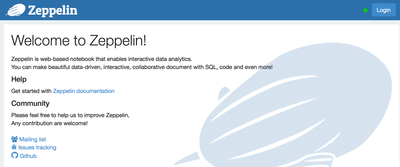
Now, running http://<ZEPPELIN_HOST>:9995 I can see
Created on 02-09-2017 12:52 PM
Hi Daniel,
thanks for sharing this info. However, I am facing exact the same problem, with the same error message. I am using the HDP 2.5 sandbox and I am not able to navigate to zeppelin. I verified the permissions of the webapps folder but they are right. Do you have any suggestions?
Any comment will be appreciated.
Thanks in advance,
Paul
Created on 06-20-2017 06:13 PM
Perfect..saved my life!!!
For cloudera user's like me, if you are using quickstart vm then issue the below command to get it working
cd <zeppelin_dir>
./bin/zeppelin-daemon.sh stop
sudo chown -R cloudera:cloudera webapps
./bin/zeppelin-daemon.sh start
Created on 03-02-2020 09:13 AM
Thank you Dkozlowski