Our Community is getting an upgrade! To get everything ready for the relaunch, we’ll be placing the site in read-only mode starting September 21st.
We really appreciate your understanding while we get things set up behind the scenes. Catch up on all the exciting details about the move here.
Need help or have questions? Drop us a line at [email protected]

Intros and Suggestions

Introduce yourself to the community, provide feedback or participate in off topic discussions
Announcements
Share your experience with Cloudera on G2 and get a $25 Amazon Gift card.
Hi, I'm CLEO! Something exciting is coming to the Community. Stay Tuned!

My post marked as spam

avatar
Contributor

Hi,

I have created a post and I got few replies but suddenly I have my posted marked as spam. I tried to create new post but still I could see all my questions are marking as spam


1 ACCEPTED SOLUTION

avatar
Community Manager

Thank you for posting @Sru111 . The community has an automated spam filter which sometimes can errantly flag a valid post for various reasons. We have removed this flag and your post is now showing on the community as expected. We also removed the duplicates for you. 


If this happens again, you can use the "Report inappropriate content" feature to alert moderators to the issue. 


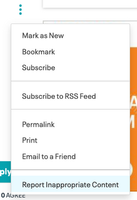
  1. Click on the options menu (signified by three vertical dots) next to the post.
  2. Click on the "Report Inappropriate Content" option

    menu.png

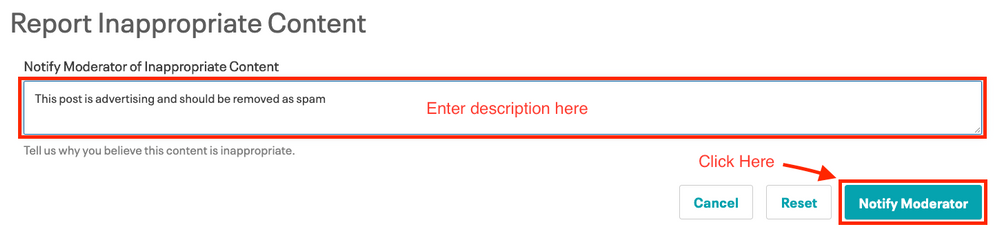
  3. On the next page enter a comment describing the issue and click "Notify Moderator.

Notify.png

Submitting the report will notify the community moderation team so the first available moderator can review the post and take the appropriate action. 


Keep the questions coming

View solution in original post

1 REPLY 1

avatar
Community Manager

Thank you for posting @Sru111 . The community has an automated spam filter which sometimes can errantly flag a valid post for various reasons. We have removed this flag and your post is now showing on the community as expected. We also removed the duplicates for you. 


If this happens again, you can use the "Report inappropriate content" feature to alert moderators to the issue. 


  1. Click on the options menu (signified by three vertical dots) next to the post.
  2. Click on the "Report Inappropriate Content" option

    menu.png

  3. On the next page enter a comment describing the issue and click "Notify Moderator.

Notify.png

Submitting the report will notify the community moderation team so the first available moderator can review the post and take the appropriate action. 


Keep the questions coming