Our Community is getting an upgrade! To get everything ready for the relaunch, we’ll be placing the site in read-only mode starting September 21st.
We really appreciate your understanding while we get things set up behind the scenes. Catch up on all the exciting details about the move here.
Need help or have questions? Drop us a line at [email protected]

Support Questions
 Hi, I'm CLEO! Something exciting is coming to the Community. Stay Tuned!
- Cloudera Community
- Support
- Support Questions
- Re: Ambari Fails to create Keytabs when Installing...
- Subscribe to RSS Feed
- Mark Question as New
- Mark Question as Read
- Float this Question for Current User
- Bookmark
- Subscribe
- Mute
- Printer Friendly Page
- Subscribe to RSS Feed
- Mark Question as New
- Mark Question as Read
- Float this Question for Current User
- Bookmark
- Subscribe
- Mute
- Printer Friendly Page
Ambari Fails to create Keytabs when Installing new services or when trying to regenerate keytabs of existing services
- Labels:
-
Apache Ambari


Created on 01-03-2019 02:21 PM - edited 09-16-2022 07:01 AM
- Mark as New
- Bookmark
- Subscribe
- Mute
- Subscribe to RSS Feed
- Permalink
- Report Inappropriate Content
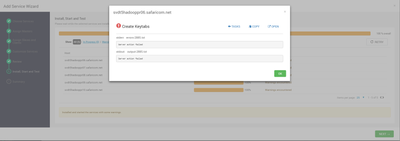
I am getting a server action failed error when ambari tries to create keytabs. I have no idea what is causing this error. I am using KDC admin to install the service. Please help. @Geoffrey Shelton Okot


Created 01-16-2019 11:57 AM
- Mark as New
- Bookmark
- Subscribe
- Mute
- Subscribe to RSS Feed
- Permalink
- Report Inappropriate Content
There seems to be a mismatch between the Active Directory encryption type and the MIT encryption types can you align the 2 supported_enctypes to be the same.
Windows supports the below encryption types depending on the Windows version which are weak encryption
DES_CBC_CRC
DES_CBC_MD5
RC4_HMAC_MD5
AES128_HMAC_SHA1
AES256_HMAC_SHA1
In your kdc.conf you have stronger encryption types you validate the AD encryption types? Else try to comment out the kdc.conf encryptions see below
# supported_enctypes = aes256-cts:normal aes128-cts:normal des3-hmac-sha1:normal arcfour-hmac:normal camellia256-cts:normal camellia128-cts:normal des-hmac-sha1:normal des-cbc-md5:normal des-cbc-crc:normal
and see whether the error persists?
Created on 01-07-2019 08:52 AM - edited 08-17-2019 03:12 PM
- Mark as New
- Bookmark
- Subscribe
- Mute
- Subscribe to RSS Feed
- Permalink
- Report Inappropriate Content
@Geoffrey Shelton Okot @Robert Levas
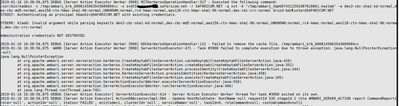
Attached is the error in the ambari-server log when trying to regenerate keytab for hbase

Created 01-07-2019 09:35 AM
- Mark as New
- Bookmark
- Subscribe
- Mute
- Subscribe to RSS Feed
- Permalink
- Report Inappropriate Content
Can you share the corresponding to my screenshots photo5 and 6 , I built a VM to test your case and documented all the steps over the weekend and I am surprised it can't work for you.
Is Java Cryptography Extension (JCE) installed, check the syntax below please adjust your jdk_home accordingly
# zipgrep CryptoAllPermission /usr/jdk64/jdk1.8.0_112/jre/lib/security/local_policy.jar
The desired output should be
default_local.policy: permission javax.crypto.CryptoAllPermission;


Created 01-09-2019 03:34 PM
- Mark as New
- Bookmark
- Subscribe
- Mute
- Subscribe to RSS Feed
- Permalink
- Report Inappropriate Content
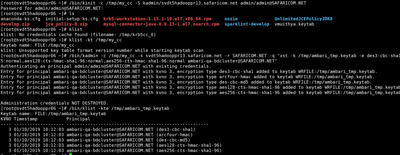
It seems like there may be an issue exporting keytab files from the KDC. Can you try to do this manually using the admin user you configured in Ambari?
/bin/kinit -c /tmp/my_cc -S kadmin/<KDC Admin Server Host> <KDC Admin Principal Name>

/bin/kadmin -c /tmp/my_cc -s <KDC Admin Server Host> -r <Realm> -q "xst -k /tmp/ambari_tmp.keytab -e des3-cbc-sha1-kd:normal,rc4-hmac:normal,des-cbc-md5:normal,aes128-cts-hmac-sha1-96:normal,aes256-cts-hmac-sha1-96:normal ambari-qa-<Cluster Name>@<Realm>"

/bin/klist -kte /tmp/ambari_tmp.keytab
You will need to change the specifics to match your cluster. For my cluster I am using:
- KDC Admin Server Host: c7402.ambari.apache.org
- KDC Admin Principal Name: admin/[email protected]
- Realm: EXAMPLE.COM
- Cluster Name: c1
Also, I assume that you haven't changed:
- The default temporary directory: /tmp
- The kadmin principal name: kadmin/<KDC Admin Server Host>
- The format of the Ambari smoke user principal name: ambari-qa-<Cluster Name>@<Realm>
- The default encryption types: aes des3-cbc-sha1 rc4 des-cbc-md5
Using the commands from above, I get the following:
[root@c7402 ~]# /bin/kinit -c /tmp/my_cc -S kadmin/c7402.ambari.apache.org admin/[email protected]
Password for admin/[email protected]:<br>[root@c7402 ~]# /bin/kadmin -c /tmp/my_cc -s c7402.ambari.apache.org -r EXAMPLE.COM -q "xst -k "/tmp/ambari_tmp.keytab" -e des3-cbc-sha1-kd:normal,rc4-hmac:normal,des-cbc-md5:normal,aes128-cts-hmac-sha1-96:normal,aes256-cts-hmac-sha1-96:normal [email protected]"
Authenticating as principal admin/[email protected] with existing credentials.
Entry for principal [email protected] with kvno 4, encryption type des3-cbc-sha1 added to keytab WRFILE:/tmp/ambari_tmp.keytab.
Entry for principal [email protected] with kvno 4, encryption type arcfour-hmac added to keytab WRFILE:/tmp/ambari_tmp.keytab.
Entry for principal [email protected] with kvno 4, encryption type des-cbc-md5 added to keytab WRFILE:/tmp/ambari_tmp.keytab.
Entry for principal [email protected] with kvno 4, encryption type aes128-cts-hmac-sha1-96 added to keytab WRFILE:/tmp/ambari_tmp.keytab.
Entry for principal [email protected] with kvno 4, encryption type aes256-cts-hmac-sha1-96 added to keytab WRFILE:/tmp/ambari_tmp.keytab.
Administration credentials NOT DESTROYED.<br>[root@c7402 ~]# /bin/klist -kte /tmp/ambari_tmp.keytab
Keytab name: FILE:/tmp/ambari_tmp.keytab
KVNO Timestamp           Principal
---- ------------------- ------------------------------------------------------
   4 01/09/2019 15:31:29 [email protected] (des3-cbc-sha1)
   4 01/09/2019 15:31:29 [email protected] (arcfour-hmac)
   4 01/09/2019 15:31:29 [email protected] (des-cbc-md5)
   4 01/09/2019 15:31:29 [email protected] (aes128-cts-hmac-sha1-96)
   4 01/09/2019 15:31:29 [email protected] (aes256-cts-hmac-sha1-96)
Can you try this to see if you get any errors?
Created on 01-10-2019 07:13 AM - edited 08-17-2019 03:11 PM
- Mark as New
- Bookmark
- Subscribe
- Mute
- Subscribe to RSS Feed
- Permalink
- Report Inappropriate Content
Created on 01-09-2019 06:38 AM - edited 08-17-2019 03:12 PM
- Mark as New
- Bookmark
- Subscribe
- Mute
- Subscribe to RSS Feed
- Permalink
- Report Inappropriate Content
Hi, my Javax policy is fine. see attached. Also I dont see photo 5 and 6 that you mentioned in your previous comment.

Created 01-09-2019 08:48 AM
- Mark as New
- Bookmark
- Subscribe
- Mute
- Subscribe to RSS Feed
- Permalink
- Report Inappropriate Content
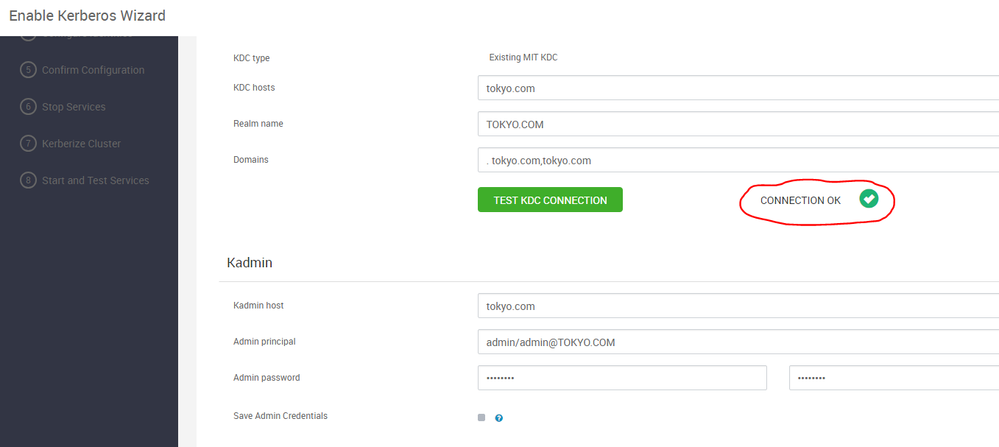


Created 01-15-2019 12:21 PM
- Mark as New
- Bookmark
- Subscribe
- Mute
- Subscribe to RSS Feed
- Permalink
- Report Inappropriate Content
Created 01-15-2019 03:51 PM
- Mark as New
- Bookmark
- Subscribe
- Mute
- Subscribe to RSS Feed
- Permalink
- Report Inappropriate Content
Have you encountered a Kerberos issue? Is it similar to the thread opened by Bashir? It's usually good to open a new thread as this one isn't being actively viewed.
I will be happy to help you if you attached some logs ,screenshot and some error logs
Created 01-15-2019 03:54 PM
- Mark as New
- Bookmark
- Subscribe
- Mute
- Subscribe to RSS Feed
- Permalink
- Report Inappropriate Content
Thank you, I had this exact issue with same errors and nothing in the comment discussion helped. However, after several ambari-server restarts and dumb retries of the "Kerberos wizard" with similar settings magically resolved this. I'm not sure at all what was the problem..
Created on 01-16-2019 08:05 AM - edited 08-17-2019 03:11 PM
- Mark as New
- Bookmark
- Subscribe
- Mute
- Subscribe to RSS Feed
- Permalink
- Report Inappropriate Content
@Robert Levas @Geoffrey Shelton Okot when I used debug mode I get an additional line which might point to an encryption issue? please see attached pic