Our Community is getting an upgrade! To get everything ready for the relaunch, we’ll be placing the site in read-only mode starting September 21st.
We really appreciate your understanding while we get things set up behind the scenes. Catch up on all the exciting details about the move here.
Need help or have questions? Drop us a line at [email protected]

Support Questions

Find answers, ask questions, and share your expertise
Announcements
Share your experience with Cloudera on G2 and get a $25 Amazon Gift card.
Hi, I'm CLEO! Something exciting is coming to the Community. Stay Tuned!

Apache NiFi 1.16.0 is failing to start in windows- Flow controller TLS configuration is invalid

avatar
Frequent Visitor

Starting Apache NIFI 1.16.0 on windows 10 , with jdk 1.8.0_45 installed is failing to start with the following error in nidi-app.log:

Caused by: java.lang.IllegalStateException: Flow controller TLS configuration is invalid

              at org.apache.nifi.controller.FlowController.<init>(FlowController.java:501)

              at org.apache.nifi.controller.FlowController.createStandaloneInstance(FlowController.java:403)

              at org.apache.nifi.spring.FlowControllerFactoryBean.getObject(FlowControllerFactoryBean.java:86)

              at org.springframework.beans.factory.support.FactoryBeanRegistrySupport.doGetObjectFromFactoryBean(FactoryBeanRegistrySupport.java:169)

              ... 110 common frames omitted

Caused by: org.apache.nifi.security.util.TlsException: The truststore properties are not valid

              at org.apache.nifi.security.util.SslContextFactory.getTrustManagers(SslContextFactory.java:181)

              at org.apache.nifi.security.util.SslContextFactory.createSslContext(SslContextFactory.java:67)

              at org.apache.nifi.controller.FlowController.<init>(FlowController.java:498)

              ... 113 common frames omitted


Please help.

2 REPLIES 2

avatar
Master Mentor

@Sinchan 
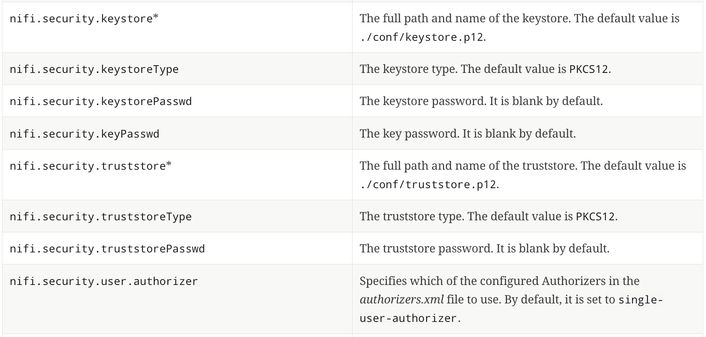
You'll want to inspect the configuration of the the following properties in the nifi.properties configuration file:

MattWho_0-1670264618900.png


When you configure a secure NiFi configuration, these properties must be configured. 

If you found that the provided solution(s) assisted you with your query, please take a moment to login and click Accept as Solution below each response that helped.

Thank you,

Matt


avatar
Community Manager

@Sinchan Has the reply helped resolve your issue? If so, please mark the appropriate reply as the solution, as it will make it easier for others to find the answer in the future. Thanks


Regards,

Diana Torres,
Senior Community Moderator


Was your question answered? Make sure to mark the answer as the accepted solution.
If you find a reply useful, say thanks by clicking on the thumbs up button.
Learn more about the Cloudera Community: