Our Community is getting an upgrade! To get everything ready for the relaunch, we’ll be placing the site in read-only mode starting September 21st.
We really appreciate your understanding while we get things set up behind the scenes. Catch up on all the exciting details about the move here.
Need help or have questions? Drop us a line at [email protected]

Support Questions

Find answers, ask questions, and share your expertise
Announcements
Share your experience with Cloudera on G2 and get a $25 Amazon Gift card.
Hi, I'm CLEO! Something exciting is coming to the Community. Stay Tuned!

CDP CLI df metrics time period argument poorly documented

avatar
Contributor

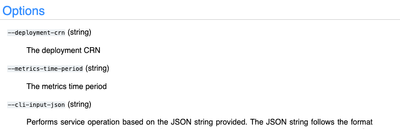
I'm trying to use the cdp cli (v. 0.9.106 on my local machine) to get KPI metrics from CDF. I'm using the command `cdp df list-deployment-system-metrics --deployment-crn my-deployment-crn` but struggling to correctly format the required `--metrics-time-period` arg. The documentation isn't helpful here:

Screenshot 2024-03-25 at 9.11.58 AM.png

I've tried a few things like:

`--metrics-time-period "2024-03-24T12:00:00Z:2024-03-24T16:00:00Z"`

`--metrics-time-period LAST_24_HOURS`

`--metrics-time-period "yesterday"`

But they all scream back:

An error occurred: No enum constant com.cloudera.dfx.metrics.TimeSpan.TimePeriod.yesterday (Status Code: 400; Error Code: INVALID_ARGUMENT; Service: df; Operation: listDeploymentSystemMetrics;

If someone could elaborate on what this command is expecting, or better yet, offer up some examples of successful executions, that'd be great!

1 ACCEPTED SOLUTION

avatar
Super Collaborator

Hi @ipson, Thanks for bringing this to our community!

You can use one of the below options with --metrics-time-period.

LAST_THIRTY_MINUTES, LAST_ONE_HOUR, LAST_TWELVE_HOURS, LAST_ONE_DAY

Let me know if this helps.

Cheers!

View solution in original post

2 REPLIES 2

avatar
Super Collaborator

Hi @ipson, Thanks for bringing this to our community!

You can use one of the below options with --metrics-time-period.

LAST_THIRTY_MINUTES, LAST_ONE_HOUR, LAST_TWELVE_HOURS, LAST_ONE_DAY

Let me know if this helps.

Cheers!

avatar
Contributor

That works. Thanks!