Our Community is getting an upgrade! To get everything ready for the relaunch, we’ll be placing the site in read-only mode starting September 21st.
We really appreciate your understanding while we get things set up behind the scenes. Catch up on all the exciting details about the move here.
Need help or have questions? Drop us a line at [email protected]

Support Questions

Find answers, ask questions, and share your expertise
Announcements
Share your experience with Cloudera on G2 and get a $25 Amazon Gift card.
Hi, I'm CLEO! Something exciting is coming to the Community. Stay Tuned!

CFM: Cannot find NiFi Service in the list after Activating CFM parcel

avatar
Contributor

Hello Team,

I am using RHEL 7 and followed documentation to install CFM https://docs.hortonworks.com/HDPDocuments/CFM/CFM-1.0.0/installation/content/add-nifi-service.html


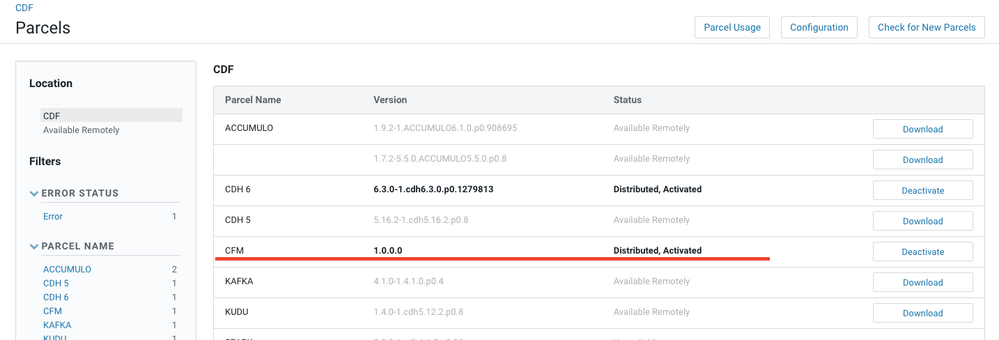
CFM package has been installed as seen in screen short. 

I checked both folders "/opt/cloudera/csd", "/opt/cloudera/parcel-repo" both contain the following files
-rw-r-----. 1 cloudera-scm cloudera-scm 41 Aug 16 11:12 CFM-1.0.0.0-el7.parcel.sha
-rw-r-----. 1 cloudera-scm cloudera-scm 1735385749 Aug 16 11:12 CFM-1.0.0.0-el7.parcel
-rw-r-----. 1 cloudera-scm cloudera-scm 66350 Aug 16 11:12 CFM-1.0.0.0-el7.parcel.torrent

I am stuck at Add and Configure CFM Services because I cannot see Nifi in the services list. 

How should install Nifi service now?

Hemanth


Screen Shot 2019-08-16 at 12.34.50 PM.png

1 ACCEPTED SOLUTION

avatar
Super Guru

Hi, @hpasumarthi ,

It seems you missed one installation step. Besides installing the parcel you have to also download the NIFI CSD, copy it to /opt/cloudera/csd and restart the cloudera-scm-server service, as described here: https://docs.hortonworks.com/HDPDocuments/CFM/CFM-1.0.0/installation/content/get-csd.html

After you do this, the NiFi service will appear in the list.

Regards,

André

--
Was your question answered? Please take some time to click on "Accept as Solution" below this post.
If you find a reply useful, say thanks by clicking on the thumbs up button.

View solution in original post

2 REPLIES 2

avatar
Super Guru

Hi, @hpasumarthi ,

It seems you missed one installation step. Besides installing the parcel you have to also download the NIFI CSD, copy it to /opt/cloudera/csd and restart the cloudera-scm-server service, as described here: https://docs.hortonworks.com/HDPDocuments/CFM/CFM-1.0.0/installation/content/get-csd.html

After you do this, the NiFi service will appear in the list.

Regards,

André

--
Was your question answered? Please take some time to click on "Accept as Solution" below this post.
If you find a reply useful, say thanks by clicking on the thumbs up button.

avatar
Contributor

Hi @araujo 

You are correct.

Just added the jars from "CSD & Manifest Files"  from https://docs.hortonworks.com/HDPDocuments/CFM/CFM-1.0.0/release-notes/content/download-locations.htm...


Now I can install Nifi.

Thanks.