
Our Community is getting an upgrade! To get everything ready for the relaunch, we’ll be placing the site in read-only mode starting September 21st.
We really appreciate your understanding while we get things set up behind the scenes. Catch up on all the exciting details about the move here.
Need help or have questions? Drop us a line at [email protected]

Support Questions
 Hi, I'm CLEO! Something exciting is coming to the Community. Stay Tuned!
- Cloudera Community
- Support
- Support Questions
- Re: Can not convert 6 digit milliseconds in NiFi. ...
- Subscribe to RSS Feed
- Mark Question as New
- Mark Question as Read
- Float this Question for Current User
- Bookmark
- Subscribe
- Mute
- Printer Friendly Page
- Subscribe to RSS Feed
- Mark Question as New
- Mark Question as Read
- Float this Question for Current User
- Bookmark
- Subscribe
- Mute
- Printer Friendly Page
Can not convert 6 digit milliseconds in NiFi. String to toDate() conversion problem in NiFi.


Created on
09-21-2020
08:52 AM
- last edited on
04-21-2026
04:25 AM
by
 GrazittiAPI

- Mark as New
- Bookmark
- Subscribe
- Mute
- Subscribe to RSS Feed
- Permalink
- Report Inappropriate Content
Hello All and @Shu_ashu,@MattWho
I have a CSV file with a time column "Apr 15, 2020 02:02:16.388267000 Paris, Madrid (heure d’été)".... "Apr 15, 2020 02:02:16.986879000 Paris, Madrid (heure d’été)"...etc.
Then I to convert the field time using UpdateRecord processor by the following code: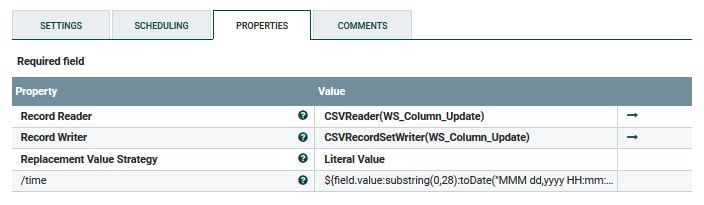
But after conversion, the output I get is:
| nb | time | delta |
| 1 | 2020-04-15 02:08:44.000267 | 0.0 |
| 2 | 2020-04-15 02:18:42.000879 | 0.598612 |
But the output should be:
| nb | time | delta |
| 1 | Apr 15, 2020 02:02:16.388267 | 0.0 |
| 2 | Apr 15, 2020 02:02:16.986879 | 0.598612 |
So, I always get 000 before the milliseconds. As per the example above, I got 000267 instead of 388267 and 000879 instead of 986879.
Why I am getting the 000 instead of the real value? How can I modify me code to resolve this problem? Any help on this issue will be highly appreciated.


Created 09-21-2020 11:34 AM
- Mark as New
- Bookmark
- Subscribe
- Mute
- Subscribe to RSS Feed
- Permalink
- Report Inappropriate Content
Hi @DarkStar
Your Expression Language(EL) should be
${field.value:substring(0,28):toDate("MMM dd,yyyy HH:mm:ss.SSSSSSSSS"):format("yyyy-MM-dd HH:mm:ss.SSSSSS")}In your EL, the pattern you used has 6 "S". But, the input has precision upto 9. Since, you gave 6, it is reading the last 6 characters, i.e., 388267000. I think, that must be the reason.
Created 09-29-2020 03:29 AM
- Mark as New
- Bookmark
- Subscribe
- Mute
- Subscribe to RSS Feed
- Permalink
- Report Inappropriate Content
Used below formula to resolve my problem
${field.value:substring(0,21):toDate("MMM dd,yyyy HH:mm:ss"):format("yyyy-MM-dd HH:mm:ss")}.${field.value:substring(22,28)}
We separately added last 6 digit using .${field.value:substring(22,28)} after the time format.Otherwise, nifi can not process 6 digit microsecond.
Created 09-21-2020 11:34 AM
- Mark as New
- Bookmark
- Subscribe
- Mute
- Subscribe to RSS Feed
- Permalink
- Report Inappropriate Content
Hi @DarkStar
Your Expression Language(EL) should be
${field.value:substring(0,28):toDate("MMM dd,yyyy HH:mm:ss.SSSSSSSSS"):format("yyyy-MM-dd HH:mm:ss.SSSSSS")}In your EL, the pattern you used has 6 "S". But, the input has precision upto 9. Since, you gave 6, it is reading the last 6 characters, i.e., 388267000. I think, that must be the reason.
Created 09-21-2020 12:29 PM
- Mark as New
- Bookmark
- Subscribe
- Mute
- Subscribe to RSS Feed
- Permalink
- Report Inappropriate Content
Hi @PVVK, thanks for your feedback. I trued your approach but its giving me the same result. Is NiFi (java) only support 3 digit in milliseconds? Do you have any idea? Is there any other alternative that I should try?

Created 09-29-2020 03:29 AM
- Mark as New
- Bookmark
- Subscribe
- Mute
- Subscribe to RSS Feed
- Permalink
- Report Inappropriate Content
Used below formula to resolve my problem
${field.value:substring(0,21):toDate("MMM dd,yyyy HH:mm:ss"):format("yyyy-MM-dd HH:mm:ss")}.${field.value:substring(22,28)}
We separately added last 6 digit using .${field.value:substring(22,28)} after the time format.Otherwise, nifi can not process 6 digit microsecond.


