
Our Community is getting an upgrade! To get everything ready for the relaunch, we’ll be placing the site in read-only mode starting September 21st.
We really appreciate your understanding while we get things set up behind the scenes. Catch up on all the exciting details about the move here.
Need help or have questions? Drop us a line at [email protected]

Support Questions
 Hi, I'm CLEO! Something exciting is coming to the Community. Stay Tuned!
- Cloudera Community
- Support
- Support Questions
- Re: Como tranformar um JSON em varios flow files?
- Subscribe to RSS Feed
- Mark Question as New
- Mark Question as Read
- Float this Question for Current User
- Bookmark
- Subscribe
- Mute
- Printer Friendly Page
- Subscribe to RSS Feed
- Mark Question as New
- Mark Question as Read
- Float this Question for Current User
- Bookmark
- Subscribe
- Mute
- Printer Friendly Page
Como tranformar um JSON em varios flow files?
- Labels:
-
Apache NiFi


Created 09-16-2021 09:35 AM
- Mark as New
- Bookmark
- Subscribe
- Mute
- Subscribe to RSS Feed
- Permalink
- Report Inappropriate Content
Ex: como gerar através deste Json abaixo e gerar 4 flow files?
[ {
"ID_WA_DESTINATARIO" : "5599999999999",
"DES_MENS_NMO" : "Você está recebendo anexa 1a via de sua fatura.",
"COD_IDEN_MENS_ENV_NMO" : "xptoqwerzxcv"
}, {
"ID_WA_DESTINATARIO" : "5599999999999",
"DES_MENS_NMO" : "Você está recebendo anexa 1a via de sua fatura.",
"COD_IDEN_MENS_ENV_NMO" : "xptoqwerzxcvb"
}, {
"ID_WA_DESTINATARIO" : "5599999999999",
"DES_MENS_NMO" : "Você está recebendo anexa 1a via de sua fatura.",
"COD_IDEN_MENS_ENV_NMO" : "xptoqwerzxcvc"
}, {
"ID_WA_DESTINATARIO" : "5599999999999",
"DES_MENS_NMO" : "Você está recebendo anexa 1a via de sua fatura.",
"COD_IDEN_MENS_ENV_NMO" : "xptoqwerzxcvd"
} ]


Created 09-16-2021 11:36 PM
- Mark as New
- Bookmark
- Subscribe
- Mute
- Subscribe to RSS Feed
- Permalink
- Report Inappropriate Content
Tu vai usar o processor SplitJson e na propriedade "JsonPath Expression" tu vai colocar "$"(sem aspas).
Created 09-16-2021 11:36 PM
- Mark as New
- Bookmark
- Subscribe
- Mute
- Subscribe to RSS Feed
- Permalink
- Report Inappropriate Content
Tu vai usar o processor SplitJson e na propriedade "JsonPath Expression" tu vai colocar "$"(sem aspas).
Created 09-17-2021 09:19 AM
- Mark as New
- Bookmark
- Subscribe
- Mute
- Subscribe to RSS Feed
- Permalink
- Report Inappropriate Content
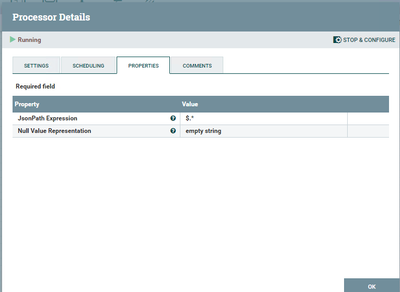
Good, muito obrigado @GCaixeta !!
Se alguém mais tiver a mesma duvida, segue abaixo como ficou o processor SplitJSON:



Created 09-21-2021 10:41 PM
- Mark as New
- Bookmark
- Subscribe
- Mute
- Subscribe to RSS Feed
- Permalink
- Report Inappropriate Content
English Translation:
Question:
How to transform a JSON into multiple flow files?
Ex: how to generate through this Json below and generate 4 flow files?
[ {
"ID_WA_REcipient" : "5599999999999",
"DES_MENS_NMO" : "You are receiving the 1st copy of your invoice.",
"COD_IDEN_MENS_ENV_NMO" : "xptoqwerzxcv"
}, {
"ID_WA_REcipient" : "5599999999999",
"DES_MENS_NMO" : "You are receiving the 1st copy of your invoice.",
"COD_IDEN_MENS_ENV_NMO" : "xptoqwerzxcvb"
}, {
"ID_WA_REcipient" : "5599999999999",
"DES_MENS_NMO" : "You are receiving the 1st copy of your invoice.",
"COD_IDEN_MENS_ENV_NMO" : "xptoqwerzxcvc"
}, {
"ID_WA_REcipient" : "5599999999999",
"DES_MENS_NMO" : "You are receiving the 1st copy of your invoice.",
"COD_IDEN_MENS_ENV_NMO" : "xptoqwerzxcvd"
}]
Solution
You will use the SplitJson processor and in the property "JsonPath Expression" you will put "$" (without quotes).
Regards,
Vidya Sargur,Community Manager
Was your question answered? Make sure to mark the answer as the accepted solution.
If you find a reply useful, say thanks by clicking on the thumbs up button.
Learn more about the Cloudera Community:


