Our Community is getting an upgrade! To get everything ready for the relaunch, we’ll be placing the site in read-only mode starting September 21st.
We really appreciate your understanding while we get things set up behind the scenes. Catch up on all the exciting details about the move here.
Need help or have questions? Drop us a line at [email protected]

Support Questions

Find answers, ask questions, and share your expertise
Announcements
Share your experience with Cloudera on G2 and get a $25 Amazon Gift card.
Hi, I'm CLEO! Something exciting is coming to the Community. Stay Tuned!

Error while activating parcels

avatar
Expert Contributor

Hello All,


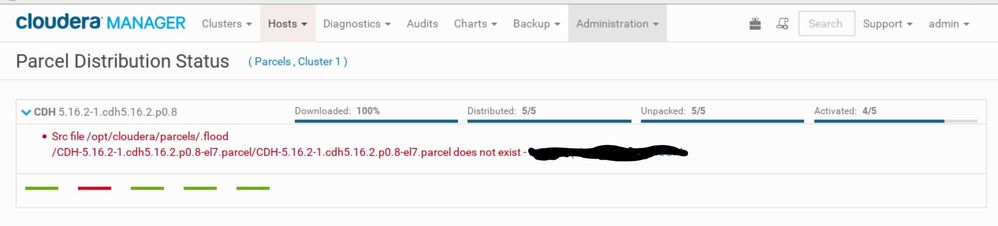
I am trying to deploy a 6-node cluster and one of the nodes I am getting attached error while activating parcels. I had tried to copy the mentioned contents from another host where the parcels are activated but I run out of space on the host where issue persists, surprisingly both the host have the same disk space of 5GB in /opt.


Requesting your assistance / guidance in resolving this issue.Capture.JPG

1 ACCEPTED SOLUTION

avatar
Master Guru

@wert_1311,


Cloudera and the agents will communicate to make sure that parcels are distributed and enabled on all hosts that are managed.  In this case, it sounds as if your attempts to copy information may have contributed to running out of space.  5GB isn't much space, though, so it could be you will need more space.


To allow the agent to correct the situation, you can do the following:


(1)


Stop the agent
service cloudera-scm-agent stop


(2)


remove the contents of the parcels directory:
/opt/cloudera/parcels/*

(3)


Start the agent:


service cloudera-scm-agent start


(4)


Monitor the agent log to see if it starts downloading the files.

View solution in original post

2 REPLIES 2

avatar
Master Guru

@wert_1311,


Cloudera and the agents will communicate to make sure that parcels are distributed and enabled on all hosts that are managed.  In this case, it sounds as if your attempts to copy information may have contributed to running out of space.  5GB isn't much space, though, so it could be you will need more space.


To allow the agent to correct the situation, you can do the following:


(1)


Stop the agent
service cloudera-scm-agent stop


(2)


remove the contents of the parcels directory:
/opt/cloudera/parcels/*

(3)


Start the agent:


service cloudera-scm-agent start


(4)


Monitor the agent log to see if it starts downloading the files.

avatar
New Contributor

This is not working for me.

[31/Oct/2022 17:39:51 -0700] 336377 WorkerThread downloader ERROR Failed op: Src file /opt/cloudera/parcels/.flood/CDH-7.1.8-1.cdh7.1.8.p0.30990532-el8.parcel/CDH-7.1.8-1.cdh7.1.8.p0.30990532-el8.parcel does not exist
Traceback (most recent call last):
File "/opt/cloudera/cm-agent/lib/python2.7/site-packages/cmf/downloader.py", line 502, in callable
callback(url, curr_op)
File "/opt/cloudera/cm-agent/lib/python2.7/site-packages/cmf/parcel_cache.py", line 200, in cb

This is the error i see in logs