Ray82
Gold ⭐️
March 15, 2023
Solved

Execute Stream Command - Unable to remove files using Wilcards

Hello,

hope someone can point me in the right direction.

I need to delete all files starting with some attributes value, so based on Linux way it should be something like this:


rm -f /opt/my_path/myfile_*


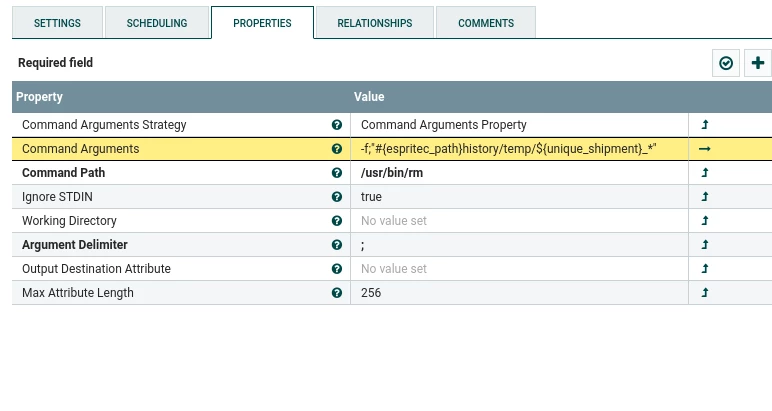
I decided to use Execute Stream Command in this way:
 

Ray82_0-1678900528929.pngRay82_1-1678900558212.png

The path seem correct, the command generated, pasted into a Linux shell is working fine, however the processor did not delete the files.

If i try with a specific file it works fine.

Seems that * is not permitted, any clue?


Many Thanks to everybody...

 

cotopaul
cotopaulAnswer
Platinum ⭐️
March 16, 2023

hmmm, try maybe with:
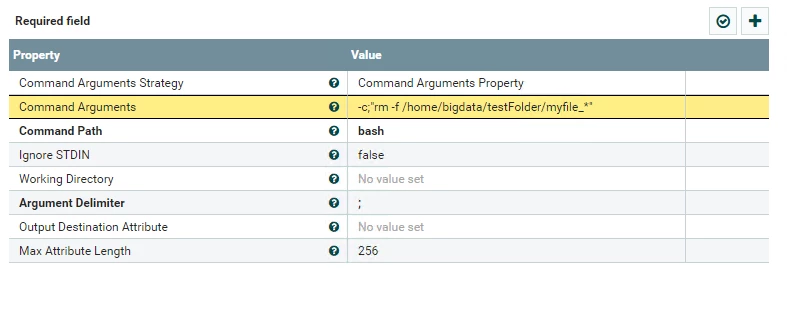
Command Path = bash
Command Arguments = -c;"rm -f /home/bigdata/testFolder/myfile_*"
I tried this on my local machine and it seems to be working accordingly.

cotopaul_1-1678959773167.png


4 replies

cotopaul
Platinum ⭐️
March 16, 2023

Hi @Ray82 , I am shooting here in the blind, but have you tried setting the command Path = /usr/bin only and the Command arguments = rm -f and_everytyhing_else?
I am asking because I am using the ExecuteStreamCommand similar as you are but with python and within the command path i set python and the entire thing I have to execute under the command arguments and it works like a charm. It might not be the recommended way of using this processor but at least I got my things running.

Translate
Ray82
Ray82Author
Gold ⭐️
March 16, 2023

Hi,

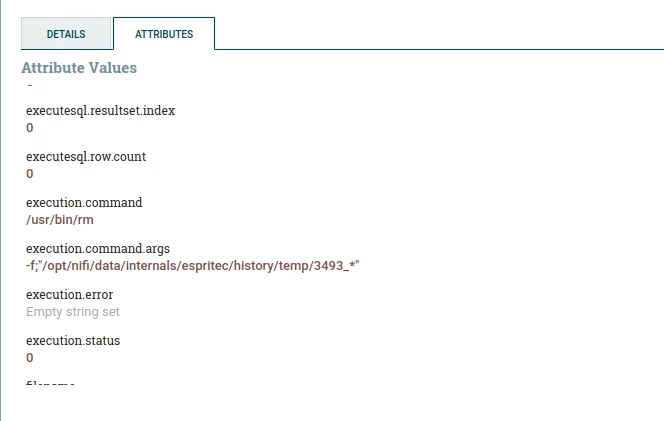
tried your suggestion, however in that case this is the error:

Ray82_0-1678956949728.png


Translate
cotopaul
cotopaulAnswer
Platinum ⭐️
March 16, 2023

hmmm, try maybe with:
Command Path = bash
Command Arguments = -c;"rm -f /home/bigdata/testFolder/myfile_*"
I tried this on my local machine and it seems to be working accordingly.

cotopaul_1-1678959773167.png


Translate