
Our Community is getting an upgrade! To get everything ready for the relaunch, we’ll be placing the site in read-only mode starting September 21st.
We really appreciate your understanding while we get things set up behind the scenes. Catch up on all the exciting details about the move here.
Need help or have questions? Drop us a line at [email protected]

Support Questions
 Hi, I'm CLEO! Something exciting is coming to the Community. Stay Tuned!
- Cloudera Community
- Support
- Support Questions
- Re: Execute Stream Command - Unable to remove file...
- Subscribe to RSS Feed
- Mark Question as New
- Mark Question as Read
- Float this Question for Current User
- Bookmark
- Subscribe
- Mute
- Printer Friendly Page
- Subscribe to RSS Feed
- Mark Question as New
- Mark Question as Read
- Float this Question for Current User
- Bookmark
- Subscribe
- Mute
- Printer Friendly Page
Execute Stream Command - Unable to remove files using Wilcards
- Labels:
-
Apache NiFi


Created 03-15-2023 10:18 AM
- Mark as New
- Bookmark
- Subscribe
- Mute
- Subscribe to RSS Feed
- Permalink
- Report Inappropriate Content
Hello,
hope someone can point me in the right direction.
I need to delete all files starting with some attributes value, so based on Linux way it should be something like this:
rm -f /opt/my_path/myfile_*
I decided to use Execute Stream Command in this way:
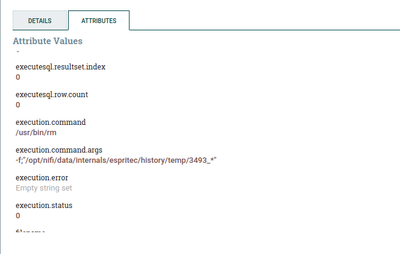
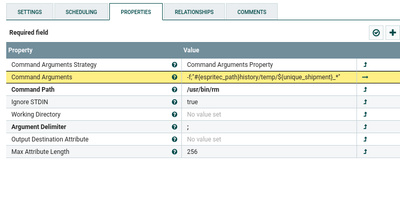
The path seem correct, the command generated, pasted into a Linux shell is working fine, however the processor did not delete the files.
If i try with a specific file it works fine.
Seems that * is not permitted, any clue?
Many Thanks to everybody...


Created 03-16-2023 02:43 AM
- Mark as New
- Bookmark
- Subscribe
- Mute
- Subscribe to RSS Feed
- Permalink
- Report Inappropriate Content
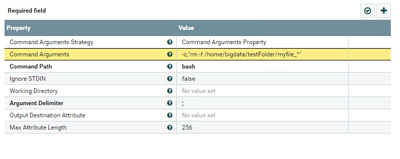
hmmm, try maybe with:
Command Path = bash
Command Arguments = -c;"rm -f /home/bigdata/testFolder/myfile_*"
I tried this on my local machine and it seems to be working accordingly.
Created 03-16-2023 02:57 AM
- Mark as New
- Bookmark
- Subscribe
- Mute
- Subscribe to RSS Feed
- Permalink
- Report Inappropriate Content
This should work, in the past i've tried the same command with ExecuteProcess but it didn't accept upstream connections.
Your solution is working great!
Many thabks for your supporto.
Created 03-16-2023 01:01 AM
- Mark as New
- Bookmark
- Subscribe
- Mute
- Subscribe to RSS Feed
- Permalink
- Report Inappropriate Content
Hi @Ray82 , I am shooting here in the blind, but have you tried setting the command Path = /usr/bin only and the Command arguments = rm -f and_everytyhing_else?
I am asking because I am using the ExecuteStreamCommand similar as you are but with python and within the command path i set python and the entire thing I have to execute under the command arguments and it works like a charm. It might not be the recommended way of using this processor but at least I got my things running.
Created 03-16-2023 01:55 AM
- Mark as New
- Bookmark
- Subscribe
- Mute
- Subscribe to RSS Feed
- Permalink
- Report Inappropriate Content
Hi,
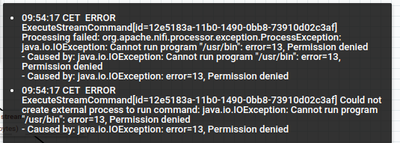
tried your suggestion, however in that case this is the error:
Created 03-16-2023 02:43 AM
- Mark as New
- Bookmark
- Subscribe
- Mute
- Subscribe to RSS Feed
- Permalink
- Report Inappropriate Content
hmmm, try maybe with:
Command Path = bash
Command Arguments = -c;"rm -f /home/bigdata/testFolder/myfile_*"
I tried this on my local machine and it seems to be working accordingly.
Created 03-16-2023 02:57 AM
- Mark as New
- Bookmark
- Subscribe
- Mute
- Subscribe to RSS Feed
- Permalink
- Report Inappropriate Content
This should work, in the past i've tried the same command with ExecuteProcess but it didn't accept upstream connections.
Your solution is working great!
Many thabks for your supporto.


