Our Community is getting an upgrade! To get everything ready for the relaunch, we’ll be placing the site in read-only mode starting September 21st.
We really appreciate your understanding while we get things set up behind the scenes. Catch up on all the exciting details about the move here.
Need help or have questions? Drop us a line at [email protected]

Support Questions

Find answers, ask questions, and share your expertise
Announcements
Share your experience with Cloudera on G2 and get a $25 Amazon Gift card.
Hi, I'm CLEO! Something exciting is coming to the Community. Stay Tuned!

Fail to connect to repository (Not Found)

avatar
Rising Star

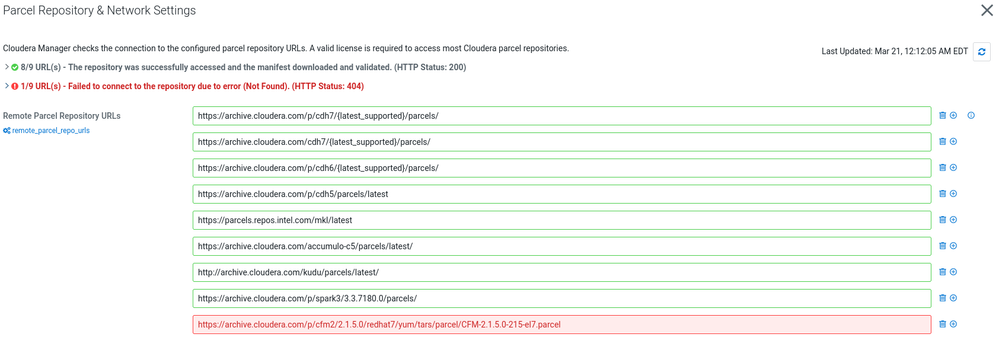
Hi all, I have installed CDP 7.1.8 runtime and CM 7.7.1. When I would like to download the parcel for CFM, I got the error shown below

cant download parce.PNG

On my VM, I can download the parcel using wget, so I don't know why it shows 404 not found.

Please kindly help me out, thanks in advance.

1 ACCEPTED SOLUTION

avatar
Contributor

Hi @BrianChan ,


In the screenshot, we could see that you have added CFM Parcel instead please add the parcel directory like below and try once:


https://archive.cloudera.com/p/cfm2/2.1.5.0/redhat7/yum/tars/parcel/

View solution in original post

2 REPLIES 2

avatar
Contributor

Hi @BrianChan ,


In the screenshot, we could see that you have added CFM Parcel instead please add the parcel directory like below and try once:


https://archive.cloudera.com/p/cfm2/2.1.5.0/redhat7/yum/tars/parcel/

avatar
Rising Star

@pkr , Thanks a lot, seems the system can reach the link you provided.


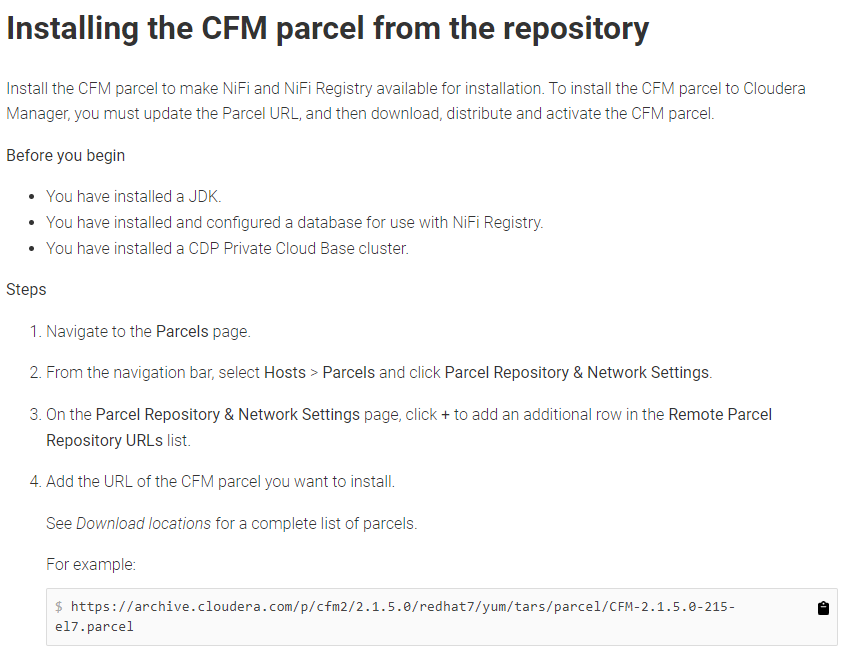
Seems the documentation is a bit misleading? As I directly copy what shows on the web page.

webpage.PNG