
Our Community is getting an upgrade! To get everything ready for the relaunch, we’ll be placing the site in read-only mode starting September 21st.
We really appreciate your understanding while we get things set up behind the scenes. Catch up on all the exciting details about the move here.
Need help or have questions? Drop us a line at [email protected]

Support Questions
 Hi, I'm CLEO! Something exciting is coming to the Community. Stay Tuned!
- Cloudera Community
- Support
- Support Questions
- Re: HS2 & Hive Metastore logs on CDP PC
- Subscribe to RSS Feed
- Mark Question as New
- Mark Question as Read
- Float this Question for Current User
- Bookmark
- Subscribe
- Mute
- Printer Friendly Page
- Subscribe to RSS Feed
- Mark Question as New
- Mark Question as Read
- Float this Question for Current User
- Bookmark
- Subscribe
- Mute
- Printer Friendly Page
HS2 & Hive Metastore logs on CDP PC


Created on
11-16-2023
03:36 AM
- last edited on
04-20-2026
11:46 PM
by
 GrazittiAPI

- Mark as New
- Bookmark
- Subscribe
- Mute
- Subscribe to RSS Feed
- Permalink
- Report Inappropriate Content
I was trying to find some documents about where would the location for HS2 & HMS logs be located for CDP-PC on AWS, but could get none the nearest I could get is https://docs.cloudera.com/data-warehouse/cloud/troubleshooting/topics/impala-logs-s3.html. but this is not what I want.
Appreciate any help in this.



Created 12-27-2023 06:53 AM
- Mark as New
- Bookmark
- Subscribe
- Mute
- Subscribe to RSS Feed
- Permalink
- Report Inappropriate Content
@wert_1311 It should be in the following location in S3:
s3://<s3_bucket_name>/clusters/<environment_id>/<database_catalog_id>/warehouse/tablespace/external/hive/sys.db/logs/dt=YYYY-MM-DD/ns=<virtual_warehouse_id>/Hiveserver2 log directory will be named app=hiveserver2/
You could also view hiveserver2 pod logs using kubectl:
e.g.
kubectl logs hiveserver2-0 -n compute-1584641610-f14f -c hiveserver2Created 12-25-2023 11:34 PM
- Mark as New
- Bookmark
- Subscribe
- Mute
- Subscribe to RSS Feed
- Permalink
- Report Inappropriate Content
@wert_1311 Are we talking about a DataHub/Data Engineering cluster or DataWarehouse?
If you have a Cloudera Manager for the cluster, check under the configuration tab of respective services. You may search for "hive_log_dir". If you SSH to the specific AWS instance hosting Hive service, you should be able to find the service logs under that path.
Created 12-27-2023 05:34 AM
- Mark as New
- Bookmark
- Subscribe
- Mute
- Subscribe to RSS Feed
- Permalink
- Report Inappropriate Content
Hi @smruti
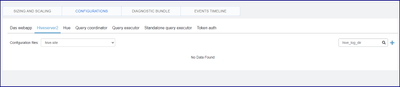
I am looking in Data Warehouse> Virtual Warehouse (CDP- PC)and under configuration I am unable to get the path, unsure if I am looking at the right place
Created 12-27-2023 06:53 AM
- Mark as New
- Bookmark
- Subscribe
- Mute
- Subscribe to RSS Feed
- Permalink
- Report Inappropriate Content
@wert_1311 It should be in the following location in S3:
s3://<s3_bucket_name>/clusters/<environment_id>/<database_catalog_id>/warehouse/tablespace/external/hive/sys.db/logs/dt=YYYY-MM-DD/ns=<virtual_warehouse_id>/Hiveserver2 log directory will be named app=hiveserver2/
You could also view hiveserver2 pod logs using kubectl:
e.g.
kubectl logs hiveserver2-0 -n compute-1584641610-f14f -c hiveserver2

