Our Community is getting an upgrade! To get everything ready for the relaunch, we’ll be placing the site in read-only mode starting September 21st.
We really appreciate your understanding while we get things set up behind the scenes. Catch up on all the exciting details about the move here.
Need help or have questions? Drop us a line at [email protected]

Support Questions

Find answers, ask questions, and share your expertise
Announcements
Share your experience with Cloudera on G2 and get a $25 Amazon Gift card.
Hi, I'm CLEO! Something exciting is coming to the Community. Stay Tuned!

How to Control File Order in NiFi MergeContent: Overcoming Ignored PriorityAttributePrioritizer with Defragment

avatar
Rising Star

I am trying to set an order to the files Tared in a merge content processor, is this possible somehow?

I need the order of the binary bits to be set so that one file (based on filename) can always be first.

In this case I need the testfile1.txt to be first and then then testfile2.txt to be second.

It seems to ignore my priorityattrbribute prioritizer.

Thank you!

1 ACCEPTED SOLUTION

avatar
Master Mentor
@John T

The PriorityAttributePrioritizer controls the order in which FlowFiles on a queue are read for processing by the next processor in a dataflow. In your case that next processor is a MergeContent processor which just places the FlowFile in a Bin and move on to the next priority FlowFile. There is no definable merging order with the TAR format in the NiFi MergeContent processor.

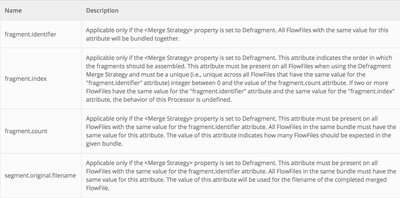
If you know the exact number of fragments that are going in to your bundle, you could try setting the fragment identifiers on the incoming FlowFiles to force a merging order.

13589-screen-shot-2017-03-13-at-102454-am.png

This would require you to change your merge strategy to "Defragment".

Thanks, Matt

View solution in original post

2 REPLIES 2

avatar
Master Mentor
@John T

The PriorityAttributePrioritizer controls the order in which FlowFiles on a queue are read for processing by the next processor in a dataflow. In your case that next processor is a MergeContent processor which just places the FlowFile in a Bin and move on to the next priority FlowFile. There is no definable merging order with the TAR format in the NiFi MergeContent processor.

If you know the exact number of fragments that are going in to your bundle, you could try setting the fragment identifiers on the incoming FlowFiles to force a merging order.

13589-screen-shot-2017-03-13-at-102454-am.png

This would require you to change your merge strategy to "Defragment".

Thanks, Matt

avatar
Rising Star

Thank you!! That worked perfectly! Feel free to check out my NiFi template where this is in use!

original-content-and-attributes-in-xmlv4.xml