Our Community is getting an upgrade! To get everything ready for the relaunch, we’ll be placing the site in read-only mode starting September 21st.
We really appreciate your understanding while we get things set up behind the scenes. Catch up on all the exciting details about the move here.
Need help or have questions? Drop us a line at [email protected]

Support Questions

Find answers, ask questions, and share your expertise
Announcements
Share your experience with Cloudera on G2 and get a $25 Amazon Gift card.
Hi, I'm CLEO! Something exciting is coming to the Community. Stay Tuned!

How to Use Dynamic FlowFile Attributes in NiFi InvokeHTTP via EvaluateJsonPath

avatar

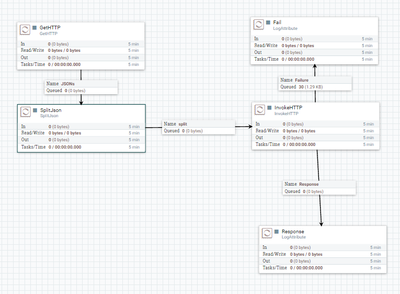
Im trying to do an app that takes a json from a web filter the url attribute of the JSON and get the html of this url.

9409-architecture.png

My problem is that I can’t set in the property remote url in InvokeHTTP the url that I got in SplitJSON.

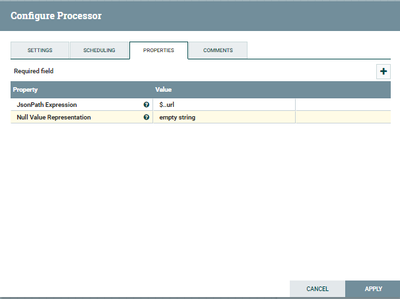
This is the config of splitJSON (it works, the output is the url that i want)

9410-confjson.png

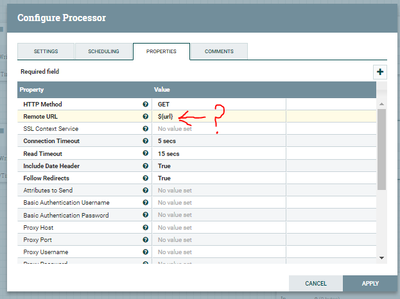
And this is the conf of the InvokeHTTP (it work if I set manually the url) but I dont know how to set a dinamic url.

9421-conf2.png

1 ACCEPTED SOLUTION

avatar
Master Mentor
@Lucas Alvarez

The SplitJSON processor splits an incoming JSON on to multiple output JSON messages. You should use the EvaluateJSONPath processor to extract the URL from your splits and ssign them to a FlowFIle attribute you acn then use in your InvokeHTTP processor.

Thanks,

Matt

View solution in original post

1 REPLY 1

avatar
Master Mentor
@Lucas Alvarez

The SplitJSON processor splits an incoming JSON on to multiple output JSON messages. You should use the EvaluateJSONPath processor to extract the URL from your splits and ssign them to a FlowFIle attribute you acn then use in your InvokeHTTP processor.

Thanks,

Matt