Our Community is getting an upgrade! To get everything ready for the relaunch, we’ll be placing the site in read-only mode starting September 21st.
We really appreciate your understanding while we get things set up behind the scenes. Catch up on all the exciting details about the move here.
Need help or have questions? Drop us a line at [email protected]

Support Questions

Find answers, ask questions, and share your expertise
Announcements
Share your experience with Cloudera on G2 and get a $25 Amazon Gift card.
Hi, I'm CLEO! Something exciting is coming to the Community. Stay Tuned!

How to View FlowFile Attributes and Values in Apache NiFi Queues

avatar
Expert Contributor

How do I view the flowfile attributes names/values once it processor completes processing and move it to queue. Wanted to be able to see the flow file attribute/name values available, such that they can be used in subsequent processor expressions.

1 ACCEPTED SOLUTION

avatar

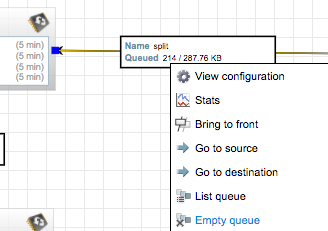
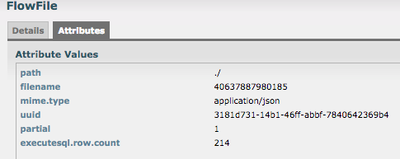
You can view the content of a flowfile as well as its attributes.

For example, RC on a queue and press "List Queue"

9031-screen-shot-2016-11-01-at-90309-am.png

Afterwards, you can view the details (i-icon, first column) of the individual flow files.

9032-screen-shot-2016-11-01-at-90342-am.png

9033-screen-shot-2016-11-01-at-90336-am.png

View solution in original post

2 REPLIES 2

avatar

You can view the content of a flowfile as well as its attributes.

For example, RC on a queue and press "List Queue"

9031-screen-shot-2016-11-01-at-90309-am.png

Afterwards, you can view the details (i-icon, first column) of the individual flow files.

9032-screen-shot-2016-11-01-at-90342-am.png

9033-screen-shot-2016-11-01-at-90336-am.png

avatar

Is there a way that one can inspect the FlowFile once it has already passed through the queues? I'm trying your recommended method of inspecting the attributes of a FlowFile but the queue finished too quick and thus end up with "The queue has no FlowFiles" instead of the output that you have displayed.