Our Community is getting an upgrade! To get everything ready for the relaunch, we’ll be placing the site in read-only mode starting September 21st.
We really appreciate your understanding while we get things set up behind the scenes. Catch up on all the exciting details about the move here.
Need help or have questions? Drop us a line at [email protected]

Support Questions

Find answers, ask questions, and share your expertise
Announcements
Share your experience with Cloudera on G2 and get a $25 Amazon Gift card.
Hi, I'm CLEO! Something exciting is coming to the Community. Stay Tuned!

How to access the nested fields in a json using expression language in Nifi?

avatar
Explorer

Hi,
I have an input json as below:


[
  {
    "orderId": "1234567890",
    "orderName": "Test1",
    "orderItems": [
      {
        "orderItemId": "01",
        "orderItemName": "test1-OrderItem1"
      },
      {
        "orderItemId": "02",
        "orderItemName": "test1-OrderItem2"
      }
    ]
  },
  {
    "orderId": "12235",
    "orderName": "Test2",
    "orderItems": [
      {
        "orderItemId": "01",
        "orderItemName": "test2-OrderItem1"
      }
    ]
  },
  {
    "orderId": "12236",
    "orderName": "Test3",
    "orderItems": [
      {
        "orderItemId": "01",
        "orderItemName": "test3-OrderItem1"
      }
    ]
  }
]


I want to convert it into text form where we want the order details and then item details for each map in the list.
Here is the desired output:


1234567890 Test1
01 test1-OrderItem1
02 test1-OrderItem2
12235 Test2
01 test2-OrderItem1
12236 Test3
01 test3-OrderItem1


This is json to csv conversion, and I am using the ConvertRecord processor and below are the reader and writer configured:
1. Record Reader - JsonTreeReader
2. Record Writer - FreeFormTextRecordSetWriter

For the FreeFormTextRecordSetWriter controller service in the text property, I added the key names from the input json like this ${keyName} and got the values but in the next line, I wanted orderItemId from all the maps in the orderItems list.

How can I access the values from orderItems list?

Thanks in advance!


1 REPLY 1

avatar
Super Collaborator

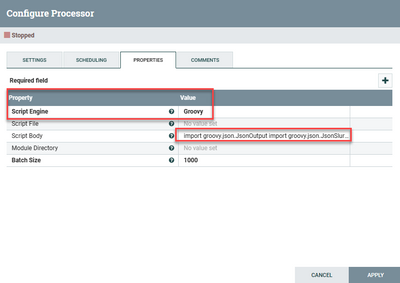
I would do this with a Groovy based InvokeScriptedProcessor 

joseomjr_0-1694907126587.png

Using this code:

import groovy.json.JsonOutput
import groovy.json.JsonSlurper
import java.nio.charset.StandardCharsets
import org.apache.commons.io.IOUtils

class GroovyProcessor implements Processor {
    PropertyDescriptor BATCH_SIZE = new PropertyDescriptor.Builder()
        .name("BATCH_SIZE")
        .displayName("Batch Size")
        .description("The number of incoming FlowFiles to process in a single execution of this processor.")
        .required(true)
        .defaultValue("1000")
        .addValidator(StandardValidators.POSITIVE_INTEGER_VALIDATOR)
        .build()

    Relationship REL_SUCCESS = new Relationship.Builder()
        .name("success")
        .description('FlowFiles that were successfully processed are routed here')
        .build()

    Relationship REL_FAILURE = new Relationship.Builder()
        .name("failure")
        .description('FlowFiles that were not successfully processed are routed here')
        .build()
    
    ComponentLog log 
    
    void initialize(ProcessorInitializationContext context) { log = context.logger }
    Set<Relationship> getRelationships() { return [REL_FAILURE, REL_SUCCESS] as Set }
    Collection<ValidationResult> validate(ValidationContext context) { null }
    PropertyDescriptor getPropertyDescriptor(String name) { null }
    void onPropertyModified(PropertyDescriptor descriptor, String oldValue, String newValue) { }
    List<PropertyDescriptor> getPropertyDescriptors() { Collections.unmodifiableList([BATCH_SIZE]) as List<PropertyDescriptor> }
    String getIdentifier() { null }

    JsonSlurper jsonSlurper = new JsonSlurper()
    JsonOutput jsonOutput = new JsonOutput()
    
    void onTrigger(ProcessContext context, ProcessSessionFactory sessionFactory) throws ProcessException {
        ProcessSession session = sessionFactory.createSession()
        try {
            List<FlowFile> flowFiles = session.get(context.getProperty(BATCH_SIZE).asInteger())
            if (!flowFiles) return

            flowFiles.each { flowFile ->
                List data = null
                session.read(flowFile, { 
                    inputStream -> data = jsonSlurper.parseText(IOUtils.toString(inputStream, StandardCharsets.UTF_8)) 
                } as InputStreamCallback)
                List outputData = []
                data.each { order ->
                    outputData.add("${order.orderId} ${order.orderName}")
                    order.orderItems.each { orderItem ->
                        outputData.add("${orderItem.orderItemId} ${orderItem.orderItemName}")
                    }
                }
                FlowFile newFlowFile = session.create()
                newFlowFile = session.write(newFlowFile, { outputStream -> outputStream.write(outputData.join('\n').getBytes(StandardCharsets.UTF_8)) } as OutputStreamCallback)
                session.transfer(newFlowFile, REL_SUCCESS)
                session.remove(flowFile)
            }
            session.commit()
        } catch (final Throwable t) {
            log.error('{} failed to process due to {}; rolling back session', [this, t] as Object[])
            session.rollback(true)
            throw t
        }
    }
}

processor = new GroovyProcessor()

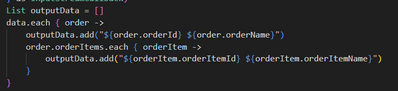
Don't let all that code scare you when the part that's doing the formatting is only these lines:

joseomjr_1-1694907251400.png

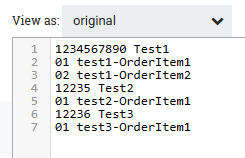
This is the generated output:

joseomjr_2-1694907283061.png