
Our Community is getting an upgrade! To get everything ready for the relaunch, we’ll be placing the site in read-only mode starting September 21st.
We really appreciate your understanding while we get things set up behind the scenes. Catch up on all the exciting details about the move here.
Need help or have questions? Drop us a line at [email protected]

Support Questions
 Hi, I'm CLEO! Something exciting is coming to the Community. Stay Tuned!
- Cloudera Community
- Support
- Support Questions
- Re: How to add new hosts in extisting cluster whe...
- Subscribe to RSS Feed
- Mark Question as New
- Mark Question as Read
- Float this Question for Current User
- Bookmark
- Subscribe
- Mute
- Printer Friendly Page
- Subscribe to RSS Feed
- Mark Question as New
- Mark Question as Read
- Float this Question for Current User
- Bookmark
- Subscribe
- Mute
- Printer Friendly Page
How to add new hosts in extisting cluster whenever All Process are Done Successfull ....


Created 01-08-2019 02:20 PM
- Mark as New
- Bookmark
- Subscribe
- Mute
- Subscribe to RSS Feed
- Permalink
- Report Inappropriate Content
Hi Everyone,
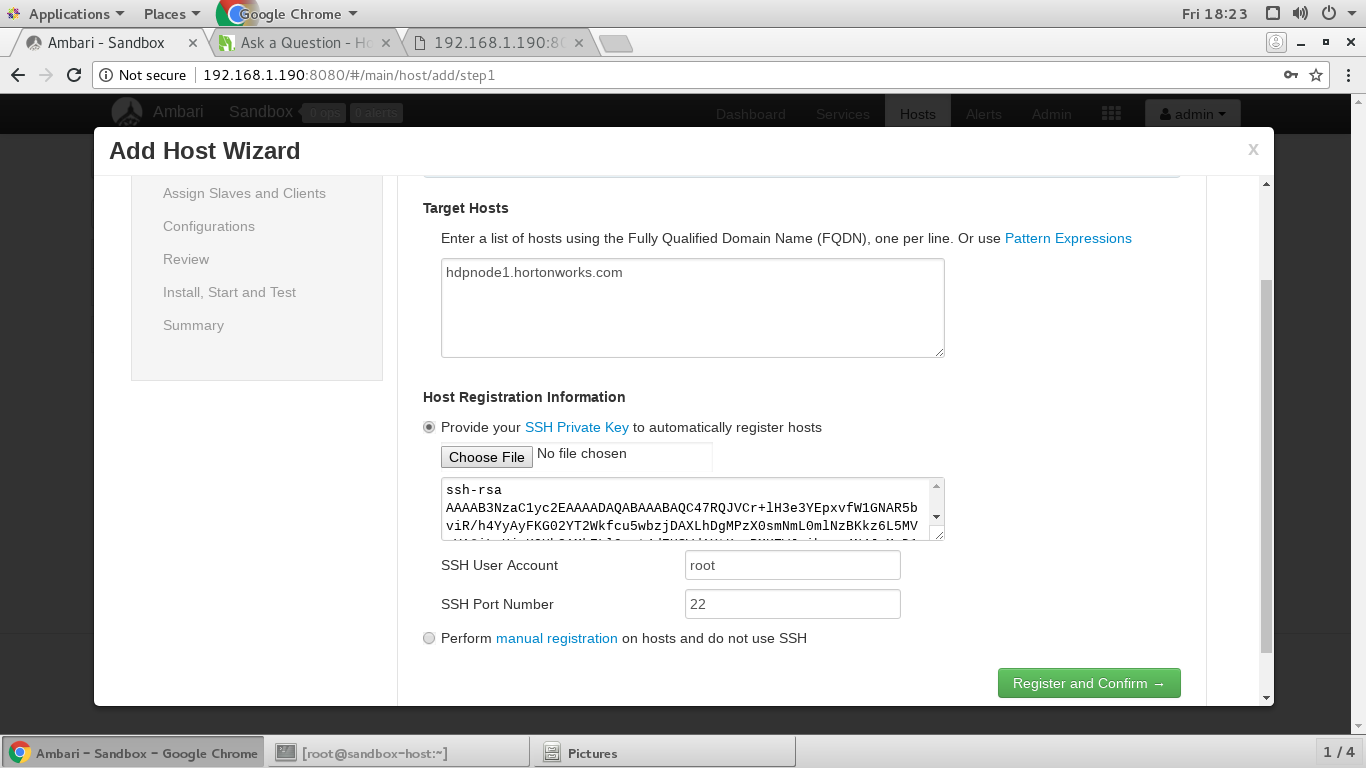
I am gonna adding a new hosts in existing cluster ....All Network Process are done successfully ...after then did't register new hosts by AMBARI....
hdp version details : hdp 2.6 with ambari 2.6
Os - centso7
Please Suggest How to do ,
Your Help is Highly appreciated .
screenshot-from-2018-12-28-18-17-06.pngscreenshot-from-2018-12-28-18-23-15.pngscreenshot-from-2018-12-28-18-40-11.png




Created 01-08-2019 02:20 PM
- Mark as New
- Bookmark
- Subscribe
- Mute
- Subscribe to RSS Feed
- Permalink
- Report Inappropriate Content
If you want to setup a multi node cluster then please refer to the following Hortonworks Youtube Video
Hadoop Series- Part1 Multinode Hadoop Cluster Installation using Ambari : https://www.youtube.com/watch?v=wHaVBoLwzwU
.
Regarding the failure which you posted in your last comment is happening due to:
  File "/var/lib/ambari-agent/tmp/os_check_type1546513757.py", line 40, in main
raise Exception("Local OS is not compatible with cluster primary OS family.
Please perform manual bootstrap on this host.")
Exception: Local OS is not compatible with cluster primary OS family. Please perform manual bootstrap on this host.
.
Looks like you are trying to register a new host which has slightly different OS version/type.
In that case we will suggest you to try using Manual Host installation & registration instead of doing it via Ambari UI. You can find the instructions to Manually Register Ambari Agenrt here:
.
Created 01-08-2019 02:20 PM
- Mark as New
- Bookmark
- Subscribe
- Mute
- Subscribe to RSS Feed
- Permalink
- Report Inappropriate Content
The problem seems to be the incorrect "SSH Private Key". Based on screenshot "screenshot-from-2018-12-28-18-23-15.png" looks like you are pasting the "Public" key content there instead of "Private Key" of the host "hdpnode1.hortonworks.com"
For example the following will be the Private Key: "~/.ssh/id_rsa" adn the content of private key file looks something like following which BEGIN and END marks:
Example:
-----BEGIN RSA PRIVATE KEY-----
ANCDEFGHIJKLMNOPoCUhgGazht5XrPbvkcD
.......
QRSTUVWXYZasdoeruoijlcsd,fns,cjsdklfjo=
-----END RSA PRIVATE KEY-----
Usually Public key file name is "~/.ssh/id_rsa.pub"
Also the Ambari API call is showing 404 because you will need to replace the "$name" with your clustername. You can get your ambari cluster name using the following API call.
http://192.168.1.190:8080/api/v1/clusters
.

Created 01-08-2019 02:20 PM
- Mark as New
- Bookmark
- Subscribe
- Mute
- Subscribe to RSS Feed
- Permalink
- Report Inappropriate Content
Can you share your /etc/hosts files? To me it seems this is the first host in the cluster, what is your cluster name?
Created 01-08-2019 02:20 PM
- Mark as New
- Bookmark
- Subscribe
- Mute
- Subscribe to RSS Feed
- Permalink
- Report Inappropriate Content
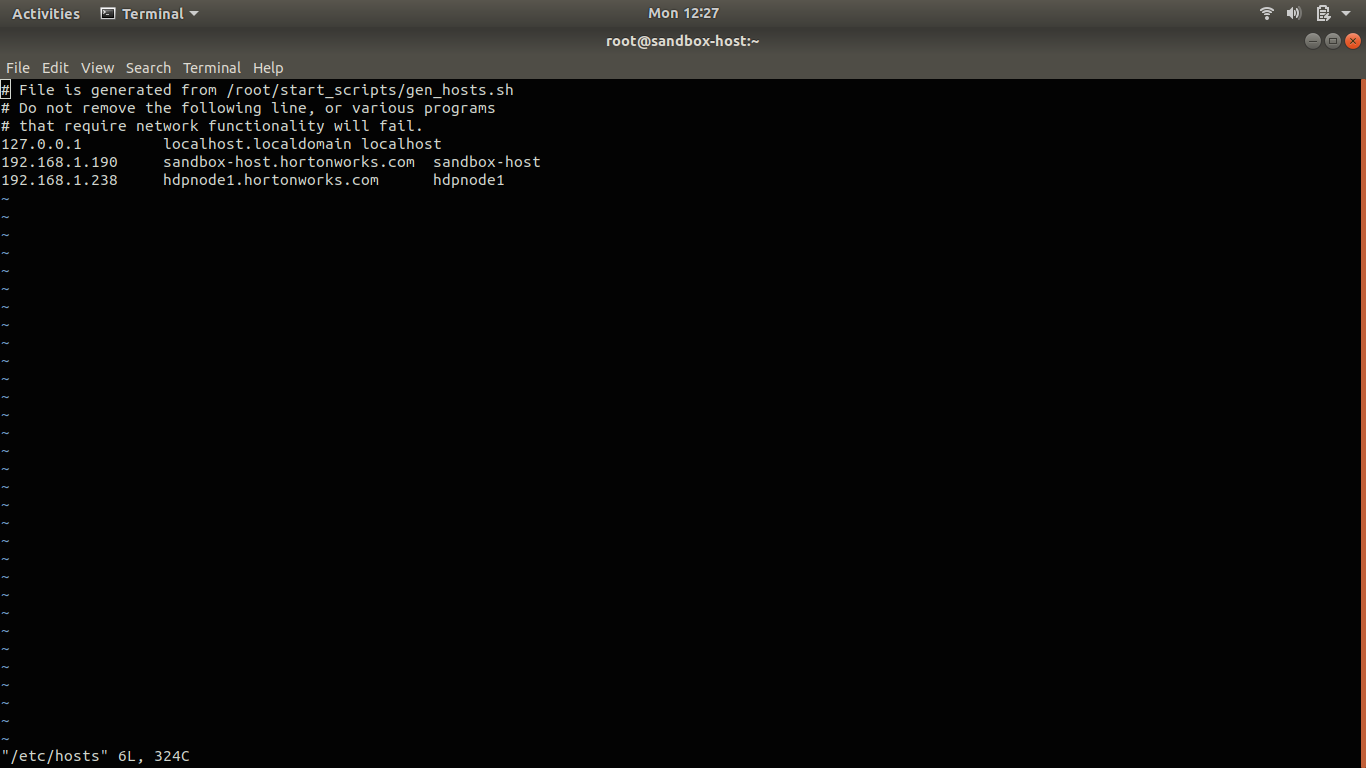
Hi Sir Thanks For the reply ...
Sir , You Are Absolutely Right , It is the first host in the cluster ......
also my cluster name is default "Sandbox" , if there is needed for Change this Please suggest the process..
i am new in Hadoop and it is my first experiment on hdp .
Thanks
screenshot-from-2018-12-31-12-27-12.pngscreenshot-from-2018-12-31-12-28-26.png


- « Previous
-
- 1
- 2
- Next »

