Our Community is getting an upgrade! To get everything ready for the relaunch, we’ll be placing the site in read-only mode starting September 21st.
We really appreciate your understanding while we get things set up behind the scenes. Catch up on all the exciting details about the move here.
Need help or have questions? Drop us a line at [email protected]

Support Questions

Find answers, ask questions, and share your expertise
Announcements
Share your experience with Cloudera on G2 and get a $25 Amazon Gift card.
Hi, I'm CLEO! Something exciting is coming to the Community. Stay Tuned!

How to convert two arrays to key value with Jolt?

avatar
Reader

I have some JSON that contains two arrays that I would like to convert to key/value pairs. I've already create a spec to convert my input data into the format below.


Input


{
  "rows" : [ {
    "row" : [ "row1", "row2", "row3" ],
    "header" : [ "header1", "header2", "header3" ]
  }, {
    "row" : [ "row4", "row5", "row6" ],
    "header" : [ "header1", "header2", "header3" ]
  } ]
}


Is it possible to convert it again with Jolt to something like:


{
"header1" : "row1",
"header2" : "row2",
"header3" : "row3",
"header1" : "row4",
"header2" : "row5",
"header3" : "row6"
}


Any guidance would be highly appreciated 🙂

1 ACCEPTED SOLUTION

avatar
Cloudera Employee

If the original input data (before your Jolt transform) looks something like this...

{
  "headers": [
    "header1",
    "header2",
    "header3"
  ],
  "rows": [
    [
      "row1",
      "row2",
      "row3"
    ],
    [
      "row4",
      "row5",
      "row6"
    ]
  ]
}


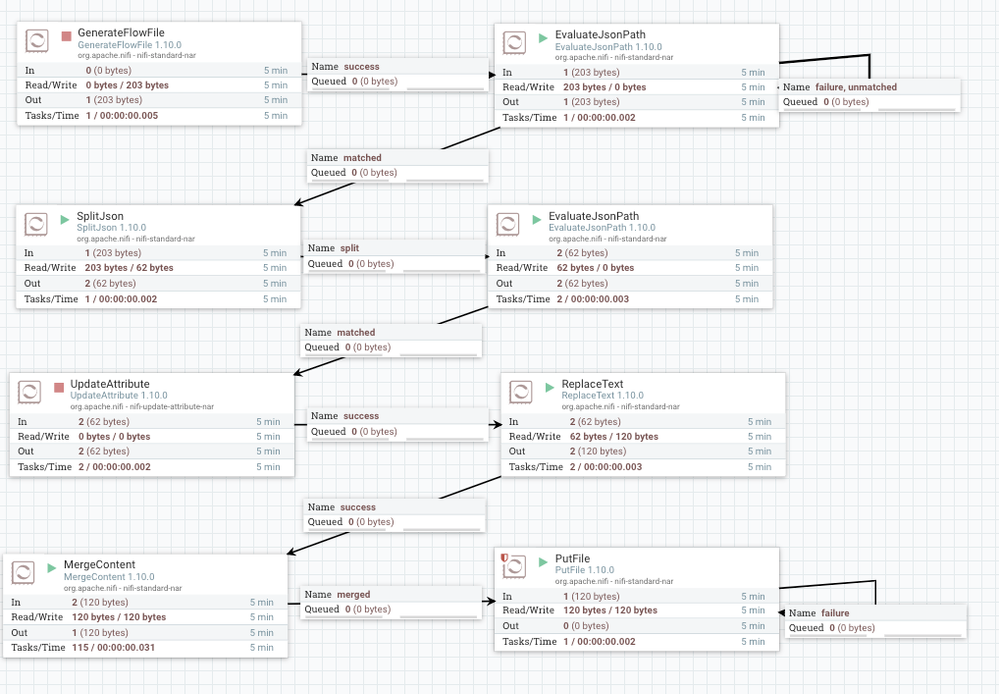
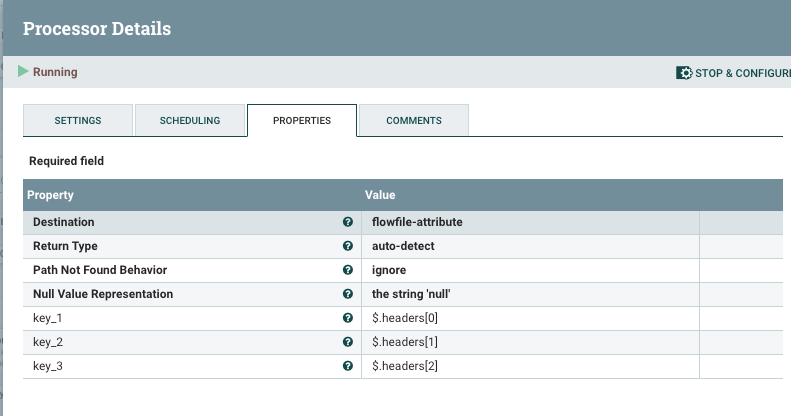
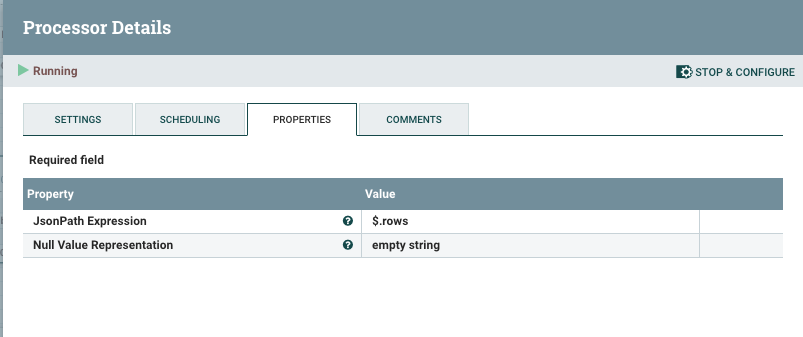
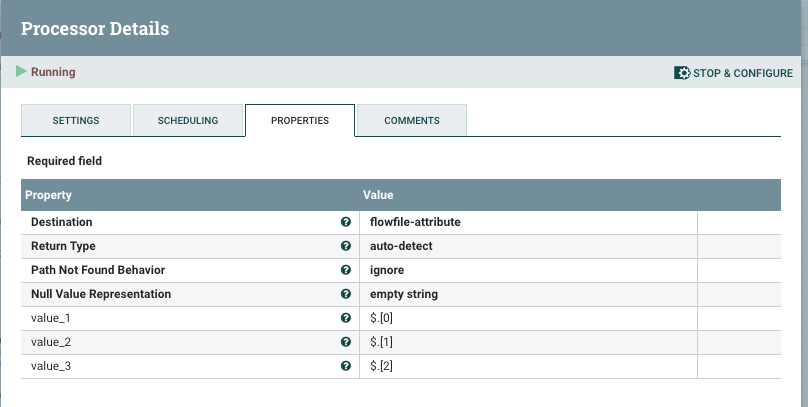
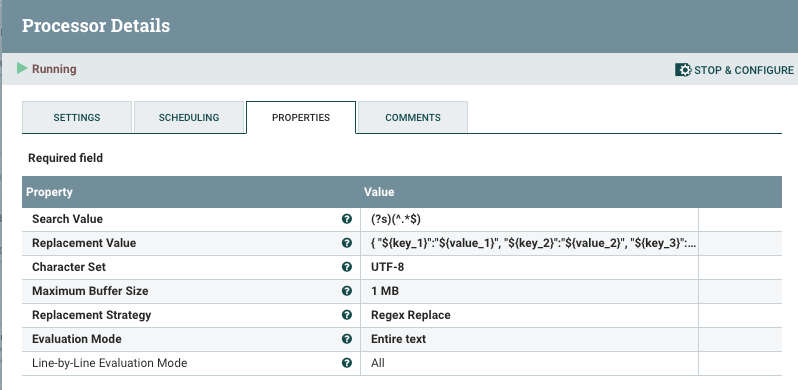
...then it may be easier using SplitJSON and EvaluateJSONPath processors in this scenario.


The GenerateFlowFile processor has some sample data that matches the above format using books as the example. The result will be a separate JSON file for each array within "rows". You can configure the MergeContent to bundle the JSON records as needed.


Screen Shot 2019-11-16 at 5.08.14 PM.png


EvaluateJSONPath

Screen Shot 2019-11-16 at 5.13.45 PM.png


SplitJSON

Screen Shot 2019-11-16 at 5.14.49 PM.png


EvaluateJSONPath

Screen Shot 2019-11-16 at 5.14.59 PM.png


ReplaceText

Screen Shot 2019-11-16 at 5.15.09 PM.png


View solution in original post

2 REPLIES 2

avatar
Cloudera Employee

If the original input data (before your Jolt transform) looks something like this...

{
  "headers": [
    "header1",
    "header2",
    "header3"
  ],
  "rows": [
    [
      "row1",
      "row2",
      "row3"
    ],
    [
      "row4",
      "row5",
      "row6"
    ]
  ]
}


...then it may be easier using SplitJSON and EvaluateJSONPath processors in this scenario.


The GenerateFlowFile processor has some sample data that matches the above format using books as the example. The result will be a separate JSON file for each array within "rows". You can configure the MergeContent to bundle the JSON records as needed.


Screen Shot 2019-11-16 at 5.08.14 PM.png


EvaluateJSONPath

Screen Shot 2019-11-16 at 5.13.45 PM.png


SplitJSON

Screen Shot 2019-11-16 at 5.14.49 PM.png


EvaluateJSONPath

Screen Shot 2019-11-16 at 5.14.59 PM.png


ReplaceText

Screen Shot 2019-11-16 at 5.15.09 PM.png


avatar
Expert Contributor

Hi @DataD,

Please find the below spec:

[
{
"operation": "shift",
"spec": {
"rows": {
"*": {
"row": {
"*": {
"@": "[&3].@(3,header[&1])"
}
}
}
}
}
}
]

This will give the output as:

[ {
"header1" : "row1",
"header2" : "row2",
"header3" : "row3"
}, {
"header1" : "row4",
"header2" : "row5",
"header3" : "row6"
} ]

I didn't convert it to 

{
"header1" : "row1",
"header2" : "row2",
"header3" : "row3",
"header1" : "row4",
"header2" : "row5",
"header3" : "row6"
}

because that is not a valid json as header1,2 and 3 are repeated keys in the same level of the json.