Our Community is getting an upgrade! To get everything ready for the relaunch, we’ll be placing the site in read-only mode starting September 21st.
We really appreciate your understanding while we get things set up behind the scenes. Catch up on all the exciting details about the move here.
Need help or have questions? Drop us a line at [email protected]

Support Questions

Find answers, ask questions, and share your expertise
Announcements
Share your experience with Cloudera on G2 and get a $25 Amazon Gift card.
Hi, I'm CLEO! Something exciting is coming to the Community. Stay Tuned!

How to count the number of records of a JSON object flow file in NiFi?

avatar
New Member

I am calling an API which returns a JSON object as the body of the response as a flow file. I want to count the total records in the flow file.

I tried record processors like CalculateRecordStats needs a record reader and that in-turn needs a schema. But I don't have a schema. So Is there a better way to do it?

{
"result":[
    {
        "key1": "value1",
        "key2": "value2"
    },
    {
        "key1": "value1",
        "key2": "value2"
    }
]
}

This is the sample JSON the api response body returns. The records are the items of the list which is the value of the "result" key

In the above sample there are 2 records (2 items in the list). So that is what I want to calculate.


You can also answer here

1 ACCEPTED SOLUTION

avatar
Master Mentor

@Sandeep Gunda

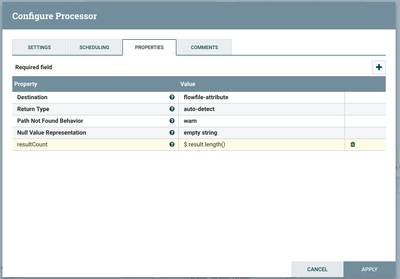
One aproach may be to use the "EvaluateJsonPath" Processor as following to get the total number of results (basically result is an Array here) so we can try something like following to store the size of the array to a new attribute

resultCount = $.result.length()

Example:

109404-json-array-count.png


Then later you can read the attribute resultCount in some other processor as following: ${resultCount}

.

View solution in original post

1 REPLY 1

avatar
Master Mentor

@Sandeep Gunda

One aproach may be to use the "EvaluateJsonPath" Processor as following to get the total number of results (basically result is an Array here) so we can try something like following to store the size of the array to a new attribute

resultCount = $.result.length()

Example:

109404-json-array-count.png


Then later you can read the attribute resultCount in some other processor as following: ${resultCount}

.