Our Community is getting an upgrade! To get everything ready for the relaunch, we’ll be placing the site in read-only mode starting September 21st.
We really appreciate your understanding while we get things set up behind the scenes. Catch up on all the exciting details about the move here.
Need help or have questions? Drop us a line at [email protected]
Created on
10-09-2019
10:34 AM
- last edited on
10-09-2019
09:55 PM
by
ask_bill_brooks
Hi Team,
I have a zipped file which contains so many text files. I used unpackContent processor to unzip the files. I want to store those unzipped files in another location. But the file names should be replaced with file1.txt, file2.txt, file3.txt and so on. How can I give file names dynamically? I thought updateAttribute can be used in this. But I'm not sure at the expression language to get this done. Can anyone help me to write a expression language in updateAttribute processor or any alternative processor/solution for this.
Thanks.
Created 10-10-2019 09:58 AM
Hello @girish6,
NiFi Expression language does have a function that will increment a number, but it does not reset back to zero (unless you restart NiFi) and is incremented globally across call calls to that function.
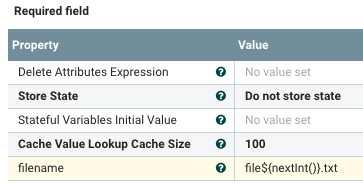
So while this function will give each FlowFile a unique filename per NiFi node, there is no guarantee that they will be sequential or will start at 0 for new source zip file you extract. If this works for your use case the NiFi Expression language statement would look like this in the UpdateAttribute processor:
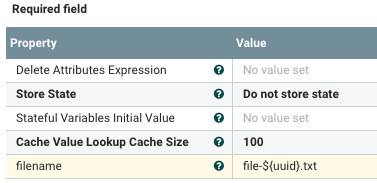
If you are just looking for filename uniqueness, a better solution may be to instead append the FlowFile's uniquely assigned UUID to the filename instead as follows:
Tips:
1. There is an expression language guide in the embedded help of your NiFi installation found by clicking on the global menu icon in upper right corner.
2. Within a NiFi processor property that support NiFi EL you can display a list of functions with details by typing "${" (signifies start of an EL statement) and then hold "Control" while clicking space bar. This also works if you are mid statement and type ":"then "control" + click spacebar.
Examples:
file-${ (then cntrl+spacebar)
${uuid: (then cntrl+spacebar)
Hope this helps,
Matt
Created 10-10-2019 09:58 AM
Hello @girish6,
NiFi Expression language does have a function that will increment a number, but it does not reset back to zero (unless you restart NiFi) and is incremented globally across call calls to that function.
So while this function will give each FlowFile a unique filename per NiFi node, there is no guarantee that they will be sequential or will start at 0 for new source zip file you extract. If this works for your use case the NiFi Expression language statement would look like this in the UpdateAttribute processor:
If you are just looking for filename uniqueness, a better solution may be to instead append the FlowFile's uniquely assigned UUID to the filename instead as follows:
Tips:
1. There is an expression language guide in the embedded help of your NiFi installation found by clicking on the global menu icon in upper right corner.
2. Within a NiFi processor property that support NiFi EL you can display a list of functions with details by typing "${" (signifies start of an EL statement) and then hold "Control" while clicking space bar. This also works if you are mid statement and type ":"then "control" + click spacebar.
Examples:
file-${ (then cntrl+spacebar)
${uuid: (then cntrl+spacebar)
Hope this helps,
Matt