
Our Community is getting an upgrade! To get everything ready for the relaunch, we’ll be placing the site in read-only mode starting September 21st.
We really appreciate your understanding while we get things set up behind the scenes. Catch up on all the exciting details about the move here.
Need help or have questions? Drop us a line at [email protected]

Support Questions
 Hi, I'm CLEO! Something exciting is coming to the Community. Stay Tuned!
- Cloudera Community
- Support
- Support Questions
- Re: Installation failed. Failed to copy installati...
- Subscribe to RSS Feed
- Mark Question as New
- Mark Question as Read
- Float this Question for Current User
- Bookmark
- Subscribe
- Mute
- Printer Friendly Page
- Subscribe to RSS Feed
- Mark Question as New
- Mark Question as Read
- Float this Question for Current User
- Bookmark
- Subscribe
- Mute
- Printer Friendly Page
Installation failed. Failed to copy installation files. Cdp 7
- Labels:
-
Cloudera


Created on
04-23-2021
09:46 AM
- last edited on
04-21-2026
02:04 AM
by
 GrazittiAPI

- Mark as New
- Bookmark
- Subscribe
- Mute
- Subscribe to RSS Feed
- Permalink
- Report Inappropriate Content
All hosts have the same issue : Installation failed. Failed to copy installation files.
Details
/tmp/scm_prepare_node.9aRx6niZ
Failed to download package. Status code: 404
I am using the free trial version.
Log error:
2021-04-23 01:03:08,424 WARN ParcelUpdateService:com.cloudera.parcel.components.ParcelDownloaderImpl: (1 skipped) Invalid parcel in manifest : CDH-7.1.6-1.cd$
2021-04-23 01:03:11,178 ERROR ParcelUpdateService:com.cloudera.parcel.components.ParcelDownloaderImpl: Failed to download manifest. Status code: 404 URI: htt$
2021-04-23 01:03:12,739 INFO ParcelUpdateService:com.cloudera.cmf.paywall.PaywallHelper: (2 skipped) License incomplete; unable to use it for authentication $


Created 04-26-2021 01:25 AM
- Mark as New
- Bookmark
- Subscribe
- Mute
- Subscribe to RSS Feed
- Permalink
- Report Inappropriate Content
@Boris_Rendon This is because of the paywall expansion. You can not download the Cloudera binaries without a valid subscription. Please follow below link which covers the discussion around this.
Cheers!
Was your question answered? Make sure to mark the answer as the accepted solution.
If you find a reply useful, say thanks by clicking on the thumbs up button.
Created 04-26-2021 07:51 AM
- Mark as New
- Bookmark
- Subscribe
- Mute
- Subscribe to RSS Feed
- Permalink
- Report Inappropriate Content
That solution didn't worked,
I already have working credential to access to the repository.
Thanks for your reply
Created 04-26-2021 07:57 AM
- Mark as New
- Bookmark
- Subscribe
- Mute
- Subscribe to RSS Feed
- Permalink
- Report Inappropriate Content
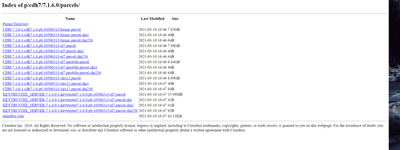
@Boris_Rendon How is your CM repo looks like on CM server host? Also what exact URL you are using in parcels setting? That can give some clue.
Cheers!
Was your question answered? Make sure to mark the answer as the accepted solution.
If you find a reply useful, say thanks by clicking on the thumbs up button.
Created 04-26-2021 08:02 AM
- Mark as New
- Bookmark
- Subscribe
- Mute
- Subscribe to RSS Feed
- Permalink
- Report Inappropriate Content
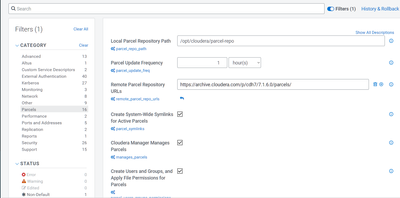
This is the URL I am using in the parcel settings:
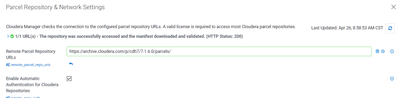
, and this is how my repo looks:
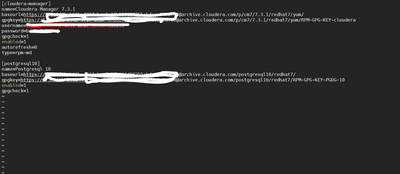
Created 04-26-2021 07:57 AM
- Mark as New
- Bookmark
- Subscribe
- Mute
- Subscribe to RSS Feed
- Permalink
- Report Inappropriate Content
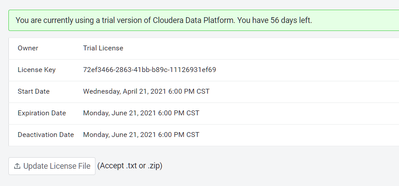
I am using the cdp trial version
Created 04-26-2021 08:05 AM
- Mark as New
- Bookmark
- Subscribe
- Mute
- Subscribe to RSS Feed
- Permalink
- Report Inappropriate Content
@Boris_Rendon Can you see the CM > Admin > Parcels > Parcels configuration page where you will see the listed repo URLs? Please paste the screenshot.
Cheers!
Was your question answered? Make sure to mark the answer as the accepted solution.
If you find a reply useful, say thanks by clicking on the thumbs up button.
Created 04-26-2021 08:08 AM
- Mark as New
- Bookmark
- Subscribe
- Mute
- Subscribe to RSS Feed
- Permalink
- Report Inappropriate Content
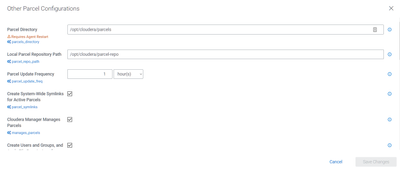
Created 04-26-2021 08:16 AM
- Mark as New
- Bookmark
- Subscribe
- Mute
- Subscribe to RSS Feed
- Permalink
- Report Inappropriate Content
@Boris_Rendon In the Remote Parcels Repository URL the syntax is wrong because this needs credentials. I.e https://<username:password>@archive.cloudera.com.xxx.xxxx.xxx
I am assuming you are using trial so you don't have credentials then simply remove that configuration and see if that helps.
If not then use CDP Trial from this link. https://www.cloudera.com/downloads/cdp-private-cloud-trial.html
Cheers!
Was your question answered? Make sure to mark the answer as the accepted solution.
If you find a reply useful, say thanks by clicking on the thumbs up button.
Created 04-26-2021 08:30 AM
- Mark as New
- Bookmark
- Subscribe
- Mute
- Subscribe to RSS Feed
- Permalink
- Report Inappropriate Content
@GangWar. I already tried with that syntax and I can access to the repository with those credentials .
Indeed I am using trial version,
Thanks


