Our Community is getting an upgrade! To get everything ready for the relaunch, we’ll be placing the site in read-only mode starting September 21st.
We really appreciate your understanding while we get things set up behind the scenes. Catch up on all the exciting details about the move here.
Need help or have questions? Drop us a line at [email protected]

Support Questions

Find answers, ask questions, and share your expertise
Announcements
Share your experience with Cloudera on G2 and get a $25 Amazon Gift card.
Hi, I'm CLEO! Something exciting is coming to the Community. Stay Tuned!

InvokeHTTP to return CSV

avatar
Rising Star

Hi!

How can I configure InvokeHTTP to return comma separated flow file?

At the moment it is returning file in below format (tab separated):


RELM Satieva_microloans 6 3369 2019-06-12 11:42:00 772103971

RELM Satieva_microloans 6 3369 2019-06-12 11:42:00 772104117

RELM Satieva_microloans 6 3369 2019-06-12 11:42:00 772101000


Thanks in advance!

1 ACCEPTED SOLUTION

avatar
Master Mentor

@Gulshan Agivetova

May be you can use the "InvokeHTTP" --> "ReplaceText" --> "PutFile" processors like following:

109339-tabs-to-comma-nifi-1.png


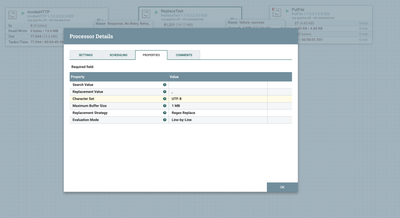
Here in "ReplaceText" processor can be used something like following to replace Search Value = TAB with COMMA

ReplaceText Properties:

Search Value =     
Replacement Value = , 
Character Set = UTF-8
Maximum Buffer Size = 1 MB
Replacement Strategy = Regex Replace
Evaluation Mode =  Line-by-Line


109355-tabs-to-comma-nifi-2.png

And then it should be able to replace the TABs with Comma.

The output of the given inout should be something like:

RELM,Satieva_microloans,6,3369,2019-06-12,11:42:00,772103971
RELM,Satieva_microloans,6,3369,2019-06-12,11:42:00,772104117
RELM,Satieva_microloans,6,3369,2019-06-12,11:42:00,772101000


.

View solution in original post

2 REPLIES 2

avatar
Master Mentor

@Gulshan Agivetova

May be you can use the "InvokeHTTP" --> "ReplaceText" --> "PutFile" processors like following:

109339-tabs-to-comma-nifi-1.png


Here in "ReplaceText" processor can be used something like following to replace Search Value = TAB with COMMA

ReplaceText Properties:

Search Value =     
Replacement Value = , 
Character Set = UTF-8
Maximum Buffer Size = 1 MB
Replacement Strategy = Regex Replace
Evaluation Mode =  Line-by-Line


109355-tabs-to-comma-nifi-2.png

And then it should be able to replace the TABs with Comma.

The output of the given inout should be something like:

RELM,Satieva_microloans,6,3369,2019-06-12,11:42:00,772103971
RELM,Satieva_microloans,6,3369,2019-06-12,11:42:00,772104117
RELM,Satieva_microloans,6,3369,2019-06-12,11:42:00,772101000


.

avatar
Rising Star

@Jay Kumar SenSharma Thank you very much! It helped