Our Community is getting an upgrade! To get everything ready for the relaunch, we’ll be placing the site in read-only mode starting September 21st.
We really appreciate your understanding while we get things set up behind the scenes. Catch up on all the exciting details about the move here.
Need help or have questions? Drop us a line at [email protected]

Support Questions

Find answers, ask questions, and share your expertise
Announcements
Share your experience with Cloudera on G2 and get a $25 Amazon Gift card.
Hi, I'm CLEO! Something exciting is coming to the Community. Stay Tuned!

Issue in Regular expression in nifi

avatar
Contributor

I am consuming a messages from IBM MQ using processor (ConsumeJMS), then once you explore as a "List queue" you will see the following type and format:

ahmedalsaidi_0-1681033213596.png


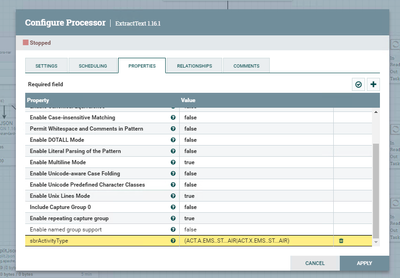
Hence, I added a following processor (ExtractText 1.16.1) in order to search for some texts using regular expression as following: (ACT.A.EMS..ST...AIR|ACT.X.EMS..ST...AIR)

ahmedalsaidi_1-1681033395890.png


Finally, Sometimes the results of regular expression are valid and sometimes it satisfies a half of my condition because:

1) if it does not match anything hence it match only the part of my condition.

2) or if the half of my condition is valid; hence it will match! 

Is there something wrong I am doing in my regular expression or something else? or I need to change type, format, or content type (application/octet-stream) to text so that I can search correctly instead of viewed as a hex?


I hope my explanation was fine and clear for everyone.

Thanks!

1 REPLY 1

avatar
Master Mentor

@ahmedalsaidi 
You do not need to change the content type since you specify the character set to use in the ExtractText processor which defaults to "UTF-8".  If you change the content type or the filename, the built in content viewer in NiFi would be able to display text instead of hex.  For example: adding ".txt" to end of filename.

When it comes to your matching issue, it would be difficult for me to say what is happening here without a working and non-working sample to look at.  In Java regular expressions the "." means any character; however, looking at you hex output screenshot it looks like you really want a literal "." to match.  If you want your java regular expression to match the literal ".", then add a "\" (backslash) before each ".".

If you found that the provided solution(s) assisted you with your query, please take a moment to login and click Accept as Solution below each response that helped.

Thank you,

Matt