
Our Community is getting an upgrade! To get everything ready for the relaunch, we’ll be placing the site in read-only mode starting September 21st.
We really appreciate your understanding while we get things set up behind the scenes. Catch up on all the exciting details about the move here.
Need help or have questions? Drop us a line at [email protected]

Support Questions
 Hi, I'm CLEO! Something exciting is coming to the Community. Stay Tuned!
- Cloudera Community
- Support
- Support Questions
- Re: Json Array data conversion
- Subscribe to RSS Feed
- Mark Question as New
- Mark Question as Read
- Float this Question for Current User
- Bookmark
- Subscribe
- Mute
- Printer Friendly Page
- Subscribe to RSS Feed
- Mark Question as New
- Mark Question as Read
- Float this Question for Current User
- Bookmark
- Subscribe
- Mute
- Printer Friendly Page
Json Array data conversion
- Labels:
-
Apache NiFi


Created 07-12-2022 10:19 AM
- Mark as New
- Bookmark
- Subscribe
- Mute
- Subscribe to RSS Feed
- Permalink
- Report Inappropriate Content
Hi,
I want to convert some of the field value like "enrolled_at":"Sun Oct 17 15:58:58 IST 2021" -> DateTime(2021-10-17 15:58:58) and "is_deleted":"{0}" -> boolean(true or false) from below Json array to save converted data in db. How i can achieve it in NiFi.
[{"id":234521,"tenant_id":1,"product_id":1,"version":"3","user_id":197172,"user_ref_id":"8TS-0516","org_id":910,"org_subscription_id":7294,"access_code":null,"order_ref_id":null,"access_code_id":null,"enrol_type":"Admin4","enrolled_at":"Sun Oct 17 15:58:58 IST 2021","subscription_start_at":"Wed Oct 13 15:58:58 IST 2021","subscription_end_at":"Sat Oct 23 15:58:58 IST 2021","product_launched_at":"Wed Oct 13 16:05:49 IST 2021","product_completed_at":"Wed Oct 13 16:15:44 IST 2021","learning_completed_at":"Wed Oct 13 16:15:44 IST 2021","subscription_status":"ACTIVE","learning_status":"COMPLETED","total_credits":null,"completion_certificate_id":3585,"ecard_id":35867,"certificate_number":"tocubg3sfbkzfgfqslnisnci","ecard_number":"1hr5w9jkpikonazrfhqquauh","online_completion_date":"Wed Oct 13 16:08:07 IST 2021","offline_completion_date":"Wed Oct 13 16:15:44 IST 2021","ecard_date":"Tue Oct 31 16:15:44 IST 2023","is_deleted":"{0}","created_by":1,"updated_by":14302,"org_Name":"International Society","assignment_id":961,"last_activity_at":"Wed Oct 13 16:15:44 IST 2021","updated_at":"Wed Oct 13 16:15:44 IST 2021","source_lms":null,"course_instance_id":"20-3583"}]



Created 07-13-2022 06:42 AM
- Mark as New
- Bookmark
- Subscribe
- Mute
- Subscribe to RSS Feed
- Permalink
- Report Inappropriate Content
You can use the following expression instead to format the date as you want in the UpdateRecord processor:
/subscription_start_at_timestamp -> format(toDate(/subscription_start_at, "EEE MMM d HH:mm:ss z yyyy"), "yyyy-MM-dd HH:mm:ss")
Cheers,
André
Was your question answered? Please take some time to click on "Accept as Solution" below this post.
If you find a reply useful, say thanks by clicking on the thumbs up button.
Created on 07-12-2022 07:49 PM - edited 07-12-2022 07:50 PM
- Mark as New
- Bookmark
- Subscribe
- Mute
- Subscribe to RSS Feed
- Permalink
- Report Inappropriate Content
You can use the UpdateRecord processor for this with the following configuration:
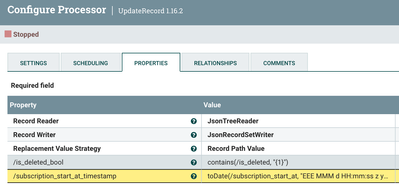
/is_deleted_bool                 -> contains(/is_deleted, "{1}")
/subscription_start_at_timestamp -> toDate(/subscription_start_at, "EEE MMM d HH:mm:ss z yyyy")
The output of that will look like the below:
[ {
  ...
  "subscription_start_at" : "Wed Oct 13 15:58:58 IST 2021",
  ...
  "is_deleted" : "{0}",
  ...
  "is_deleted_bool" : false,
  "subscription_start_at_timestamp" : "1634133538000"
} ]
Cheers,
André
Was your question answered? Please take some time to click on "Accept as Solution" below this post.
If you find a reply useful, say thanks by clicking on the thumbs up button.
Created 07-12-2022 10:35 PM
- Mark as New
- Bookmark
- Subscribe
- Mute
- Subscribe to RSS Feed
- Permalink
- Report Inappropriate Content
I want to convert it to DateTime format like: 2021-10-17 15:58:58 not in timstamp.
is there possible here to convert it to datetime formate like yyyy-MM-dd hh:mm:ss ?
Created 07-13-2022 06:42 AM
- Mark as New
- Bookmark
- Subscribe
- Mute
- Subscribe to RSS Feed
- Permalink
- Report Inappropriate Content
You can use the following expression instead to format the date as you want in the UpdateRecord processor:
/subscription_start_at_timestamp -> format(toDate(/subscription_start_at, "EEE MMM d HH:mm:ss z yyyy"), "yyyy-MM-dd HH:mm:ss")
Cheers,
André
Was your question answered? Please take some time to click on "Accept as Solution" below this post.
If you find a reply useful, say thanks by clicking on the thumbs up button.


