Our Community is getting an upgrade! To get everything ready for the relaunch, we’ll be placing the site in read-only mode starting September 21st.
We really appreciate your understanding while we get things set up behind the scenes. Catch up on all the exciting details about the move here.
Need help or have questions? Drop us a line at [email protected]

Support Questions
 Hi, I'm CLEO! Something exciting is coming to the Community. Stay Tuned!
- Cloudera Community
- Support
- Support Questions
- Re: HDP Kerberos enable through Ambari
- Subscribe to RSS Feed
- Mark Question as New
- Mark Question as Read
- Float this Question for Current User
- Bookmark
- Subscribe
- Mute
- Printer Friendly Page
- Subscribe to RSS Feed
- Mark Question as New
- Mark Question as Read
- Float this Question for Current User
- Bookmark
- Subscribe
- Mute
- Printer Friendly Page
Kerberos on Ambari 2.6.2.2: 500 status code received on POST method for API: /api/v1/clusters/hdp265/requests
- Labels:
-
Apache Ambari


Created on
10-09-2019
09:39 AM
- last edited on
10-09-2019
09:47 AM
by
 lwang
lwang

- Mark as New
- Bookmark
- Subscribe
- Mute
- Subscribe to RSS Feed
- Permalink
- Report Inappropriate Content
I am trying to enable Kerberos on Ambari 2.6.2.2 on CentOS 7. Below are the errors
***********************
500 status code received on POST method for API: /api/v1/clusters/hdp265/requests
Error message: An internal system exception occurred: Failed to execute the command: Broken pipe
***********************************
Below is my krb5.conf file
nano /etc/krb5.conf
# Configuration snippets may be placed in this directory as well
includedir /etc/krb5.conf.d/
[logging]
default = FILE:/var/log/krb5libs.log
kdc = FILE:/var/log/krb5kdc.log
admin_server = FILE:/var/log/kadmind.log
[libdefaults]
dns_lookup_realm = false
ticket_lifetime = 24h
renew_lifetime = 7d
forwardable = true
rdns = false
pkinit_anchors = /etc/pki/tls/certs/ca-bundle.crt
default_realm = HADOOPSECURITY.COM
default_ccache_name = KEYRING:persistent:%{uid}
[realms]
# EXAMPLE.COM = {
# kdc = kerberos.example.com
# admin_server = kerberos.example.com
# }
HADOOPSECURITY.COM = {
kdc = p1.bigdata.com
admin_server = p1.bigdata.com
}
[domain_realm]
.p1.bigdata.com = HADOOPSECURITY.COM
p1.bigdata.com = HADOOPSECURITY.COM
************************************
nano /var/kerberos/krb5kdc/kadm5.acl
*/[email protected] *
Created 10-10-2019 09:41 AM
- Mark as New
- Bookmark
- Subscribe
- Mute
- Subscribe to RSS Feed
- Permalink
- Report Inappropriate Content
Finally, it worked when I added admin/admin into /var/kerberos/krb5kdc/kadm5.acl file. Here I have added admin/admin and root/admin as well... just created the root user.
Created on
10-09-2019
09:36 AM
- last edited on
10-09-2019
09:47 PM
by
ask_bill_brooks
- Mark as New
- Bookmark
- Subscribe
- Mute
- Subscribe to RSS Feed
- Permalink
- Report Inappropriate Content
I have the same issue and followed all the instructions from this post but still no luck


Created 10-09-2019 11:11 PM
- Mark as New
- Bookmark
- Subscribe
- Mute
- Subscribe to RSS Feed
- Permalink
- Report Inappropriate Content
1.Your KDC part of the screenshot has an error 🙂 in the domains part just copy and paste the below as is to replace p1.bigdata.com noe the dot(.) and comma separating the names
.hadoopsecurity.com,hadoopsecurity.com
The validation passed because in reality it only test the connectivity ONLY to the KDC server
2. And then the Kadmin part the Admin principal should be the output of your
# kadmin.local
Something like admin/[email protected] or root/[email protected]
What ever you chose during the installation of Kerberos after that then launch the recreation of the keytabs and all should be okay.
Make sure the KDC server is up and running during this process.
Please revert
Created on 10-10-2019 05:10 AM - edited 10-10-2019 05:37 AM
- Mark as New
- Bookmark
- Subscribe
- Mute
- Subscribe to RSS Feed
- Permalink
- Report Inappropriate Content
is this what you are saying?
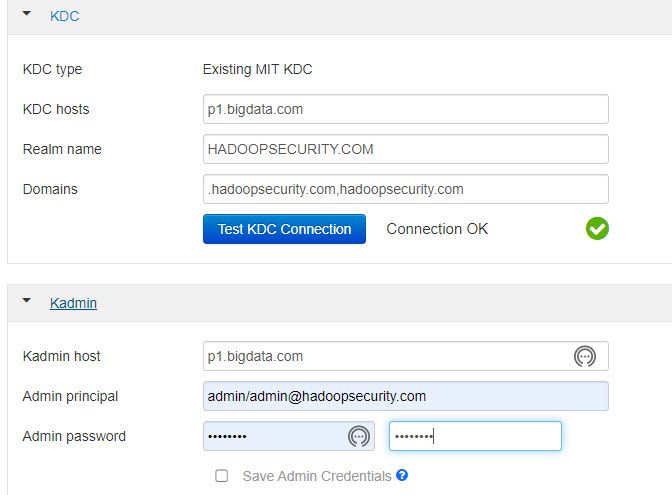
Also giving what i have in kadmin.local
[root@p1 /]# kadmin.local
Authenticating as principal admin/[email protected] with password.
kadmin.local: listprincs
K/[email protected]
admin/[email protected]
kadmin/[email protected]
kadmin/[email protected]
kadmin/[email protected]
kiprop/[email protected]
krbtgt/[email protected]
[email protected]
kadmin.local:
But still the same error. I think something I am missing
Created 10-10-2019 06:12 AM
- Mark as New
- Bookmark
- Subscribe
- Mute
- Subscribe to RSS Feed
- Permalink
- Report Inappropriate Content
I went into logs and i see below error.
stderr:
2019-10-10 09:10:37,501 - Failed to create principal, [email protected] - Failed to create service principal for [email protected]
STDOUT: Authenticating as principal admin/[email protected] with password.
Password for admin/[email protected]:
Enter password for principal "[email protected]":
Re-enter password for principal "[email protected]":
STDERR: WARNING: no policy specified for [email protected]; defaulting to no policy
add_principal: Operation requires ``add'' privilege while creating "[email protected]".
stdout:
2019-10-10 09:10:37,475 - Processing identities...
2019-10-10 09:10:37,482 - Processing principal, [email protected]
Created 10-10-2019 07:19 AM
- Mark as New
- Bookmark
- Subscribe
- Mute
- Subscribe to RSS Feed
- Permalink
- Report Inappropriate Content
Not exactly now the REALM part was wrong again the rest are okay you substituted the wrong values here is how it's supposed to be you see the highlighted part
Configuration snippets may be placed in this directory as well
includedir /etc/krb5.conf.d/
[logging]
default = FILE:/var/log/krb5libs.log
kdc = FILE:/var/log/krb5kdc.log
admin_server = FILE:/var/log/kadmind.log
[libdefaults]
dns_lookup_realm = false
ticket_lifetime = 24h
renew_lifetime = 7d
forwardable = true
rdns = false
pkinit_anchors = /etc/pki/tls/certs/ca-bundle.crt
default_realm = HADOOPSECURITY.COM
default_ccache_name = KEYRING:persistent:%{uid}
[realms]
HADOOPSECURITY.COM = {
kdc = p1.bigdata.com
admin_server = p1.bigdata.com
}
[domain_realm]
.hadoopsecurity.com = HADOOPSECURITY.COM
hadoopsecurity.com = HADOOPSECURITY.COM
Do that and let me know the KDC and Admin server are usually the same 🙂
Created 10-10-2019 09:26 AM
- Mark as New
- Bookmark
- Subscribe
- Mute
- Subscribe to RSS Feed
- Permalink
- Report Inappropriate Content
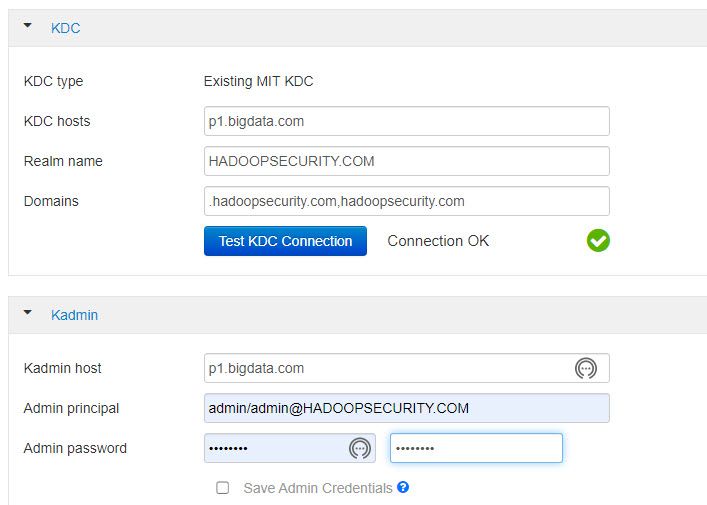
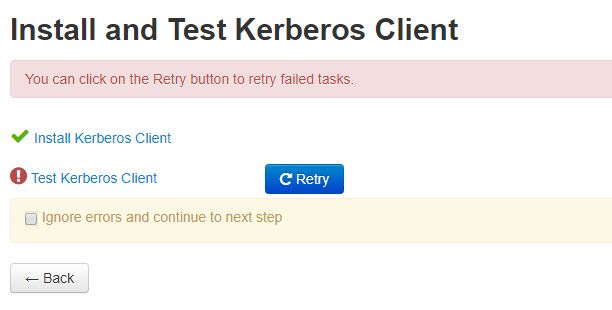
failing at the same place with same config.
nano /etc/krb5.conf
# Configuration snippets may be placed in this directory as well
includedir /etc/krb5.conf.d/
[logging]
default = FILE:/var/log/krb5libs.log
kdc = FILE:/var/log/krb5kdc.log
admin_server = FILE:/var/log/kadmind.log
[libdefaults]
dns_lookup_realm = false
ticket_lifetime = 24h
renew_lifetime = 7d
forwardable = true
rdns = false
pkinit_anchors = /etc/pki/tls/certs/ca-bundle.crt
default_realm = HADOOPSECURITY.COM
default_ccache_name = KEYRING:persistent:%{uid}
[realms]
HADOOPSECURITY.COM = {
kdc = p1.bigdata.com
admin_server = p1.bigdata.com
}
[domain_realm]
.hadoopsecurity.com = HADOOPSECURITY.COM
hadoopsecurity.com = HADOOPSECURITY.COM
Created 10-10-2019 09:41 AM
- Mark as New
- Bookmark
- Subscribe
- Mute
- Subscribe to RSS Feed
- Permalink
- Report Inappropriate Content
Finally, it worked when I added admin/admin into /var/kerberos/krb5kdc/kadm5.acl file. Here I have added admin/admin and root/admin as well... just created the root user.
Created 10-10-2019 10:24 AM
- Mark as New
- Bookmark
- Subscribe
- Mute
- Subscribe to RSS Feed
- Permalink
- Report Inappropriate Content
Great, it worked but you should recognize even if you had modified the /var/kerberos/krb5kdc/kadm5.acl still krb5.conf was wrong and your Ambari UI was wrong so you still wouldn't have resolved it 🙂
Happy hadooping
Created 10-10-2019 11:58 AM
- Mark as New
- Bookmark
- Subscribe
- Mute
- Subscribe to RSS Feed
- Permalink
- Report Inappropriate Content
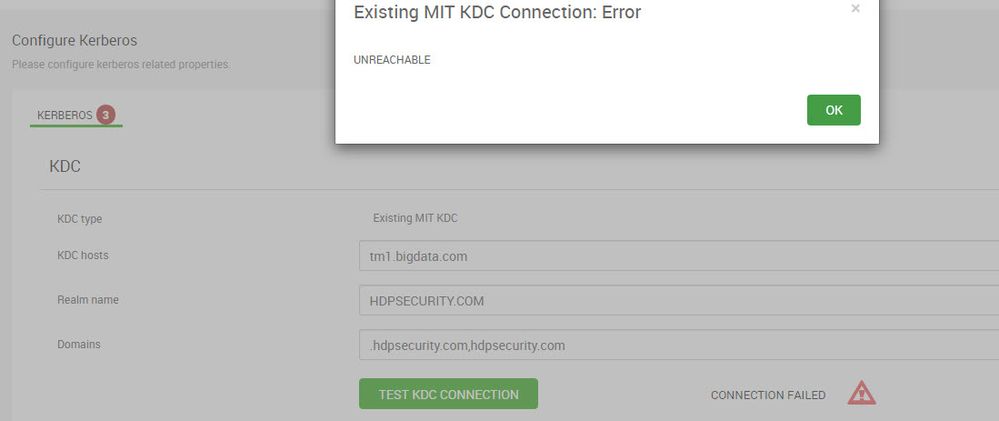
Thanks for your help Shelton. I have one other question... trying to enable Kerberos in other server but it is saying not reachable. Using similar configuration... server name different. What would be be the issue? btw. it is on HDP 3.1(Ambari 2.7) on CentOS 7 server. What could be the reason to not able to reach the KDC?