

NiFi convert json to csv with optional attributes
Hello,
I have a problem with converting json to csv.
I use ConvertRecord processor with attached JsonTreeReader and CSVRecordSetWriter.
The schema for both might look like this. Attributes in the json are optional.
{
"type": "record",
"name": "some_event",
"fields": [
{ "name": "date_time", "type": ["string","null"] },
{ "name": "id", "type": ["string","null"] },
{ "name": "is_success", "type": ["string","null"] },
{ "name": "username", "type": ["string","null"] },
{ "name": "username_type", "type": ["string","null"] }
]
}
for the input json like
{
"date_time": "2017-01-29T13:42:03.965Z",
"id": "20049015990001584400001"
"is_success": "TRUE",
}
where username and username_type is not set, the output does not correspond to my expectation
I get
2022-01-29T13:42:03.965Z|20049015990001584400001|true
instead of
2022-01-29T13:42:03.965Z|20049015990001584400001|true||
which should be the right format. Note the separator for null values at the end of the second record.
Do you have some hints, how to solve it? It should be sort of standard task.
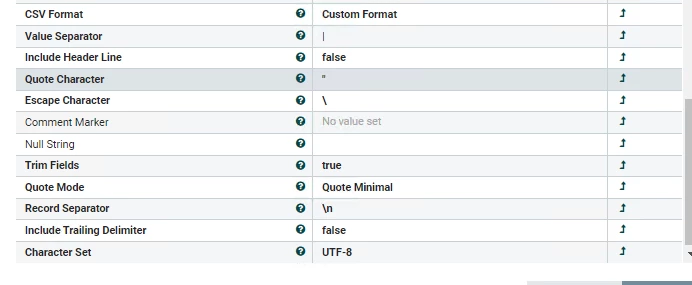
The CSVRecordSetWriter is configured like this:
We use
Cloudera Flow Management (CFM) 2.0.4.3
1.11.4.2.0.4.3-1 built 01/06/2021 23:14:00 CET
Best regards
Jaro

