Hi,
I'm using NIFI EvaluateXPath module.
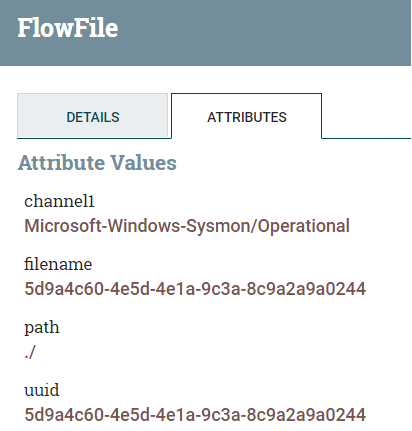
I am trying to extract the value from the first Channel parameter (Microsoft-Windows-Sysmon/Operational) and add it as an attribute - The channel1 attribute is empty when setting the value to "/Event/System/Channel"
I'm trying to understand what should be the Value in the Channel1 property
XML
<?xml version="1.0" encoding="UTF-8"?>
<Event xmlns="http://schemas.microsoft.com/win/2004/08/events/event">
   <System>
      <Provider Name="Microsoft-Windows-Sysmon"
                Guid="{5770385f-c22a-43e0-bf4c-06f5698ffbd9}"/>
      <EventID>10</EventID>
      <Version>3</Version>
      <Level>4</Level>
      <Task>10</Task>
      <Opcode>0</Opcode>
      <Keywords>0x8000000000000000</Keywords>
      <TimeCreated SystemTime="2020-12-03T14:23:35.660463800Z"/>
      <EventRecordID>94211</EventRecordID>
      <Correlation/>
      <Execution ProcessID="10052" ThreadID="9516"/>
      <Channel>Microsoft-Windows-Sysmon/Operational</Channel>
      <Computer>workstation.test.com</Computer>
      <Security UserID="S-1-5-18"/>
   </System>
   <EventData>
      <Data Name="RuleName"/>
      <Data Name="UtcTime">2020-12-03 14:23:35.659</Data>
      <Data Name="SourceProcessGUID">{921b204f-2632-5fc2-0000-0010a0d20100}</Data>
      <Data Name="SourceProcessId">3428</Data>
      <Data Name="SourceThreadId">4072</Data>
      <Data Name="SourceImage">C:\ProgramData\Microsoft\Windows Defender\platform\4.18.2010.7-0\MsMpEng.exe</Data>
      <Data Name="TargetProcessGUID">{921b204f-2636-5fc2-0000-001085f80200}</Data>
      <Data Name="TargetProcessId">4212</Data>
      <Data Name="TargetImage">C:\ProgramData\Microsoft\Windows Defender\platform\4.18.2010.7-0\NisSrv.exe</Data>
      <Data Name="GrantedAccess">0x1400</Data>
      <Data Name="CallTrace">C:\Windows\SYSTEM32\ntdll.dll+9c584|C:\Windows\System32\KERNELBASE.dll+2730e|C:\ProgramData\Microsoft\Windows Defender\platform\4.18.2010.7-0\mpsvc.dll+1c606f|C:\ProgramData\Microsoft\Windows Defender\platform\4.18.2010.7-0\mpsvc.dll+103572|C:\ProgramData\Microsoft\Windows Defender\platform\4.18.2010.7-0\mpsvc.dll+1093e6|C:\Windows\System32\ucrtbase.dll+20e72|C:\Windows\System32\KERNEL32.DLL+17bd4|C:\Windows\SYSTEM32\ntdll.dll+6ced1</Data>
   </EventData>
   <RenderingInfo Culture="en-US">
      <Message>Process accessed:
RuleName:
UtcTime: 2020-12-03 14:23:35.659
SourceProcessGUID: {921b204f-2632-5fc2-0000-0010a0d20100}
SourceProcessId: 3428
SourceThreadId: 4072
SourceImage: C:\ProgramData\Microsoft\Windows Defender\platform\4.18.2010.7-0\MsMpEng.exe
TargetProcessGUID: {921b204f-2636-5fc2-0000-001085f80200}
TargetProcessId: 4212
TargetImage: C:\ProgramData\Microsoft\Windows Defender\platform\4.18.2010.7-0\NisSrv.exe
GrantedAccess: 0x1400
CallTrace: C:\Windows\SYSTEM32\ntdll.dll+9c584|C:\Windows\System32\KERNELBASE.dll+2730e|C:\ProgramData\Microsoft\Windows Defender\platform\4.18.2010.7-0\mpsvc.dll+1c606f|C:\ProgramData\Microsoft\Windows Defender\platform\4.18.2010.7-0\mpsvc.dll+103572|C:\ProgramData\Microsoft\Windows Defender\platform\4.18.2010.7-0\mpsvc.dll+1093e6|C:\Windows\System32\ucrtbase.dll+20e72|C:\Windows\System32\KERNEL32.DLL+17bd4|C:\Windows\SYSTEM32\ntdll.dll+6ced1</Message>
      <Level>Information</Level>
      <Task>Process accessed (rule: ProcessAccess)</Task>
      <Opcode>Info</Opcode>
      <Channel/>
      <Provider/>
      <Keywords/>
   </RenderingInfo>
</Event>
Configuration

Empty Attribute



 Hi, I'm CLEO! Something exciting is coming to the Community. Stay Tuned!