
Our Community is getting an upgrade! To get everything ready for the relaunch, we’ll be placing the site in read-only mode starting September 21st.
We really appreciate your understanding while we get things set up behind the scenes. Catch up on all the exciting details about the move here.
Need help or have questions? Drop us a line at [email protected]

Support Questions
 Hi, I'm CLEO! Something exciting is coming to the Community. Stay Tuned!
- Cloudera Community
- Support
- Support Questions
- Re: Nifi Unable to convert CSV to Excel using POI ...
- Subscribe to RSS Feed
- Mark Question as New
- Mark Question as Read
- Float this Question for Current User
- Bookmark
- Subscribe
- Mute
- Printer Friendly Page
- Subscribe to RSS Feed
- Mark Question as New
- Mark Question as Read
- Float this Question for Current User
- Bookmark
- Subscribe
- Mute
- Printer Friendly Page
Nifi Unable to convert CSV to Excel using POI API
- Labels:
-
Apache NiFi


Created 12-22-2022 03:19 PM
- Mark as New
- Bookmark
- Subscribe
- Mute
- Subscribe to RSS Feed
- Permalink
- Report Inappropriate Content
I want to convert csv flowfile content into XLS file usin groovy script + POI API
I m using ivy to grab POI dependencies and it seems work well.
please find more details below:
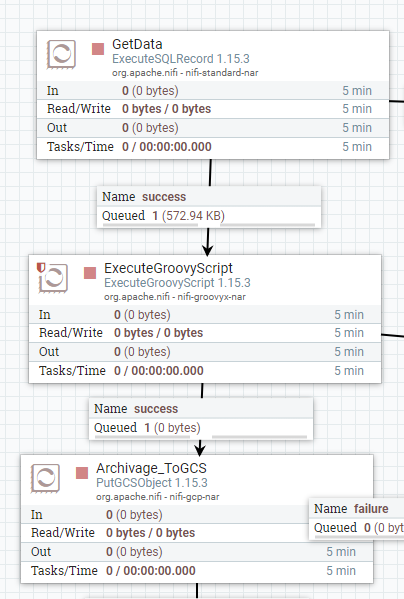
This is my Nifi flow:
This is my script
@Grapes(@Grab(group='org.apache.poi', module='poi-ooxml', version='3.9'))
import org.apache.poi.ss.usermodel.*
import org.apache.poi.hssf.usermodel.*
import org.apache.poi.xssf.usermodel.*
import org.apache.poi.ss.util.*
import org.apache.poi.ss.usermodel.*
import org.apache.poi.hssf.extractor.*
import java.nio.charset.*
import java.io.*
import org.apache.commons.io.IOUtils

def flowFile = session.get()
def date = new Date()

if(!flowFile) return

flowFile = session.write(flowFile, {inputStream, outputStream ->
try {

Workbook wb = WorkbookFactory.create(inputStream,);
Sheet mySheet = wb.getSheetAt(0);


def record = IOUtils.toString(inputStream, StandardCharsets.UTF_8)
outputStream.write(record.getBytes(StandardCharsets.UTF_8))

wb.close();

} catch(e) {
 log.error("Error during processing", e)
 session.transfer(flowFile, REL_FAILURE)
}
} as StreamCallback)


def filename = flowFile.getAttribute('filename')+'.xlsx'
flowFile = session.putAttribute(flowFile, 'filename', filename)

session.transfer(flowFile, REL_SUCCESS)
I get this error
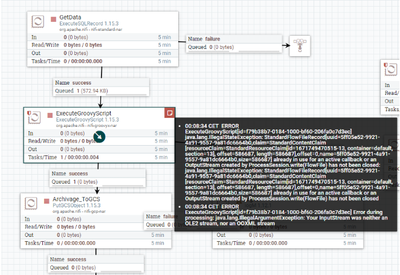
Any idea about this error ?
Created 01-03-2023 01:56 PM
- Mark as New
- Bookmark
- Subscribe
- Mute
- Subscribe to RSS Feed
- Permalink
- Report Inappropriate Content
I found a solution, this is my worked scripr:
@Grapes(@Grab(group='org.apache.poi', module='poi-ooxml', version='3.9'))
import com.opencsv.CSVReader
@Grapes(@Grab(group='com.opencsv', module='opencsv', version='4.2'))
import org.apache.poi.ss.usermodel.*
import org.apache.poi.xssf.streaming.*
import org.apache.poi.hssf.usermodel.*
import org.apache.poi.xssf.usermodel.*
import org.apache.poi.ss.util.*
import org.apache.poi.ss.usermodel.*
import org.apache.poi.hssf.extractor.*
import java.nio.charset.*
import java.io.*
import org.apache.commons.io.IOUtils

def flowFile = session.get()
def date = new Date()

if(!flowFile) return


flowFile = session.write(flowFile, {inputStream, outputStream ->
        SXSSFSheet sheet1 = null;
        CSVReader reader = null;
        Workbook wb = null;
        String generatedXlsFilePath = "/home/";
        FileOutputStream fileOutputStream = null;

  def filename = flowFile.getAttribute('filename')
  def path = flowFile.getAttribute('path')

            def nextLine = ''
            reader = new CSVReader(new FileReader(path+filename), ',');

 //Workbook wb = WorkbookFactory.create(inputStream,);
 //Sheet sheet1 = wb.createSheet("Feuille");

            wb = new SXSSFWorkbook(inputStream);
            sheet1 = (SXSSFSheet) wb.createSheet('Sheet');

            def rowNum = 0;
            while((nextLine = reader.readNext()) != null) {
                Row currentRow = sheet1.createRow(rowNum++);
                for(int i=0; i < nextLine.length; i++) {
                    if(NumberUtils.isDigits(nextLine[i])) {
                        currentRow.createCell(i).setCellValue(Integer.parseInt(nextLine[i]));
                    } else if (NumberUtils.isNumber(nextLine[i])) {
                        currentRow.createCell(i).setCellValue(Double.parseDouble(nextLine[i]));
                    } else {
                        currentRow.createCell(i).setCellValue(nextLine[i]);
                    }
                }
            }


            //fileOutputStream = new FileOutputStream(generatedXlsFilePath.trim());
            //wb.write(fileOutputStream);
            generatedXlsFilePath = generatedXlsFilePath + 'SAISIE_MAGASING.XLS'
            outputStream = new FileOutputStream(generatedXlsFilePath.trim());

            wb.write(outputStream);

                wb.close();
                //fileOutputStream.close();
                outputStream.close();
                reader.close();
                //outputStream.close();
                inputStream.close();


} as StreamCallback)


flowFile = session.putAttribute(flowFile, 'filename', filename)
Created 01-03-2023 01:56 PM
- Mark as New
- Bookmark
- Subscribe
- Mute
- Subscribe to RSS Feed
- Permalink
- Report Inappropriate Content
I found a solution, this is my worked scripr:
@Grapes(@Grab(group='org.apache.poi', module='poi-ooxml', version='3.9'))
import com.opencsv.CSVReader
@Grapes(@Grab(group='com.opencsv', module='opencsv', version='4.2'))
import org.apache.poi.ss.usermodel.*
import org.apache.poi.xssf.streaming.*
import org.apache.poi.hssf.usermodel.*
import org.apache.poi.xssf.usermodel.*
import org.apache.poi.ss.util.*
import org.apache.poi.ss.usermodel.*
import org.apache.poi.hssf.extractor.*
import java.nio.charset.*
import java.io.*
import org.apache.commons.io.IOUtils

def flowFile = session.get()
def date = new Date()

if(!flowFile) return


flowFile = session.write(flowFile, {inputStream, outputStream ->
        SXSSFSheet sheet1 = null;
        CSVReader reader = null;
        Workbook wb = null;
        String generatedXlsFilePath = "/home/";
        FileOutputStream fileOutputStream = null;

  def filename = flowFile.getAttribute('filename')
  def path = flowFile.getAttribute('path')

            def nextLine = ''
            reader = new CSVReader(new FileReader(path+filename), ',');

 //Workbook wb = WorkbookFactory.create(inputStream,);
 //Sheet sheet1 = wb.createSheet("Feuille");

            wb = new SXSSFWorkbook(inputStream);
            sheet1 = (SXSSFSheet) wb.createSheet('Sheet');

            def rowNum = 0;
            while((nextLine = reader.readNext()) != null) {
                Row currentRow = sheet1.createRow(rowNum++);
                for(int i=0; i < nextLine.length; i++) {
                    if(NumberUtils.isDigits(nextLine[i])) {
                        currentRow.createCell(i).setCellValue(Integer.parseInt(nextLine[i]));
                    } else if (NumberUtils.isNumber(nextLine[i])) {
                        currentRow.createCell(i).setCellValue(Double.parseDouble(nextLine[i]));
                    } else {
                        currentRow.createCell(i).setCellValue(nextLine[i]);
                    }
                }
            }


            //fileOutputStream = new FileOutputStream(generatedXlsFilePath.trim());
            //wb.write(fileOutputStream);
            generatedXlsFilePath = generatedXlsFilePath + 'SAISIE_MAGASING.XLS'
            outputStream = new FileOutputStream(generatedXlsFilePath.trim());

            wb.write(outputStream);

                wb.close();
                //fileOutputStream.close();
                outputStream.close();
                reader.close();
                //outputStream.close();
                inputStream.close();


} as StreamCallback)


flowFile = session.putAttribute(flowFile, 'filename', filename)


