
Our Community is getting an upgrade! To get everything ready for the relaunch, we’ll be placing the site in read-only mode starting September 21st.
We really appreciate your understanding while we get things set up behind the scenes. Catch up on all the exciting details about the move here.
Need help or have questions? Drop us a line at [email protected]

Support Questions
 Hi, I'm CLEO! Something exciting is coming to the Community. Stay Tuned!
- Cloudera Community
- Support
- Support Questions
- Re: REST API + create an instance of SLIDER view
- Subscribe to RSS Feed
- Mark Question as New
- Mark Question as Read
- Float this Question for Current User
- Bookmark
- Subscribe
- Mute
- Printer Friendly Page
- Subscribe to RSS Feed
- Mark Question as New
- Mark Question as Read
- Float this Question for Current User
- Bookmark
- Subscribe
- Mute
- Printer Friendly Page
REST API + create an instance of SLIDER view
- Labels:
-
Apache Ambari


Created on 02-12-2019 12:32 PM - edited 08-17-2019 02:39 PM
- Mark as New
- Bookmark
- Subscribe
- Mute
- Subscribe to RSS Feed
- Permalink
- Report Inappropriate Content
hi all
we want to create an instance of SLIDER view

so we run the following API
 curl --user admin:admin -i -H 'X-Requested-By: ambari' -X POST http://localhost:8080/api/v1/views/SLIDER/versions/2.0.0/instances/SLIDER_NEW
HTTP/1.1 400 Bad Request
X-Frame-Options: SAMEORIGIN
X-XSS-Protection: 1; mode=block
X-Content-Type-Options: nosniff
Cache-Control: no-store
Pragma: no-cache
Set-Cookie: AMBARISESSIONID=hpxbpzq0m16x1xygqwvbu3340;Path=/;HttpOnly
Expires: Thu, 01 Jan 1970 00:00:00 GMT
User: admin
Content-Type: text/plain
Content-Length: 527
{
  "status" : 400,
  "message" : "{\"propertyResults\":{\"ambari.server.password\":{\"valid\":false,\"detail\":\"No property values exist for the required parameter ambari.server.password.\"},\"ambari.server.url\":{\"valid\":false,\"detail\":\"No property values exist for the required parameter ambari.server.url.\"},\"ambari.server.username\":{\"valid\":false,\"detail\":\"No property values exist for the required parameter ambari.server.username.\"}},\"valid\":false,\"detail\":\"The instance has invalid properties.\"}"
but not succeeded
please advice what is wrong with my API?



Created 02-12-2019 12:52 PM
- Mark as New
- Bookmark
- Subscribe
- Mute
- Subscribe to RSS Feed
- Permalink
- Report Inappropriate Content
Can you please try something like this:
# curl --user admin:admin -i -H 'X-Requested-By: ambari' -X POST -d '{"ViewInstanceInfo":{"instance_name":"SLIDER_NEW","label":"SLIDER_NEW","visible":true,"description":"SLIDER_NEWDescription","properties":{"ambari.server.url":"http://localhost:8080/api/v1/clusters/YOUR_CLUSTER_NAME","ambari.server.username":"admin","ambari.server.password":"admin","slider.user":"admin"},"cluster_type":"NONE"}}' http://localhost:8080/api/v1/views/SLIDER/versions/2.0.0/instances/SLIDER_NEW.
You will need to make sure to change the Cluster Name "YOUR_CLUSTER_NAME" in the following piece of the JSON data:
"ambari.server.url":"http://localhost:8080/api/v1/clusters/YOUR_CLUSTER_NAME"
.
Created 02-12-2019 12:52 PM
- Mark as New
- Bookmark
- Subscribe
- Mute
- Subscribe to RSS Feed
- Permalink
- Report Inappropriate Content
Can you please try something like this:
# curl --user admin:admin -i -H 'X-Requested-By: ambari' -X POST -d '{"ViewInstanceInfo":{"instance_name":"SLIDER_NEW","label":"SLIDER_NEW","visible":true,"description":"SLIDER_NEWDescription","properties":{"ambari.server.url":"http://localhost:8080/api/v1/clusters/YOUR_CLUSTER_NAME","ambari.server.username":"admin","ambari.server.password":"admin","slider.user":"admin"},"cluster_type":"NONE"}}' http://localhost:8080/api/v1/views/SLIDER/versions/2.0.0/instances/SLIDER_NEW.
You will need to make sure to change the Cluster Name "YOUR_CLUSTER_NAME" in the following piece of the JSON data:
"ambari.server.url":"http://localhost:8080/api/v1/clusters/YOUR_CLUSTER_NAME"
.
Created on 02-12-2019 01:19 PM - edited 08-17-2019 02:39 PM
- Mark as New
- Bookmark
- Subscribe
- Mute
- Subscribe to RSS Feed
- Permalink
- Report Inappropriate Content
@Jay , when I click on "go to instance" we get

Slider View requires access to user's home directory in HDFS to proceed. Contact your administrator to create the home directory. (File hdfs://hdfsha/user/slider does not exist.)
Created 02-12-2019 01:25 PM
- Mark as New
- Bookmark
- Subscribe
- Mute
- Subscribe to RSS Feed
- Permalink
- Report Inappropriate Content
I solved it by
hadoop fs -mkdir /user/slider
Created on 02-12-2019 01:27 PM - edited 08-17-2019 02:39 PM
- Mark as New
- Bookmark
- Subscribe
- Mute
- Subscribe to RSS Feed
- Permalink
- Report Inappropriate Content
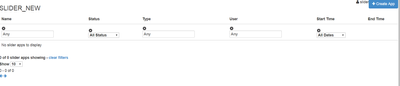
but when I click on Create App button ( on the right side )
we get black screen , - why?
Created on 02-12-2019 01:30 PM - edited 08-17-2019 02:39 PM
- Mark as New
- Bookmark
- Subscribe
- Mute
- Subscribe to RSS Feed
- Permalink
- Report Inappropriate Content
example after we click on - Create App button

Created 02-12-2019 03:14 PM
- Mark as New
- Bookmark
- Subscribe
- Mute
- Subscribe to RSS Feed
- Permalink
- Report Inappropriate Content
Just create the home directory as follows
# su - hdfs
$ hdfs dfs -mkdir /user/slider
$ hdfs dfs -chown slider:hdfs /user/slider
That should be enough .. good luck


