Our Community is getting an upgrade! To get everything ready for the relaunch, we’ll be placing the site in read-only mode starting September 21st.
We really appreciate your understanding while we get things set up behind the scenes. Catch up on all the exciting details about the move here.
Need help or have questions? Drop us a line at [email protected]

Support Questions
 Hi, I'm CLEO! Something exciting is coming to the Community. Stay Tuned!
- Cloudera Community
- Support
- Support Questions
- Re: [SOLVED] Using an External Source in Cloudbrea...
- Subscribe to RSS Feed
- Mark Question as New
- Mark Question as Read
- Float this Question for Current User
- Bookmark
- Subscribe
- Mute
- Printer Friendly Page
- Subscribe to RSS Feed
- Mark Question as New
- Mark Question as Read
- Float this Question for Current User
- Bookmark
- Subscribe
- Mute
- Printer Friendly Page
[SOLVED] Using an External Source in Cloudbreak
- Labels:
-
Hortonworks Cloudbreak


Created on 03-13-2019 09:48 PM - edited 08-17-2019 04:46 PM
- Mark as New
- Bookmark
- Subscribe
- Mute
- Subscribe to RSS Feed
- Permalink
- Report Inappropriate Content
Hi All,
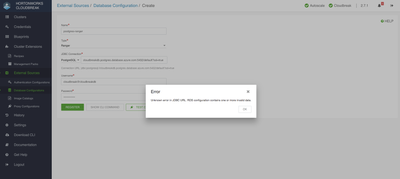
Trying to add an Azure Database for Postgres (v10). I am able to access it using psql from my host however when trying to add it to Hortonworks as an External Source gives the following issue:
Kind Regards,
Nathaniel Vala



Created 03-25-2019 02:25 PM
- Mark as New
- Bookmark
- Subscribe
- Mute
- Subscribe to RSS Feed
- Permalink
- Report Inappropriate Content
@Nathaniel Vala This might be of help.

Created 03-18-2019 09:08 PM
- Mark as New
- Bookmark
- Subscribe
- Mute
- Subscribe to RSS Feed
- Permalink
- Report Inappropriate Content
Hi Nathaniel,
This issue discovered and fixed in Cloudbreak 2.7.2. You can update to this version easily, here are the steps:
1. Navigate to your deployment directory
2. Run the following commands:
 export CBD_VERSION=2.7.2
curl -Ls public-repo-1.hortonworks.com/HDP/cloudbreak/cloudbreak-deployer_${CBD_VERSION}_$(uname)_x86_64.tgz | tar -xz -C /bin cbd- $(uname) will be replaced automatically with Linux or Darwin according to the OS you are running it
> If you would like to download via browser, replace2.7.2 and $(uname) in the URL and then paste the URL in the browser and extract into the /bin directory
3.Verify the version
cbd version
4.Next, restart Cloudbreak by using:
cbd restart
Let me know if you need any help!
Br,
Gergely
Created on 03-19-2019 10:14 AM - edited 08-17-2019 04:46 PM
- Mark as New
- Bookmark
- Subscribe
- Mute
- Subscribe to RSS Feed
- Permalink
- Report Inappropriate Content
Hi @Gergely Topolyai, Thanks for the recommendation, I upgraded to 2.9.0 however was still not able to connect. However this time I got a more verbose message, looks like it is an Azure routing / compatibility issue.

Created 03-25-2019 02:25 PM
- Mark as New
- Bookmark
- Subscribe
- Mute
- Subscribe to RSS Feed
- Permalink
- Report Inappropriate Content
@Nathaniel Vala This might be of help.
Created on 03-26-2019 07:15 AM - edited 08-17-2019 04:46 PM
- Mark as New
- Bookmark
- Subscribe
- Mute
- Subscribe to RSS Feed
- Permalink
- Report Inappropriate Content
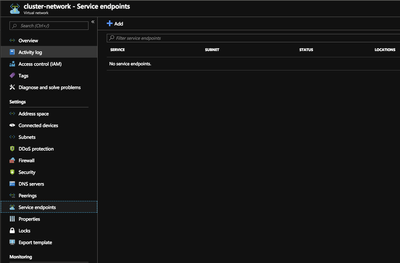
Thanks! This solved the issue. Once I had removed the SQL service endpoint from the VNet that hosted my cloudbreak VM everything worked fine 🙂