Omarb
Bronze III
August 17, 2022
Solved

Unable to read topic containing a csv file with one row and no headers in Nifi

I am trying to read a kafka topic that contains a csv file with no headers. The file is read as it should be when the csv contains two rows or more (no headers) but when I use a csv file with only one row (no headers) the processor Read from Kafka doesn't do anything (no error message, and no file ingested. (0 in 0 out)

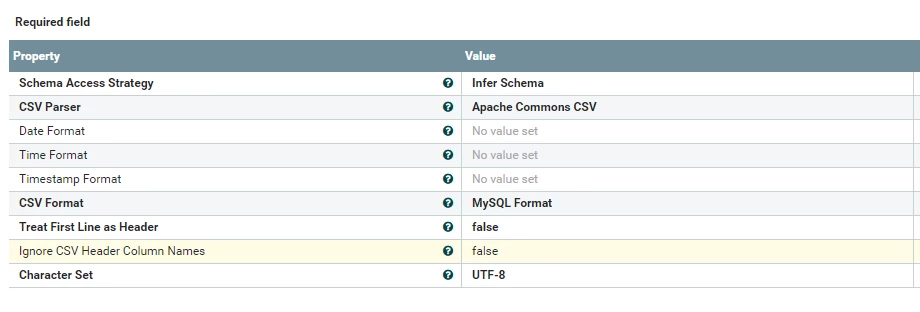
The controller services show below are : 

- CSVReader

csv reader.PNG

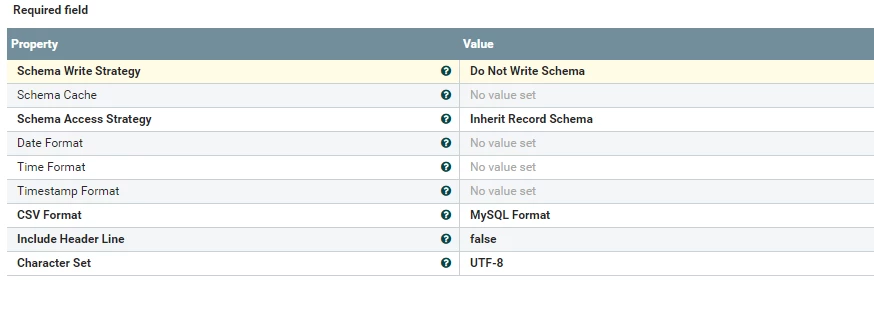
CSVRecordSetWriter : 

record writer.PNG

araujo
araujoAnswer
Platinum ⭐️⭐️⭐️
August 27, 2022

@Omarb ,


Initially I thought this was a problem with the CSVRecordSetWriter, but I was mistaken.

The issue here is that even though your CSVReader is set to ignore the header line, it has Schema Access Strategy set to "Infer Schema", and this will cause the reader to consume the first line of the flow file to infer the schema, even though the other property tells it to ignore it.


To avoid this, set the Schema Access Strategy property to "Use 'Schema Text' Property" and provide a schema that matches your flowfile structure. For example:

 "type": "record",
"name": "MyFlowFile",
"fields": [
{ "name": "col_a", "type": "string" },
{ "name": "col_b", "type": "string" },
{ "name": "col_c", "type": "string" },
...
]
}


This will stop the first line being "consumed" by the reader.


Cheers,

André

-- Was your question answered? Please take some time to click on "Accept as Solution" below this post. If you find a reply useful, say thanks by clicking on the thumbs up button.


3 replies

steven-matison
Platinum ⭐️⭐️
Platinum ⭐️⭐️
August 22, 2022

@Omarb   Not sure if this is helpful, but sometimes I do something like this: 


Take the operational test, write the schema, then capture it from one of your tests (check attributes for the schema).   Now re-use that schema object for the non-operational test instead of infer-schema.    I only like to infer schema to help me write the schema, especially if complicated.


Hope this helps,


Steven

Translate
araujo
Platinum ⭐️⭐️⭐️
araujoAnswer
Platinum ⭐️⭐️⭐️
August 27, 2022

@Omarb ,


Initially I thought this was a problem with the CSVRecordSetWriter, but I was mistaken.

The issue here is that even though your CSVReader is set to ignore the header line, it has Schema Access Strategy set to "Infer Schema", and this will cause the reader to consume the first line of the flow file to infer the schema, even though the other property tells it to ignore it.


To avoid this, set the Schema Access Strategy property to "Use 'Schema Text' Property" and provide a schema that matches your flowfile structure. For example:

 "type": "record",
"name": "MyFlowFile",
"fields": [
{ "name": "col_a", "type": "string" },
{ "name": "col_b", "type": "string" },
{ "name": "col_c", "type": "string" },
...
]
}


This will stop the first line being "consumed" by the reader.


Cheers,

André

Translate
-- Was your question answered? Please take some time to click on "Accept as Solution" below this post. If you find a reply useful, say thanks by clicking on the thumbs up button.
VidyaSargur
Community Manager
Community Manager
September 5, 2022

@Omarb, Has any of the replies helped resolve your issue? If so, please mark the appropriate reply as the solution, as it will make it easier for others to find the answer in the future. 

Translate
Regards, Vidya Sargur, Community Manager Was your question answered? Make sure to mark the answer as the accepted solution. If you find a reply useful, say thanks by clicking on the thumbs up button.