
Our Community is getting an upgrade! To get everything ready for the relaunch, we’ll be placing the site in read-only mode starting September 21st.
We really appreciate your understanding while we get things set up behind the scenes. Catch up on all the exciting details about the move here.
Need help or have questions? Drop us a line at [email protected]

Support Questions
 Hi, I'm CLEO! Something exciting is coming to the Community. Stay Tuned!
- Cloudera Community
- Support
- Support Questions
- Understanding FlowFile Attributes and Metadata Man...
- Subscribe to RSS Feed
- Mark Question as New
- Mark Question as Read
- Float this Question for Current User
- Bookmark
- Subscribe
- Mute
- Printer Friendly Page
- Subscribe to RSS Feed
- Mark Question as New
- Mark Question as Read
- Float this Question for Current User
- Bookmark
- Subscribe
- Mute
- Printer Friendly Page
Understanding FlowFile Attributes and Metadata Management in Apache NiFi
- Labels:
-
Apache NiFi


Created on
04-26-2018
10:57 AM
- last edited on
06-05-2026
09:10 AM
by
 DianaTorres

- Mark as New
- Bookmark
- Subscribe
- Mute
- Subscribe to RSS Feed
- Permalink
- Report Inappropriate Content
@Rahul Soni Hi Rahul..I wanted to monitor the jvm heap usage in Nifi.So could you please suggest me a way to load flowfile attributes heavily?


Created on 04-26-2018 03:00 PM - edited 08-18-2019 02:09 AM
- Mark as New
- Bookmark
- Subscribe
- Mute
- Subscribe to RSS Feed
- Permalink
- Report Inappropriate Content
The GenerateFlowFile processor will create 1 GB of content for each FlowFile it creates. The FlowFile content does not live in heap memory space.
-
Each generated FlowFile will have a core set of FlowFile Attributes created. For example:
--------------------------------------------------
Standard FlowFile Attributes
Key: 'entryDate'
 Value: 'Thu Apr 26 14:52:12 UTC 2018'
Key: 'lineageStartDate'
 Value: 'Thu Apr 26 14:52:12 UTC 2018'
Key: 'fileSize'
 Value: '67'
FlowFile Attribute Map Content
Key: 'filename'
 Value: '7409235136254821'
Key: 'path'
 Value: './'
Key: 'uuid'
 Value: '119b16a1-7cb2-40ff-b92e-77bc733389e6'
--------------------------------------------------
-
You can however define attributes on attributes on each generated FlowFile by adding attributes via custom properties in GenerateFlowFile processor:
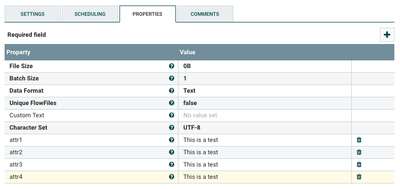
FileSize in the case of heap does not matter when it comes to heap usage of queued FlowFiles.
In this way you can create FlowFiles with as many attributes as you want:
--------------------------------------------------
Standard FlowFile Attributes
Key: 'entryDate'
 Value: 'Thu Apr 26 14:55:54 UTC 2018'
Key: 'lineageStartDate'
 Value: 'Thu Apr 26 14:55:54 UTC 2018'
Key: 'fileSize'
 Value: '0'
FlowFile Attribute Map Content
Key: 'attr1'
 Value: 'This is a test'
Key: 'attr2'
 Value: 'This is a test'
Key: 'attr3'
 Value: 'This is a test'
Key: 'attr4'
 Value: 'This is a test'
Key: 'filename'
 Value: '7409457340083769'
Key: 'path'
 Value: './'
Key: 'uuid'
 Value: 'f6254149-be47-46f3-a659-c5126ae80481'
--------------------------------------------------
-
You can adjust the run schedule and batch setting to control the number of new FlowFiles generated over a specific time period.
-
For example: Setting run Schedule to 5 sec and Batch Size to 1000, Every 5 seconds this procesor will produce 1000 new FlowFiles.
-
Thanks,
Matt
Created on 04-26-2018 03:00 PM - edited 08-18-2019 02:09 AM
- Mark as New
- Bookmark
- Subscribe
- Mute
- Subscribe to RSS Feed
- Permalink
- Report Inappropriate Content
The GenerateFlowFile processor will create 1 GB of content for each FlowFile it creates. The FlowFile content does not live in heap memory space.
-
Each generated FlowFile will have a core set of FlowFile Attributes created. For example:
--------------------------------------------------
Standard FlowFile Attributes
Key: 'entryDate'
 Value: 'Thu Apr 26 14:52:12 UTC 2018'
Key: 'lineageStartDate'
 Value: 'Thu Apr 26 14:52:12 UTC 2018'
Key: 'fileSize'
 Value: '67'
FlowFile Attribute Map Content
Key: 'filename'
 Value: '7409235136254821'
Key: 'path'
 Value: './'
Key: 'uuid'
 Value: '119b16a1-7cb2-40ff-b92e-77bc733389e6'
--------------------------------------------------
-
You can however define attributes on attributes on each generated FlowFile by adding attributes via custom properties in GenerateFlowFile processor:
FileSize in the case of heap does not matter when it comes to heap usage of queued FlowFiles.
In this way you can create FlowFiles with as many attributes as you want:
--------------------------------------------------
Standard FlowFile Attributes
Key: 'entryDate'
 Value: 'Thu Apr 26 14:55:54 UTC 2018'
Key: 'lineageStartDate'
 Value: 'Thu Apr 26 14:55:54 UTC 2018'
Key: 'fileSize'
 Value: '0'
FlowFile Attribute Map Content
Key: 'attr1'
 Value: 'This is a test'
Key: 'attr2'
 Value: 'This is a test'
Key: 'attr3'
 Value: 'This is a test'
Key: 'attr4'
 Value: 'This is a test'
Key: 'filename'
 Value: '7409457340083769'
Key: 'path'
 Value: './'
Key: 'uuid'
 Value: 'f6254149-be47-46f3-a659-c5126ae80481'
--------------------------------------------------
-
You can adjust the run schedule and batch setting to control the number of new FlowFiles generated over a specific time period.
-
For example: Setting run Schedule to 5 sec and Batch Size to 1000, Every 5 seconds this procesor will produce 1000 new FlowFiles.
-
Thanks,
Matt
Created 04-27-2018 06:11 AM
- Mark as New
- Bookmark
- Subscribe
- Mute
- Subscribe to RSS Feed
- Permalink
- Report Inappropriate Content
Thanks Matt for the information..and helping out...it worked


