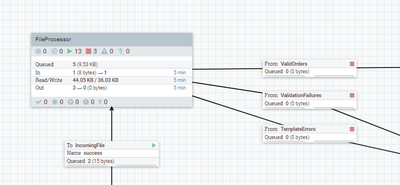
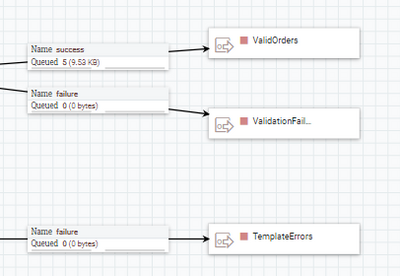
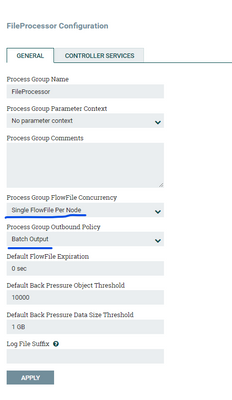
Our Community is getting an upgrade! To get everything ready for the relaunch, we’ll be placing the site in read-only mode starting September 21st.
We really appreciate your understanding while we get things set up behind the scenes. Catch up on all the exciting details about the move here.
Need help or have questions? Drop us a line at [email protected]

Support Questions
 Hi, I'm CLEO! Something exciting is coming to the Community. Stay Tuned!
- Cloudera Community
- Support
- Support Questions
- Wait for a Flowfile to be picked only after the pr...
- Subscribe to RSS Feed
- Mark Question as New
- Mark Question as Read
- Float this Question for Current User
- Bookmark
- Subscribe
- Mute
- Printer Friendly Page
- Subscribe to RSS Feed
- Mark Question as New
- Mark Question as Read
- Float this Question for Current User
- Bookmark
- Subscribe
- Mute
- Printer Friendly Page
Wait for a Flowfile to be picked only after the previous flowfile has been processed completely
- Labels:
-
Apache NiFi


Created 08-31-2023 02:35 AM
- Mark as New
- Bookmark
- Subscribe
- Mute
- Subscribe to RSS Feed
- Permalink
- Report Inappropriate Content
I have a flowfile that is a list of files,
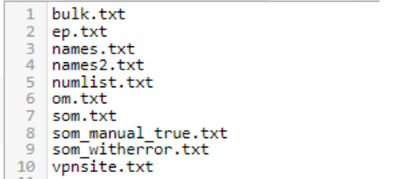
that gets split into individual flowfiles (10 in this case)
I am using FetchSFTP to fetch the file from a sftp location, the content of this fetched file is then split and is processed and stored.
In this example: I want to start processing ep.txt only after i have processed bulk.txt after that names.txt and so on.
I was referring to these links:
NiFi workflow monitoring – Wait/Notify pattern with split and merge – Pierre Villard
and
How to wait for all fragments to be processed, then do something? (ijokarumawak.github.io)
I was able to implement something like this.

but this is not what I was looking for, I want to implement a wait before fetchSFTP

I tried release signal identifier with filename , but that was stopping any flowfile from moving forward.
Please advise, thank you


Created 08-31-2023 09:15 AM
- Mark as New
- Bookmark
- Subscribe
- Mute
- Subscribe to RSS Feed
- Permalink
- Report Inappropriate Content
Another way to consider for processing one file at a time:
https://www.youtube.com/watch?v=kvJx8vQnCNE&lc=UgzHBAI-4X3vn_dWSHV4AaABAg.9ssoo7vzq1d9ssqH-c7ttL




Created 08-31-2023 05:01 AM
- Mark as New
- Bookmark
- Subscribe
- Mute
- Subscribe to RSS Feed
- Permalink
- Report Inappropriate Content
You can evaluate the following for better approach
1. Batch use case with ListSFTP/FetchSFTP
2 . ExecuteStateless processor
Thank you
Created 08-31-2023 08:57 AM
- Mark as New
- Bookmark
- Subscribe
- Mute
- Subscribe to RSS Feed
- Permalink
- Report Inappropriate Content
Thanks for the reply, I cannot use list sftp as it does not allow incoming request hence I have created an execute stream command processor that fetches the list.
I will then feed these list into fetch sftp and then process these files.
I want to fetch these file one by one only after the previous file has processed completely. So far with my implementation the files are picked almost immediately and processed, I cannot use the control rate processor in between because each file has different set of data and have varying processing time
Created 08-31-2023 09:15 AM
- Mark as New
- Bookmark
- Subscribe
- Mute
- Subscribe to RSS Feed
- Permalink
- Report Inappropriate Content
Another way to consider for processing one file at a time:
https://www.youtube.com/watch?v=kvJx8vQnCNE&lc=UgzHBAI-4X3vn_dWSHV4AaABAg.9ssoo7vzq1d9ssqH-c7ttL
Created 09-03-2023 09:36 PM
- Mark as New
- Bookmark
- Subscribe
- Mute
- Subscribe to RSS Feed
- Permalink
- Report Inappropriate Content
@SAMSAL : Thank you for this. This could be what I am looking for, Will try with this and update here.
Created 09-03-2023 10:42 PM
- Mark as New
- Bookmark
- Subscribe
- Mute
- Subscribe to RSS Feed
- Permalink
- Report Inappropriate Content